Smart IT tools
Quick Answer:
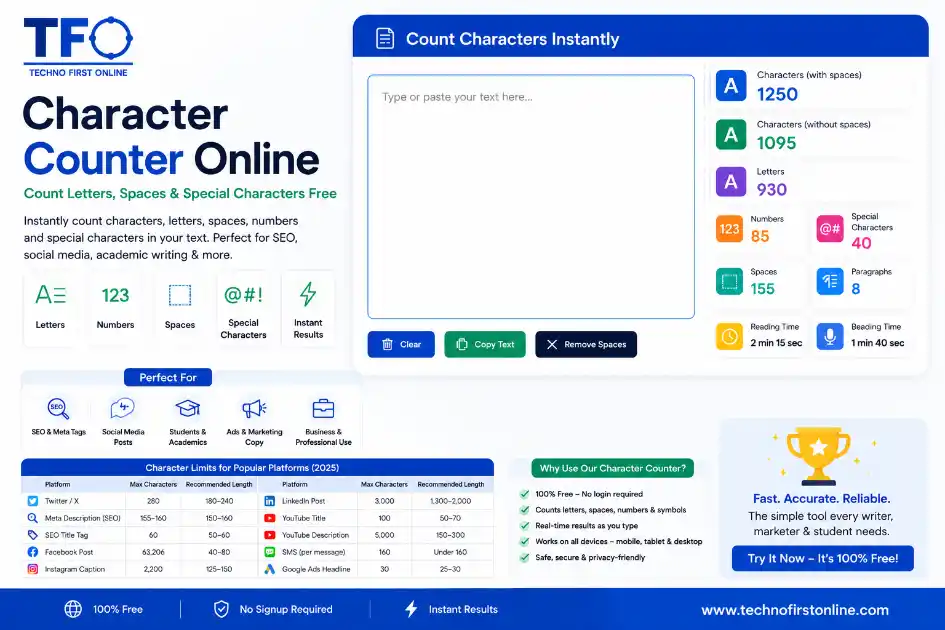
A character counter online instantly counts letters, spaces, numbers, punctuation, emojis, and special characters in real time as you type or paste text.
Character Counter Online — Count Letters, Spaces & Special Characters Free
Picture this: You have just finished writing a meta description for your website.
You think it looks good. But before you hit publish, a small question pops up —
“Is this actually within the 155-character limit?”
That is exactly the kind of moment a character counter online was built for.
Whether you are writing a tweet, crafting a Google ad, polishing an SMS campaign,
or submitting a university essay, the number of characters in your text matters
far more than most people realise — and counting them manually is simply not
an option.
In this guide, you will learn everything about character counters: what they
are, why every writer needs one, how to use them, and what character limits
you need to know for different platforms.
What Is a Character Counter?
A character counter is a free online tool that instantly calculates the total
number of characters in any text you type or paste into it.
But here is the thing — “characters” means more than just letters.
A proper character counter online tracks:
- – **Letters** — every A to Z, uppercase and lowercase
- – **Numbers** — digits 0 through 9
- – **Spaces** — every blank space between words
- – **Special characters** — punctuation marks, symbols like @, #, $, %, &, *
- – **Line breaks** — paragraph returns and new lines
- – **Characters with spaces** — the full total including blanks
- – **Characters without spaces** — the total of only visible, non-space characters
Why does the with-spaces vs. without-spaces distinction matter? Because
different platforms count differently. Some platforms count every character
including spaces. Others only count visible characters. A solid character counter
online gives you both numbers so you are always covered.
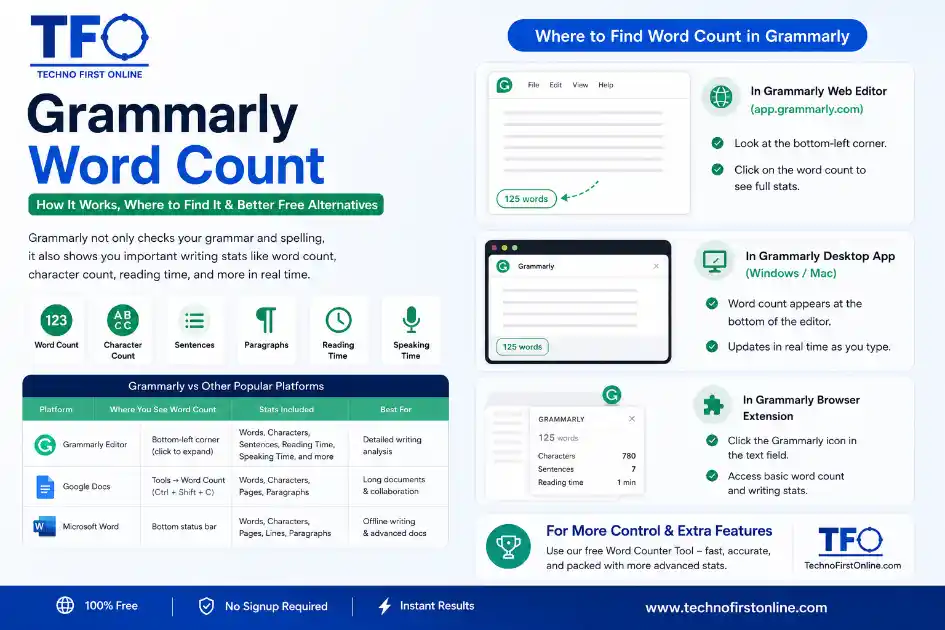
You can also use a character counter as a word counter online at the same time
— most good tools show words, sentences, paragraphs, and reading time alongside
the character breakdown.
Why Character Count Matters More Than You Think
Word count is something most writers understand. Character count, though — that
is where things get surprisingly important.
Here is a look at the situations where having an accurate character count makes
a real, practical difference.
SEO and Meta Tags
This is the biggest one for anyone who runs a website or writes content online.
When you write a title tag or meta description for a webpage, Google uses
character width (measured in pixels) to decide what gets displayed in search
results. In practical terms:
- – **SEO title tag:** 50–60 characters is the safe range for full display
- – **Meta description:** 150–160 characters before Google truncates it
Go over these limits and your text gets cut off in search results with a “…”
at the end. That not only looks unprofessional — it can reduce your click-through
rate because readers cannot see your full message.
A character counter online helps you nail these limits every single time before
you publish.
Social Media Posts
Every major social platform has its own character limits. Knowing them means
your content always fits — no awkward truncations, no “See more” breaks cutting
off your best line.
Here is a complete 2025 reference table of platform character limits:
Platform Max Characters Recommended Length
- Twitter / X 280 180–240
- Instagram Caption 2,200 125–150 (visible before “more”)
- Facebook Post 63,206 40–80 (best engagement)
- LinkedIn Post 3,000 1,300–2,000
- LinkedIn Summary 2,000 1,500–2,000
- Pinterest Description 500 100–200
- YouTube Title 100 50–70
- YouTube Description 5,000 150–300 (first 157 shown)
- Reddit Post Title 300 120–200
- SMS Message 160 per segment Under 160 (single message)
- WhatsApp Status 139 Under 139
- Google Ads Headline 30 25–30
- Google Ads Description 90 80–90
- eBay Product Title 80 60–80
Writing without checking these limits is like packing for a flight without
checking the luggage rules. Everything looks fine until it is too late.
Academic and Professional Writing
Many academic institutions set character limits rather than word limits for
short-answer questions, abstracts, and personal statements. Job applications,
LinkedIn bios, scholarship forms, and government portals all commonly use
character-based limits.
A word count counter alone will not help you here. You need a character counter
that gives you precise numbers.
App Development and Database Design
For developers and technical writers, character count is a core consideration.
Database fields have maximum character storage limits. App input fields need
validation. User interface copy must fit inside buttons, labels, and tooltips.
Knowing exact character counts helps developers avoid overflow errors and
keeps UI designs clean and consistent.
Email Subject Lines
Email open rates depend heavily on subject line length. Research consistently
shows that subject lines under 50 characters tend to perform best on mobile
devices, where over 60% of emails are now opened.
An accurate character count helps email marketers write tighter, punchier
subject lines that get opened more often.
How to Use the Free Character Counter at TechnoFirstOnline
Using the character counter at TechnoFirstOnline takes about five seconds.
Here is all you need to do:
1. Visit: https://technofirstonline.com/grammarly-word-count/
2. Type your text directly into the input box — or paste it from anywhere
(Google Docs, Word, Notepad, your email client, a social media draft).
3. Your character count, word count, sentence count, and paragraph count
all appear instantly and update in real time as you type.
4. Use the numbers to check against your platform’s limit and adjust
your text as needed.
No account. No login. No installation. No cost. Just open the tool, paste
your text, and get your numbers.
And because it also works as a full word counter online, you get words,
characters, sentences, and paragraphs all from one place — without needing
to open multiple tools.
Characters With Spaces vs. Characters Without Spaces — What Is the Difference?
This is one of the most common questions people have when using a character
counter for the first time.
**Characters with spaces** = total count of every single character, including
every blank space between words.
**Characters without spaces** = total count of letters, numbers, and
punctuation only — blank spaces excluded.
Which one should you use?
- – Use **characters with spaces** for platforms and tools that count all
characters (Twitter, SMS, Google Ads, most word processors). - – Use **characters without spaces** when you need to know the “content density”
of your text — useful for academic submissions and some publishing contexts
that exclude spaces from their stated limits.
When in doubt, check which definition the platform or institution is using —
and then use the matching number from your character counter.
What Counts as a “Character”? A Clear Breakdown
Many writers are surprised by what actually gets counted as a character. Here
is a plain-English breakdown:
- – **Letters:** A, b, C, z — each one is one character
- – **Numbers:** 1, 2, 100 — each digit is one character (“100” = 3 characters)
- – **Spaces:** Each blank space = one character (in the with-spaces count)
- – **Punctuation:** Full stops, commas, exclamation marks — each = one character
- – **Special symbols:** @, #, $, %, &, *, (, ) — each = one character
- – **Emojis:** Most emojis = two characters (because they use two Unicode slots)
- – **Hyphenated words:** “up-to-date” counts as 10 characters including the
hyphens, but usually as one word in a word count - – **Apostrophes:** “don’t” = 5 characters, counted as one word
Understanding these distinctions helps you use a character counter more
precisely — especially when working to tight limits on social media or
advertising platforms.
Character Counter vs. Word Counter — When to Use Each
A lot of people wonder: should I use a word calculator or a character counter?
The honest answer is: both, and often at the same time.
Here is a practical guide to when each one is most relevant:
Use a Word Counter When:
- – Writing a blog post, article, or essay to a word count target
- – Checking whether your content meets a minimum word requirement for SEO
- – Estimating how long your content will take to read or speak aloud
- – Tracking your daily writing progress on a long-form project
- – Working as a freelance writer and billing per word
Use a Character Counter When:
- – Writing a meta title or meta description for a webpage
- – Crafting a social media post or ad copy for any platform
- – Filling in a form, profile bio, or short-answer field with a stated limit
- – Writing an SMS or WhatsApp message where length directly affects delivery cost
- – Checking whether your Google Ads headline fits within the 30-character cap
Use Both Together When:
– Writing content that needs to hit a word count target AND stay within
character-based format limits (for example, a blog post where you also
need to write an optimised meta description)
– Editing copy where you want to reduce both words and characters simultaneously
The word count counter at TechnoFirstOnline gives you both metrics in one place,
so you do not need to switch between tools:
👉 https://technofirstonline.com/grammarly-word-count/
Character Limits for SEO — A Practical Guide
Search engine optimisation is one of the biggest reasons people look up
character counters. Let us walk through the key SEO character limits you
need to know.
Title Tags (Page Titles)
Your title tag is the clickable blue headline Google shows in search results.
- – Ideal length: **50 to 60 characters**
- – Maximum before truncation: approximately 600 pixels (roughly 60 characters
in standard text) - – Place your primary keyword near the beginning
If your title is too long, Google cuts it off with “…” — and your reader
never sees the most important part. Use a character counter to trim it down
before publishing.
Meta Descriptions
Your meta description is the short summary under your title in Google results.
It does not directly affect your rankings, but it strongly influences whether
people click on your link.
- – Ideal length: **150 to 160 characters** (including spaces)
- – Keep your keyword in the first 120 characters if possible
- – End with a clear call to action
According to research on meta description best practices, staying at or under
155 characters virtually guarantees your description displays fully on desktop.
For more on this, the guide at SimpleApp on meta description character limits
is an excellent reference:
https://web-3-apps.com/char-counter/articles/meta-description-length/
H1 Headings and Page Subheadings
Google does not enforce a character limit on headings, but readability best
practices suggest:
– H1 (main page heading): under 60 characters for clean display
– H2 and H3 subheadings: under 70 characters works well
Shorter headings are easier to scan and tend to be more click-worthy in
featured snippets.
URL Slugs
While not strictly about character count, shorter URLs perform better in
search and are easier to share. Aim for under 60 characters in your URL,
and avoid unnecessary words.
Tips for Writing Within Character Limits
Being forced to stay within a character limit is actually one of the best
writing exercises there is. Here are practical tips to help you write tighter
copy every time.
Cut Every Word That Does Not Earn Its Place
Go through your text and ask: “Does this word add meaning, or is it just
filling space?” Phrases like “in order to” (use “to”), “due to the fact that”
(use “because”), and “at this point in time” (use “now”) can all be shortened
without losing anything.
Front-Load Your Most Important Information
On most platforms, only the first chunk of your text is visible without
clicking. Whether it is a tweet, a meta description, or an Instagram caption —
put your best content first, before the character limit cuts it off.
Use Active Voice Instead of Passive Voice
Active voice is shorter and more direct. “The team launched the product”
(5 words) is tighter than “The product was launched by the team” (7 words).
This adds up quickly when you are working to tight character limits.
Check Emojis Separately
If you use emojis in social media copy, remember that most emojis count as
two characters in Unicode. A string of five emojis is actually 10 characters
in platform terms. A character counter online will account for this accurately.
Always Count Before You Copy-Paste
It is easy to write copy in one place and paste it somewhere with a character
limit — only to find it is too long. Make it a habit to run your text through
a character counter before copying it anywhere.
Who Uses a Character Counter — And Why
Character counter tools are used far more widely than most people expect.
Here is a quick look at the professions and situations where they come up:
- – **SEO specialists** — Checking title tags and meta descriptions before
every publish - – **Social media managers** — Writing platform-specific posts that fit
limits and drive engagement - – **Copywriters** — Crafting Google Ads and email subject lines to precise
character limits - – **Students** — Meeting character-based limits on university application
forms, short-answer questions, and abstracts - – **Journalists** — Fitting subheadings and breaking news summaries into
display-friendly lengths - – **Developers** — Validating user input lengths and planning database storage
- – **Marketers** — Writing WhatsApp and SMS campaigns where each character
segment costs money - – **Translators** — Estimating how translated text will expand or contract
relative to the original
The common thread? Anyone who writes for digital platforms needs to understand
character count — and a reliable character counter online makes that instant
and effortless.
Final Thoughts
A character counter online is one of those tools you do not fully appreciate
until the first time a truncated title tag costs you clicks, or a too-long
ad headline gets rejected before it even runs.
Understanding character limits — and using a tool that tells you exactly
where you stand — is a genuinely professional habit. It makes your writing
sharper, your SEO cleaner, and your social media copy more effective.
The character counter at TechnoFirstOnline is free, instant, and handles
everything — letters, spaces, special characters, words, sentences, and
paragraphs — in a single clean tool with no account required.
👉 Count your characters now: https://technofirstonline.com/grammarly-word-count/

TechnoFirstOnline provides powerful free online tools, expert tutorials, and smart digital resources to simplify everyday tasks. Explore SEO, image, AI, PDF, and productivity tools designed for everyone.



Most Recent Posts



Frequently Asked Questions
A character counter online is a free tool that instantly calculates the total
number of characters in any text you type or paste. It counts letters, numbers,
spaces, punctuation, and special symbols. Most tools also show characters with
spaces and characters without spaces separately, along with word count and
sentence count.
Characters with spaces includes every character in your text — letters, numbers,
punctuation, and every blank space. Characters without spaces counts only the
visible characters and excludes all spaces. Different platforms use different
definitions, so knowing both numbers helps you match the right count to the
right platform.
A meta description should ideally be between 150 and 160 characters including
spaces. If it is longer, Google may truncate it in search results, cutting off
your message with “…” before the reader sees the end. Staying under 155
characters is the safe standard recommended by most SEO professionals.
Special characters include symbols that are not letters or numbers — such as
@, #, $, %, &, *, (, ), !, ?, and punctuation marks like commas, full stops,
hyphens, and quotation marks. Each special character counts as one character
in most counters.
Yes. The character counter at TechnoFirstOnline also shows your full word count,
sentence count, and paragraph count in real time. You get both a character
counter and a word count counter in one place, so you do not need to use
separate tools.
Most standard emojis use two Unicode code points, which means they typically
count as two characters on platforms like Twitter. A text with five emojis
could use up to ten characters from your character limit just from the emojis
alone. Always run emoji-heavy text through a character counter to know your
exact count.
Yes, completely. The character counter at TechnoFirstOnline is free to use
with no account, no login, no daily limit, and no charges of any kind. Just
open the tool, paste or type your text, and get your results instantly.
Twitter (now called X) allows up to 280 characters per post. Most well-performing
tweets tend to be between 180 and 240 characters. Staying within this range
gives your message room to be shared or quoted without running into limits.