Smart IT tools
Quick Answer:
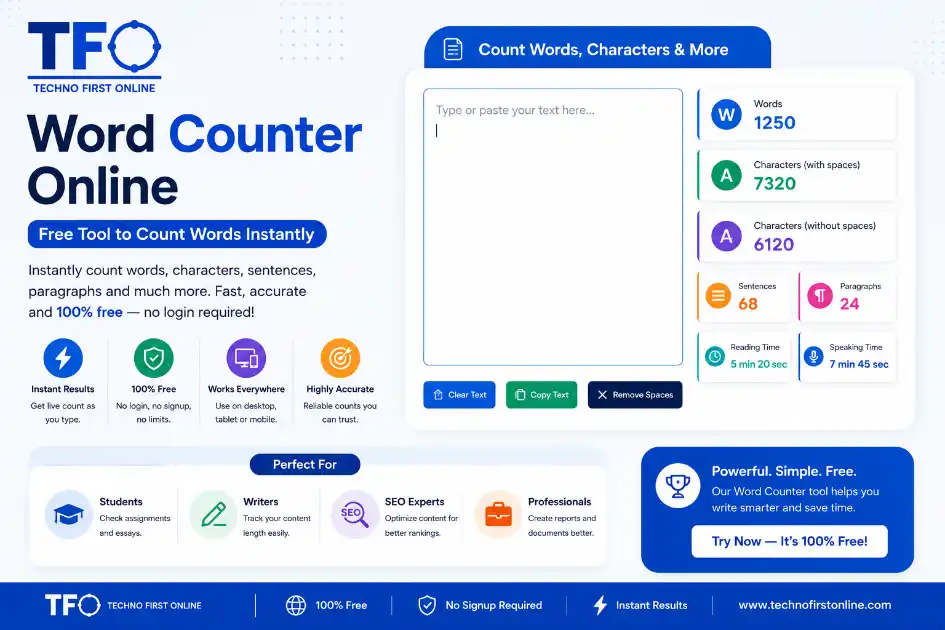
A word counter online instantly calculates words, characters, sentences, paragraphs, and reading time in real time as you type or paste text.
Word Counter Online — Free Tool to Count Words Instantly
Have you ever finished writing something and thought — “Wait, how many words did
I actually write?”
Whether you are a student working on an assignment, a blogger publishing your
next post, or a professional drafting a report, keeping track of your word count
matters more than most people realise. And doing it manually? That is just a
waste of your time.
That is exactly why a free word counter online exists — to give you an instant,
accurate number without any fuss.
In this guide, we will walk through everything you need to know about word
counters: what they do, who needs them, how to use them, and why having the right
word count tool in your corner makes writing easier, faster, and smarter.
What Is a Word Counter?
A word counter is a simple online tool that calculates the total number of words
in any text you paste or type into it. It sounds basic — but modern word count
counters do a lot more than just count words.
A good word calculator typically gives you:
- – Total word count (updated live as you type)
- – Character count with spaces
- – Character count without spaces
- – Number of sentences
- – Number of paragraphs
- – Estimated reading time
- – Estimated speaking time
All of this information appears instantly, without you needing to create an
account, install anything, or pay a single rupee.
The best word counter online tools work right in your browser — on desktop, tablet,
or mobile. You paste your text, and the numbers appear in real time.
Why Word Count Actually Matters
A lot of people underestimate how much word count affects their writing — and
their results.
Here is a quick look at why tracking words is more important than most people
think.
For Students and Academic Writers
Schools, colleges, and universities almost always set word limits for essays,
assignments, reports, and research papers. Go too short, and you lose marks.
Go over the limit, and your submission might get rejected outright.
A word counter online lets you track your progress as you write, so you never
end up scrambling at the last minute to cut 300 words or desperately add content
to hit the minimum.
For Bloggers and Content Writers
In the world of digital content, word count is closely connected to content
quality and SEO performance.
According to research published by Yoast, a minimum of 300 words is generally
recommended for any web page, while cornerstone blog content should cross the
900-word mark to support strong rankings. Most well-performing blog posts fall
between 1,500 and 2,500 words for competitive topics.
Using a word count counter while you write keeps you on target without breaking
your flow. You can check where you stand, then get back to writing.
For SEO Professionals and Digital Marketers
Content marketers and SEO specialists rely on word count tools constantly.
Whether you are writing:
- – A meta description (155–160 characters)
- – A Twitter/X post (280 characters)
- – An Instagram caption (up to 2,200 characters)
- – A LinkedIn article (up to 125,000 characters)
- – A Google Ads headline (30 characters maximum)
Every platform has different limits. A reliable word calculator helps you stay
within those limits and craft tighter, more effective copy every time.
For Freelance Writers
Many freelance writers are paid per word. Knowing your exact word count is
essential for accurate invoicing — and for building trust with clients who are
paying for a specific volume of work.
For Business Professionals
Business proposals, executive summaries, and formal emails all have an
unwritten expectation of appropriate length. Too long, and busy readers stop
reading. Too short, and you appear unprepared.
Tracking word count keeps your professional writing sharp and purposeful.
How to Use Our Free Word Counter Online
Using the word counter tool at TechnoFirstOnline is as straightforward as it
gets. Here is all you need to do:
1. Go to: https://technofirstonline.com/grammarly-word-count/
2. Type your text directly into the input box — OR — paste it from anywhere
(Word, Google Docs, Notepad, your email, anywhere at all).
3. Your word count, character count, sentences, and paragraphs update
automatically in real time.
4. Done. No login. No signup. No waiting.
There is no word limit — you can paste short tweets or full-length articles.
The tool handles it all, fast and accurately.
What Makes a Good Word Counter Online?
Not all word counters are built the same. Here is what separates a truly useful
tool from one that just slaps a number on your screen.
Real-Time Counting
The best tools update your count as you type — not after you click a button.
This live feedback helps you stay in the writing zone without stopping to check
manually.
Accurate Character Counting
Character count with spaces and without spaces are two different things — and
both matter depending on the platform. A solid word calculator breaks these down
clearly.
Sentence and Paragraph Tracking
These numbers help you understand the structure and readability of your content.
Too many long sentences in a row? The sentence count tells you it is time to
break things up.
Reading Time Estimate
Knowing how long your content will take to read helps you plan better. A blog
post that takes 12 minutes to read might need trimming. A speech that only takes
90 seconds might need expanding. Reading time gives you that quick gut-check.
Mobile-Friendly Design
A large percentage of people in India write, edit, and review content on their
phones. A word counter that works smoothly on mobile is not optional — it is a
must.
No Login Required
You should never need an account just to count words. The best tools are
completely open — type or paste, and you are done.
Word Count Guidelines for Different Types of Content
One of the most common questions writers ask is: “How many words should my
content be?”
The honest answer is that it depends on what you are writing and who you are
writing it for. But here are some widely accepted benchmarks that can help you
plan:
- – Blog post (standard) : 800 – 1,500 words
- – Blog post (in-depth / SEO) : 1,500 – 2,500 words
- – Pillar / cornerstone content : 3,000 – 5,000+ words
- – Product page : 300 – 500 words
- – Landing page : 600 – 1,200 words
- – Email newsletter : 200 – 500 words
- – LinkedIn article : 1,000 – 1,500 words
- – Twitter/X post : Up to 280 characters
- – Instagram caption : 125 – 150 characters (for engagement)
- – Meta description (SEO) : 150 – 160 characters
- – College essay : Usually 500 – 650 words
- – Research paper abstract : 150 – 300 words
These are starting points, not rigid rules. Always look at what the top-ranking
content in your niche looks like, and aim to match or exceed that depth — without
adding filler just to pad the numbers.
Word Count and SEO — What You Actually Need to Know
There is a lot of confusion around this topic, so let’s clear it up plainly.
Word count itself is not a direct Google ranking factor. Google’s own
representatives, including Search Advocate John Mueller, have said this clearly.
Simply writing more words does not guarantee better rankings.
However — and this is important — longer, well-structured content tends to rank
better for a number of indirect reasons:
- – It covers topics more thoroughly, which satisfies user intent more completely.
- – It naturally includes more relevant keywords and related terms.
- – It tends to earn more backlinks because it becomes a reference for other
writers. - – It keeps readers on your page longer, which is a positive engagement signal.
According to data from Backlinko, the average first-page Google result contains
roughly 1,400 to 1,900 words. That is not a target to hit blindly — but it is a
signal that depth matters.
The key takeaway? Use a word count counter to stay disciplined about length. But
always ask yourself: does every sentence here actually add value? If not, cut it.
For a deeper understanding of how content quality affects SEO, Yoast’s guide on
word count and SEO is an excellent resource:
https://yoast.com/blog-post-word-count-seo/
Word Counter vs. Word Processor — Which Should You Use?
You might be wondering: Microsoft Word and Google Docs already show word count.
Why use a separate tool?
Fair question. Here is the difference:
When Your Word Processor Is Enough
If you are writing everything inside Word or Google Docs and just need a quick
glance at your total count, those built-in tools are perfectly fine. Google Docs
shows a live word count at the bottom of the screen. Word has it in the status bar.
When a Standalone Word Counter Online Wins
A dedicated word counter makes more sense when:
- – You are working in a platform that does not have built-in counting — like
WordPress, Notion, Gmail, or a plain text editor. - – You need a detailed breakdown beyond just the word number (characters,
sentences, reading time). - – You want to paste a snippet of text and check its stats without opening a
full document. - – You need to check content written for social media, ads, or email subject
lines where character precision really matters. - – You do not want to log into Google or Microsoft just for a quick count.
The word counter at TechnoFirstOnline is built for exactly these situations.
Fast, accurate, no barriers.
Tips to Write Better With a Word Counter
Using a word count tool is not just about hitting a number. Here are some ways
to make it work harder for your writing:
Set Your Word Count Goal Before You Start
Decide upfront how long your piece should be. This shapes everything — how many
points you cover, how much detail you go into, whether you include examples.
Starting without a target is like driving without a destination.
Write First, Count Later
Do not stop every few minutes to check your word count. That interrupts your
thinking. Write a full draft freely, then use the word counter to assess where
you stand.
Use Character Count for Headlines and Descriptions
Your article title should ideally be under 60 characters for Google to display
it fully. Your meta description should sit between 150 and 160 characters. Use
the character count feature — not just word count — to nail these.
Cut, Do Not Pad
If you are 300 words over your target, look for:
- – Sentences that repeat points already made
- – Filler phrases (“it is important to note that,” “as we all know”)
- – Adverbs that can be removed without losing meaning (“very,” “really,”
“basically”) - – Long introductions that take too long to get to the point
If you are 300 words short, look for gaps — questions a reader might still have,
examples you could add, or context that is missing.
Track Progress for Long Projects
Writing a book, a thesis, or a long-form content series? Use the word counter
to set daily writing targets. Tracking 500 words a day, for example, adds up
to 15,000 words in a month — the length of a solid novella or a major report.
Who Uses a Word Counter Tool — And Why
Word counter tools are used across a wider range of professions than most people
expect. Here is a quick look:
– **Students:** To hit essay word limits without going over or under.
– **Bloggers:** To ensure articles are long enough to rank and detailed enough
to satisfy readers.
– **Copywriters:** To write ad copy, email subject lines, and landing page
content that fits within platform limits.
– **Journalists:** To stay within editorial word counts set by publications.
– **Teachers:** To check that student submissions meet stated requirements.
– **Translators:** To estimate project scope and billing by word volume.
– **Social Media Managers:** To fit captions, bios, and posts within the
character limits of each platform.
– **YouTubers and Podcasters:** To estimate speaking time for scripts before
recording.
The word calculator is genuinely one of those tools that sounds too simple to
matter — until you start using it and realise you reach for it every single day.
Final Thoughts
A free word counter online is one of the most quietly useful writing tools
available. It does not make you a better writer on its own — but it gives you
the information you need to make smarter decisions about your writing.
Know where you stand. Hit your targets. Cut what does not add value. And spend
your creative energy on the content itself, not on manually counting words.
The TechnoFirstOnline word counter is free, instant, and works on any device —
no account, no limits, no friction.
👉 Start counting now: – https://technofirstonline.com/grammarly-word-count/

TechnoFirstOnline provides powerful free online tools, expert tutorials, and smart digital resources to simplify everyday tasks. Explore SEO, image, AI, PDF, and productivity tools designed for everyone.
Other Useful Tools



People Also Read


Frequently Asked Questions
A word counter is a free online tool that calculates the total number of words
in any text. Most word counters also show character count, sentence count,
paragraph count, and estimated reading time — all updating live as you type
or paste your content.
Simply open the word counter tool, type or paste your text into the input area,
and your stats appear instantly. There is no need to click a button, sign up,
or install anything. The count updates in real time as you write or edit.
Yes, completely. The word counter at TechnoFirstOnline is free to use with no
account required, no daily limits, and no hidden charges. Just open, paste, and
count.
Word count measures the total number of words (space-separated units) in your
text. Character count measures every individual letter, number, space, and
punctuation mark. Character count with spaces includes spaces; without spaces
does not. Both metrics are important depending on what you are writing.
Word count is not a direct Google ranking factor, but longer, well-written
content tends to perform better in search results because it covers topics more
thoroughly, attracts more backlinks, and keeps readers engaged longer. Using a
word counter helps you stay on track with content length targets without padding
your writing with unnecessary filler.
Most online word counter tools, including this one, work with any language that
uses spaces between words. For languages written without spaces, counting
behaviour may vary, but the character count will always be accurate.
It depends on the topic and competition. A standard blog post typically does
well at 800 to 1,500 words. For competitive SEO topics, 1,500 to 2,500 words
is a more suitable target. Cornerstone content — your most important, in-depth
guides — often runs to 3,000 words or more.
Yes. The TechnoFirstOnline word counter is mobile-friendly and works on
smartphones and tablets just as smoothly as it does on a desktop or laptop.