Smart IT tools
How to change to sentence case online Free
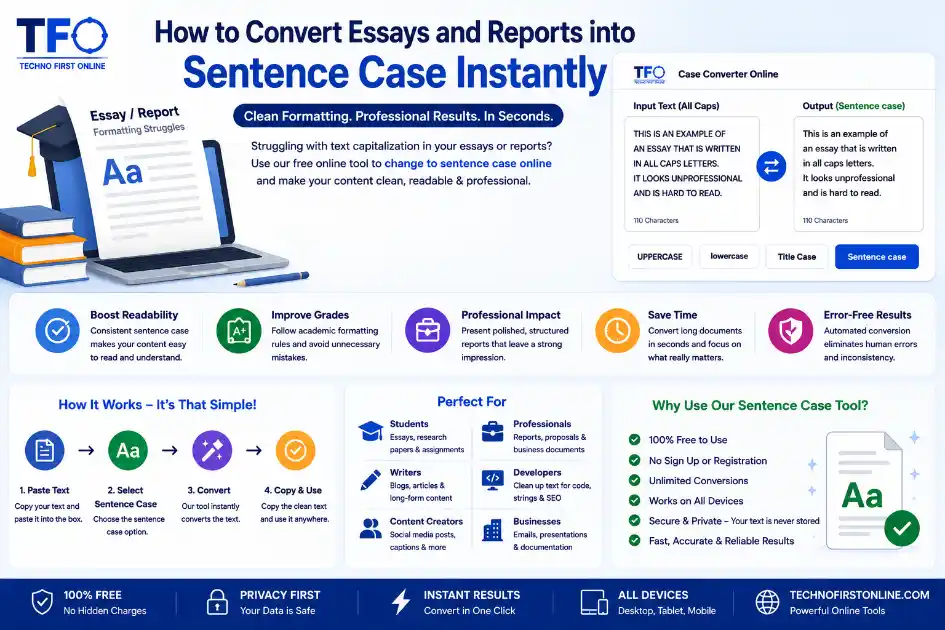
Quick Answer:
You can instantly change text to sentence case online using a free case converter tool. It automatically capitalizes the first letter of each sentence while converting the remaining text into lowercase.
Change to sentence case online
The Struggle of Academic and Corporate Document Formatting
Writing an academic essay, a comprehensive research paper, or a critical corporate report requires a massive amount of mental energy. You have to gather data, verify facts, structure arguments, and maintain a professional tone throughout the text. However, once the actual writing process is finished, a secondary and often more frustrating challenge appears: maintain perfect layout integrity. Academic bodies and corporate compliance units maintain strict rules regarding how text capitalization must appear across body text blocks, quotes, and structural references.
One of the most widely used standards for paragraphs and body content is sentence case. This format dictates that only the very first letter of a sentence, along with proper nouns like names, countries, or specific brands, should hold a capital letter. Unfortunately, when you are compiling information from multiple digital sources, data sheets, and online PDFs, your text casing gets completely disrupted. Instead of wasting hours manually editing every individual line, learning how to change to sentence case online with a smart converter helps you keep your document formatting clean and professional.
Why Raw Text Inconsistencies Kill Your Document Authority
When a professor opens your college thesis or an executive reviews your quarterly market analysis report, their initial impression is heavily based on visual presentation. A document filled with chaotic typography, random uppercase words, or paragraphs copied from spreadsheets where everything is locked in capital text looks messy and unprofessional. It signals a lack of attention to detail and immediately lowers your authority, regardless of how brilliant your research or data might be.
Manually scanning through a 2,000-word essay to find and correct minor character capitalization mistakes is an inefficient use of your time. It leads to extreme mental fatigue, meaning you are highly likely to miss several errors scattered across the deep sections of your document files. Utilizing an automated online script removes the guesswork entirely, allowing you to clean your formatting layout instantly while you focus your brainpower on the actual quality of your writing content.
- * Boost Layout Readability: Consistent text casing allows readers to scan and digest information faster.
- * Secure Higher Grades: Avoid losing critical academic points due to poor grammatical styling and messy case setups.
- * Present Corporate Authority: Ensure business memos, technical proposals, and presentations match standard enterprise style guides perfectly.
- * Eradicate Human Review Errors: Let automated algorithms identify casing faults rather than relying on tired human eyes.
How a Dedicated Letter Case or Sentence Converter Optimizes
When writing long-form reports, your research workflow usually involves gathering quotes, technical references, and data blocks from various corners of the web. Government archives often publish data in rigid all-caps arrays, while older database systems might export descriptions in complete lowercase rows. When you paste these mixed elements into your main document file, the layout turns into a chaotic formatting puzzle.
A high-quality letter case converter bridges these structural gaps seamlessly. By acting as a universal baseline, it processes conflicting fonts and text styles into a unified grammar format. When you feed your raw research data into an intelligent system, it strips away the foreign formatting styles instantly, resetting your phrases to clean, readable standards that flow naturally with the rest of your written project.
Try Our Case Converter:- https://technofirstonline.com/case-converter-online/
The Functional Mechanics of a Web-Based Sentence Case Tool
Many users wonder how an automated sentence case tool manages to correct text parameters so accurately without changing the underlying meaning of the words. The logic behind the script relies on tracking punctuation marks and grammatical breaks. As soon as you paste your text into the processing box, the algorithm scans for period blocks, exclamation points, and question marks to locate where a sentence officially concludes.
Once a sentence boundary is identified, the system automatically sets the next alphabetical character to uppercase while dropping all subsequent letters down to lowercase. Advanced configurations also cross-reference basic text strings to protect proper nouns from accidental lowercase conversion. This background mechanics setup turns what would normally be a grueling, multi-hour proofreading chore into a painless process that executes in less than a second.
Maximizing Text Utility for Web Developers and Virtual Assistants
The utility of transforming mixed text sets goes far beyond academic classrooms and corporate boardrooms. Virtual assistants managing data entry lines or e-commerce product catalogs frequently run into badly formatted manufacturer descriptions. Clean, standardized sentence layouts are mandatory to make product listings look trustworthy to online shoppers.
For web developers managing content management system (CMS) databases, unformatted user inputs can break website design symmetry. Passing database strings through an external case converter online system before publishing them ensures that user testimonials, forum posts, and public reviews fit cleanly within the structural boundaries of the website theme layout.

TechnoFirstOnline provides powerful free online tools, expert tutorials, and smart digital resources to simplify everyday tasks. Explore SEO, image, AI, PDF, and productivity tools designed for everyone.
Other Useful Tools



People Also Read





Professional formatting standards used in academic and corporate environments often recommend sentence case for readability and consistency. Writing resources like Purdue OWL and major document platforms such as Google Docs emphasize maintaining clean capitalization structures for professional communication.
Frequently Asked Questions
It means using a free web utility to automatically format a block of text so that only the first letter of each sentence and proper nouns are capitalized. All other letters are instantly converted to lowercase, matching standard grammatical writing rules.
No, it will not. A reliable case converter online only alters the capitalization properties of alphabetical characters. Your original line breaks, tab spaces, spacing structures, commas, periods, and special symbols remain completely untouched.
Yes, absolutely! The system is designed to handle extensive data blocks. You can copy entire essay files, legal briefs, or book chapters from your word processor, paste them into the box, and format the entire batch instantly.
Basic text tools perform a blanket conversion on all characters. However, using a smart letter case converter helps minimize this by preserving sentence starting structures, though it is always a good practice to quickly scan for custom names or specific industry acronyms after a global conversion.
Yes, your data is 100% secure. The conversion script runs entirely inside your local computer web browser via client-side scripts. No data is uploaded to cloud databases or external hosting servers, ensuring complete privacy for your sensitive work files.
Yes, you can toggle between formats as many times as you like. Our case converter online features multiple conversion buttons, allowing you to instantly switch the same text block between lowercase, UPPERCASE, sentence case, or title case styles effortlessly.
No registration, login, or premium subscription is required. The utility is completely free to use for students, professionals, and developers looking to optimize their daily text formatting workflows.