
Case Converter Online
Convert your text to any case instantly. 100% Client-side (No server load).
Words: 0 |
Characters: 0
Text copied to clipboard!

Case Converter Online - Convert Text to Upper Case, Lower Case
Quick Answer:
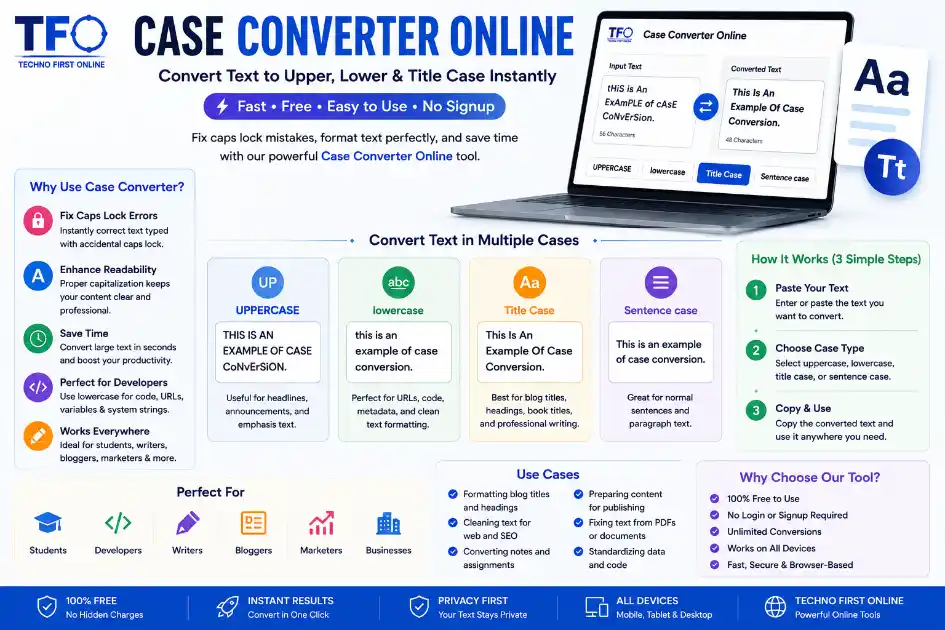
A Case Converter Online instantly changes text formatting between uppercase, lowercase, sentence case, and title case without manual editing.
What Is a Case Converter Online?
A Case Converter Online is a simple yet powerful text formatting tool that helps you change the capitalization of your text instantly. Whether you need to convert text to UPPERCASE, lowercase, Sentence Case, or Title Case, the tool performs the transformation in seconds without requiring any manual editing.
With the TechnoFirstOnline Case Converter, you can paste or type your content and instantly switch between different text formats with a single click. This saves time, improves accuracy, and eliminates the need to retype large sections of text when correcting capitalization errors.
The tool is useful for students, writers, bloggers, marketers, developers, and business professionals who regularly work with text. Whether you’re preparing academic assignments, blog articles, website content, emails, social media posts, or professional documents, a case converter helps maintain consistent formatting and a polished appearance.
Because it runs directly in your browser, there is no software to install or account to create. Simply enter your text, choose the desired case format, and copy the converted result instantly from any device.
Why Text Capitalization Matters for Readers and Search Engines
In the digital world, clean formatting is essential for readability and user experience. If you are a content writer, student, or programmer, maintaining accurate text syntax is critical. Badly formatted headings or text blocks loaded with accidental all-caps blocks can quickly alienate your audience.
By using a reliable case converter online, you can quickly fix those formatting glitches. Clean text structure ensures that your stories look professional before they go live on your blog or publishing platform. Furthermore, search engine crawlers prefer well-formatted pages that deliver high readability scores to users.
- * Fix Caps Lock Errors: Instantly rescue text typed with accidental caps lock on.
- * Enhance Readability: Properly capitalized sentences ensure your audience stays hooked.
- * Save Formatting Time: Eliminate the need for manual re-typing and editing.
- * Streamline Clean Coding: Easily swap variable descriptions and system strings to matching clean text configurations.
Convert Text Between Uppercase, Lowercase, and More
Different writing situations require different text formats. For example, website headings may look better in Title Case, professional documents often use Sentence Case, while certain codes, usernames, tags, and URLs commonly require lowercase text. A Case Converter helps you switch between these formats instantly without manually editing every word.
Whether you need to convert text to UPPERCASE for emphasis, transform ALL CAPS text into lowercase for better readability, or apply proper capitalization to articles and reports, the tool can handle the task in seconds. This saves time and reduces formatting mistakes, especially when working with large blocks of text.
The tool is particularly useful for writers, students, editors, marketers, developers, and content creators who regularly manage text across multiple platforms. Instead of correcting capitalization manually, you can instantly apply the desired format and maintain a clean, professional, and consistent appearance throughout your content.
Try Our Free tool : – https://technofirstonline.com/case-converter-online/
Advanced Casing Styles Supported by Our Platform
Our case converter online goes beyond simple all-caps transformations. To accommodate a wide array of writing styles, corporate guidelines, and creative formats, the platform integrates multiple distinct layout configurations. Understanding how each styling mode modifies your content helps you achieve pristine results every time.
Sentence Case: This mode mimics standard grammar structures by capitalizing only the very first letter of a sentence and any proper nouns. It is the ideal format for standard blogs, informative articles, long-form stories, and legal documentation.
UPPERCASE: This option instantly converts every single alphabetical character into capital blocks. It is heavily utilized for creating eye-catching book titles, loud website banner announcements, strict warnings, and distinct legal terms.
lowercase: Perfect for web developers setting up system variables or digital marketers building optimized SEO slug structures. Utilizing a lowercase converter guarantees that no stray capital letters trigger link breakages or server mismatches on your host platform.
Title Case: Ideal for formatting blog headlines, professional emails, essay topics, and book chapters. It capitalizes the initial letter of every principal word while leaving minor conjunctions and articles lowercase.
How a Case Converter Improves Productivity
Manually correcting text capitalization can be time-consuming, especially when working with long documents, articles, reports, or large amounts of copied content. A Case Converter eliminates this repetitive work by allowing you to transform text instantly with a single click.
Whether you’ve accidentally typed with Caps Lock enabled, received text in the wrong format, or need to apply consistent capitalization across a document, the tool helps you make corrections quickly and accurately. Instead of editing each word manually, you can convert entire paragraphs in seconds.
This is particularly useful for students preparing assignments, writers editing articles, marketers creating content, and professionals handling business documents. By automating text formatting tasks, a Case Converter saves valuable time, reduces errors, and helps maintain a professional and consistent appearance across all written content. With instant conversion between uppercase, lowercase, sentence case, and title case, you can focus more on creating quality content and less on manual formatting adjustments.
People Also Read


How to change to sentence case online
How to Automatically Change Capital Letters to Lowercase
Grammarly Word Count vs Free Word Counter

word counter google docs — How to Check Word Count

Word Count Checker — Check Word Count in PDFs & Documents
Free Character Counter Online — Count Letters & Spaces

How to Word Counter Online Free
Other Useful Tools


Frequently Asked Questions
Our tool processes your text locally in your browser. You simply paste your content into the input box, select the formatting style you need (such as UPPERCASE or Sentence case), and the tool transforms the text instantly without refreshing the page.
No, not at all. Privacy and data safety are our top priorities. The entire case converter online operation runs entirely within your local web browser using JavaScript scripts. Your text never gets sent to external servers, meaning your confidential files stay completely safe.
No, there is no strict character limit. You can paste short phrases, full paragraphs, or long chapters generated by any writing platform to format them using our lower case converter and switcher systems in one go, entirely for free.
Formatting consistency is important for both readability and digital publishing standards. According to documentation practices used by platforms like MDN Web Docs, consistent lowercase structures are often recommended for URLs, variables, and web development environments to reduce formatting errors and improve maintainability.
Best Case Converter Online #1 - Convert Text to Upper, Lower
Easily transform text casing with our free Case Converter Online. Fix caps lock mistakes, format headings, and toggle smoothly between lowercase instantly.
Price Currency: $
Operating System: All
Application Category: Utilities Application