
Sanskrit & Hindi OCR Tool
Scan PDFs & Images with High Accuracy (Browser-Based)
Ready

PDF OCR Hindi Online Free – Extract Hindi Text from PDF Instantly
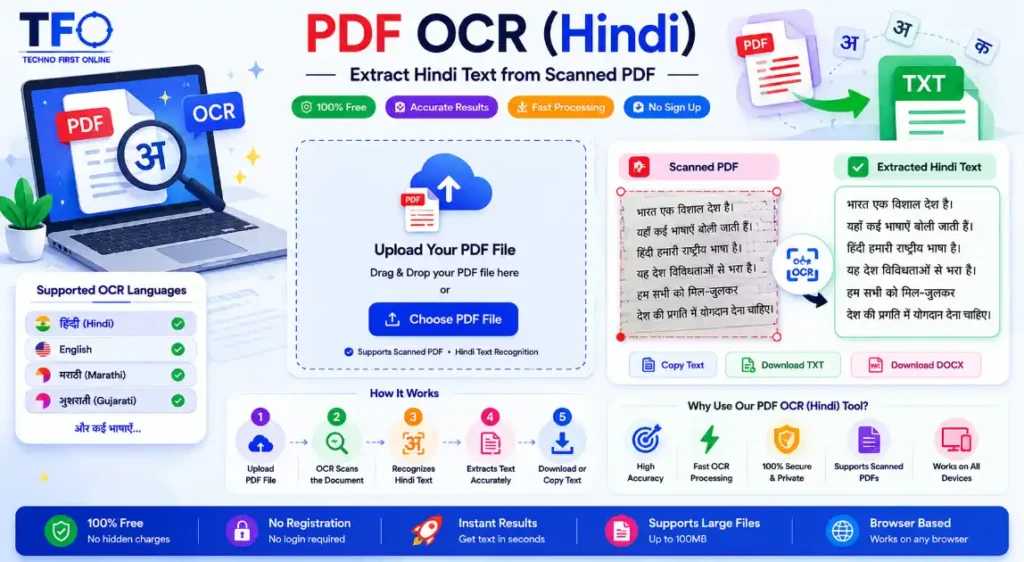
Working with scanned Hindi PDF files can be difficult when the text is not editable or searchable. Many users receive scanned documents, books, notes, invoices, government forms, or handwritten PDFs where copying text is impossible. In such situations, a reliable PDF OCR Hindi tool becomes extremely useful. The Technofirstonline Hindi PDF OCR tool helps users convert scanned Hindi PDF files into editable text online without installing software. Whether you want to extract Hindi text from PDF, convert scanned documents into editable content, or copy text from Hindi PDFs, this tool makes the process fast and simple.
Using advanced OCR technology, the tool recognizes Hindi characters accurately and converts them into readable digital text within seconds.
What is PDF OCR Hindi?
PDF OCR Hindi is an online technology that reads text from scanned Hindi PDF documents and converts it into editable text.
OCR stands for Optical Character Recognition. This technology identifies letters, words, and characters from scanned images or PDFs.
For example, if you have:
- A scanned Hindi book
- Government PDF documents
- Hindi handwritten notes
- Newspaper scans
- Old Hindi records
- Hindi study material
The OCR tool can detect the text and make it editable.
This process is commonly known as:
- Hindi OCR online
- PDF text extractor
- Scanned PDF to text
- Hindi text converter
- Image to text Hindi
- OCR PDF converter
Why Use an Online Hindi OCR Tool?
Many users still manually type text from scanned documents, which wastes time and effort.
An online OCR tool simplifies this work instantly.
No Software Installation
You can use the tool directly from your browser without downloading any application.
Fast Hindi Text Extraction
The OCR engine quickly scans and extracts Hindi text from PDF files.
Free to Use
You can convert scanned Hindi PDFs online free.
Mobile Friendly
The tool works on smartphones, tablets, laptops, and desktop devices.
Time Saving
Instead of manually typing pages, the OCR system automatically detects text.
Better Productivity
Students, teachers, offices, and researchers can manage documents more efficiently.
How to Convert Hindi PDF to Editable Text
Using the Technofirstonline PDF OCR Hindi tool is very easy.
Step 1: Upload Your PDF File
Choose the scanned Hindi PDF from your device.
Step 2: Start OCR Processing
Click the convert button to begin OCR scanning.
Step 3: Extract Hindi Text
The system automatically detects Hindi characters and converts them into editable text.
Step 4: Copy or Download Text
You can copy the extracted text or save it for future use.
The complete process takes only a few seconds depending on file size.
Extract Hindi Text from PDF Easily
Many PDF documents contain scanned pages where text selection is disabled.
With Hindi OCR online, you can:
- Copy Hindi text from scanned PDFs
- Edit PDF content
- Convert books into editable notes
- Save text for research purposes
- Translate Hindi text easily
- Reuse old documents digitally
This feature is especially useful for students and professionals.
Best Uses of PDF OCR Hindi Tool
The OCR Hindi PDF tool can be useful in many situations.
For Students
- Convert study notes into editable text
- Extract important paragraphs from books
- Save Hindi assignments digitally
For Teachers
- Prepare editable learning materials
- Convert scanned worksheets
- Create digital notes
For Offices
- Digitize scanned files
- Extract information from reports
- Convert printed forms into editable data
For Researchers
- Convert old Hindi documents
- Save historical records digitally
- Analyze Hindi content efficiently
For General Users
- Copy text from scanned PDFs
- Translate Hindi documents
- Store digital backups
Why Technofirstonline PDF OCR Hindi Tool is Better
Many online OCR tools either have poor Hindi recognition or require paid subscriptions.
The Technofirstonline OCR tool focuses on simplicity, speed, and usability.
Key Features
- PDF OCR Hindi support
- Fast OCR processing
- Browser-based tool
- No software installation
- Mobile responsive design
- Easy-to-use interface
- Extract Hindi text accurately
- Free online access
- Supports scanned PDF documents
These features make it one of the best Hindi OCR online tools for everyday use.
Convert Scanned PDF to Editable Text
Scanned PDF files are basically image-based documents. Normal PDF readers cannot identify the text inside them.
OCR technology solves this problem by recognizing letters from images.
The tool converts:
- Printed Hindi documents
- Image-based PDFs
- Scanned forms
- Book pages
- Newspaper scans
into editable digital text.
This makes document editing much easier.
Is Hindi OCR Accurate?
OCR accuracy depends on document quality.
For best results:
- Upload clear PDF files
- Use properly scanned documents
- Avoid blurry images
- Use high-resolution scans
Clean and readable documents usually produce better OCR accuracy.
Modern OCR AI systems are continuously improving Hindi text recognition.
Is PDF OCR Hindi Tool Safe?
Yes, browser-based OCR tools are generally safe for regular document processing.
The Technofirstonline OCR tool processes files securely and helps users convert scanned Hindi PDFs quickly without complex software.
Still, users should avoid uploading highly confidential documents on unknown platforms.
Tips for Better OCR Results
To get the best text extraction quality:
- Upload high-quality scanned PDFs
- Avoid tilted pages
- Ensure proper lighting in scanned images
- Use readable fonts
- Crop unnecessary borders if possible
These small improvements can significantly increase OCR accuracy.
OCR Online vs Manual Typing
Manual typing from scanned documents takes a lot of time.
OCR online tools provide several advantages:
| OCR Online Tool | Manual Typing |
|---|---|
| Fast processing | Slow work |
| Saves time | Time-consuming |
| Automatic extraction | Requires typing effort |
| Better productivity | Limited efficiency |
| Works on large documents | Difficult for big files |
For large PDF files, OCR technology is clearly more efficient.
Final Words
If you regularly work with scanned Hindi PDF files, a reliable PDF OCR Hindi tool can save hours of manual effort. Whether you want to extract Hindi text from PDF, convert scanned documents into editable text, or digitize old records, the Technofirstonline OCR tool provides a fast and simple solution.
The tool is free, browser-based, mobile friendly, and easy to use for students, teachers, offices, and professionals.
With accurate Hindi OCR recognition and quick processing, users can manage scanned Hindi documents more efficiently without installing software.


Frequently Asked Questions
PDF OCR Hindi is an online technology that converts scanned Hindi PDF files into editable text using Optical Character Recognition.
Yes, you can use the Technofirstonline PDF OCR Hindi tool to extract Hindi text from scanned PDFs without installing software.
Yes, the OCR tool is mobile friendly and works on smartphones, tablets, laptops, and desktop devices.
Yes, OCR accuracy is generally good for clear and high-quality scanned Hindi documents.
Yes, the OCR tool converts scanned PDF documents into editable and searchable text instantly.
PDF OCR Hindi Online Free – Extract Hindi Text Instantly
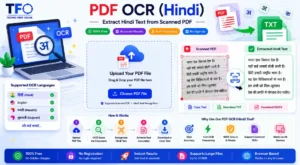
Convert scanned Hindi PDF to editable text online free using Technofirstonline PDF OCR Hindi Tool. Extract Hindi text from PDF accurately without software.
Price Currency: $
Application Category: Utilities Application