
Slug Generator
Convert any text into a clean, SEO-friendly URL slug — instantly
your-slug-will-appear-here
0 characters

Slug Generator
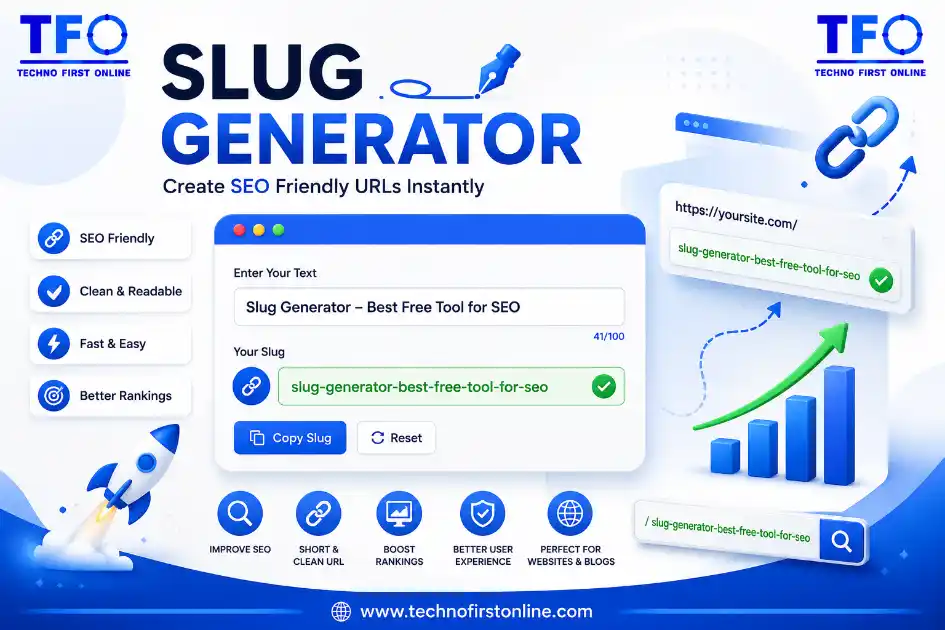
Google recommends using simple, descriptive, and user-friendly URLs that clearly explain what a page is about. Clean, keyword-focused slugs help both users and search engines understand your content more effectively. Learn more in the official Google Search Central URL Structure Guide.
What Is a Slug Generator?
A slug generator is a small but powerful tool that turns any piece of text — a blog title, a product name, a page heading — into a clean, readable web address. Instead of ending up with a messy URL full of spaces, symbols, and capital letters, you get something short, lowercase, and easy for both people and search engines to understand.
Think of it this way: if your article is titled “10 Best Budget Laptops for Students (2026 Guide)!”, your browser shouldn’t have to deal with %20, exclamation marks, or parentheses in the address bar. A good slug maker strips all of that away and leaves you with something like best-budget-laptops-for-students — simple, direct, and ready to publish.
This free online slug generator does exactly that. Paste your text, tweak a few options if you like, and copy a ready-to-use slug in seconds. No installation, no sign-up, and nothing ever leaves your browser.
Creating an SEO-friendly URL is only one part of on-page optimization. Before publishing your content, it’s also a good idea to check whether your target keyword appears naturally throughout the article. Our Keyword Density Checker helps you analyze keyword usage, prevent over-optimization, and maintain a healthy keyword balance for better search engine visibility.
What Exactly Is a URL Slug?
A URL slug is the part of a web address that comes after your domain name and identifies a specific page. In the URL technofirstonline.com/blog/free-url-slug-generator, the slug is free-url-slug-generator.
Slugs matter more than most people realize. A well-structured slug:
- Tells visitors what the page is about before they even click
- Helps search engines understand the page’s topic and relevance
- Makes links easier to share, remember, and trust
- Keeps your site’s URL structure consistent and professional
Poorly formatted URLs — long, cluttered with numbers, or stuffed with special characters — tend to get fewer clicks and can even hurt how search engines interpret the page. That’s the exact problem a slug url generator like this one is built to solve.
A clean URL works even better when it’s paired with optimized page metadata. After generating your slug, you can use our Meta Tag Generator to create SEO-friendly title tags, meta descriptions, Open Graph tags, and other essential metadata that help improve search visibility and social sharing.
Why Use an SEO Slug Generator Instead of Typing It Manually?
You could technically write a slug by hand every time, but it’s easy to get wrong. Common manual mistakes include:
- Leaving capital letters or spaces in the URL
- Forgetting to remove punctuation like commas, colons, or apostrophes
- Ending up with double hyphens or trailing dashes
- Making the slug too long for search engines to display fully
- Accidentally including filler words that add no SEO value
An automated seo slug generator removes all of this guesswork. It applies consistent formatting rules every single time, so whether you’re publishing one page or fifty, your URLs stay clean, predictable, and optimized without extra manual effort.
Many content creators prepare their article titles in different formats before publishing. If you need to quickly convert text between uppercase, lowercase, title case, or sentence case, our Case Converter makes the process fast and effortless before creating your final URL slug.
How to Use This Slug Generator
Using the tool takes just a few seconds:
- Type or paste your title into the text box — this can be a blog headline, product name, or any page title.
- Choose your separator — hyphens are the SEO-recommended standard, but underscores are available if your project needs them.
- Pick a letter case — lowercase is best practice for URLs, but the option is there if you need it.
- Set a max length if you want to keep especially long titles trimmed to a search-engine-friendly size.
- Remove stopwords (optional) if you want to drop small connector words like “a,” “the,” or “and” for an even tighter slug.
- Copy your slug with one click and paste it directly into your CMS or website.
The result updates live as you type, so you can experiment with different options until the slug looks exactly right.
Long titles often produce lengthy URLs that are difficult to read. Before generating a slug, you can use our Word Counter to measure the length of your content, count words and characters, and create shorter, more user-friendly page titles.
Best Practices for Creating SEO-Friendly Slugs
If you want your URLs to actually help your rankings — not just look tidy — keep these guidelines in mind:
- Keep it short. Aim for 3–5 words where possible. Shorter slugs are easier to read and share.
- Use hyphens, not underscores. Search engines treat hyphens as word separators; underscores can cause words to be read as one long string.
- Stick to lowercase. URLs are technically case-sensitive, and mixing cases can create duplicate-content confusion.
- Include your target keyword. If your page is about “email marketing tips,” make sure those words appear in the slug.
- Avoid stop words when you can. Words like “the,” “and,” or “of” rarely add SEO value and only make the slug longer.
- Don’t use dates or numbers that change. A slug like
top-tools-2024becomes outdated fast — go evergreen instead. - Never duplicate slugs across pages. Each URL should be unique to avoid confusing both users and search engines.
Publishing original content is just as important as creating SEO-friendly URLs. Before publishing a page, you can verify the originality of your text using our AI Content Detector, helping you identify AI-generated content and improve the overall quality of your website.
Common Mistakes This Tool Helps You Avoid
- Spaces converted into
%20or left as literal spaces - Special characters like
&,!,:, or?breaking the URL structure - Accented letters (like é or ñ) causing encoding issues
- Overly long URLs that get truncated in search results
- Random capitalization that creates inconsistent link formatting
Because this slug maker handles normalization, punctuation removal, and formatting automatically, you avoid all of these issues without having to think about them.
If your page includes downloadable images, featured graphics, or blog illustrations, optimizing them before uploading can improve page speed. Our Image Compressor reduces file size while maintaining image quality, helping your pages load faster and perform better in search results.
People Also Read
No posts found in this category.


keyword density checker chrome extension

website keyword density

Best free keyword density checker tools

Ideal Keyword Density
keyword density analyzer

Keyword Stuffing Checker

Keyword Density Calculator

How to Check Keyword Density
Word Density Checker vs Keyword Density Checker

What Is a Password Hash Generator

SHA-1 vs SHA-256 vs SHA-512 comparison

what is bcrypt beginners guide

md5 vs sha256 vs bcrypt

Is MD5 Still Secure Hash Collisions Explained

How Generate Hash Online

MD5 Hash Generator Online guide

How to Create a Custom QR Code for Free

stylish text generator

How to change to sentence case online
How to Automatically Change Capital Letters to Lowercase
Grammarly Word Count vs Free Word Counter
word counter google docs — How to Check Word Count
Word Count Checker — Check Word Count in PDFs & Documents
Free Character Counter Online — Count Letters & Spaces
How to Word Counter Online Free
Other Useful Tools












Frequently Asked Questions
The best slug generator is one that automatically converts your title into lowercase, removes special characters, replaces spaces with hyphens, and lets you control length — all of which this free tool does instantly in your browser.
Not exactly. The slug is only the last segment of a URL — the part that identifies the specific page. The full URL includes your domain name plus the slug, for example
Hyphens are strongly recommended for SEO. Search engines read hyphens as spaces between words, while underscores can sometimes be interpreted as connecting the words into one term.
Most SEO guidelines suggest keeping slugs under 60 characters. Shorter, keyword-focused slugs tend to perform better in search results and are easier for users to read and remember.
Yes. This slug generator includes an option to strip out common stop words like “a,” “the,” “of,” and “and,” giving you a tighter, more focused slug without manual editing.
Yes. Accented characters are automatically normalized to their closest plain-letter equivalent, and any remaining symbols are safely removed so your slug stays clean and URL-compatible.
Yes, completely free with no sign-up required. It runs directly in your browser, so your text is never uploaded or stored anywhere.
Absolutely. Whether it’s a blog post title, a product name, a category page, or a service page, the same slug-formatting rules apply, and this tool works for any of them.
Whether you’re a blogger, marketer, developer, or business owner, creating optimized URLs is an essential step in modern SEO. Along with this Slug Generator, explore our complete suite of free online SEO and productivity tools to simplify content creation, improve website performance, and enhance your search engine rankings.
A well-optimized URL is only one part of on-page SEO. Google also recommends creating helpful, people-first content with clear page titles, logical site structure, and descriptive URLs. Following these best practices can improve both user experience and search engine understanding. Read the official recommendations in Google’s SEO Starter Guide.
Free Slug Generator – Create SEO-Friendly URL Slugs Online

Create clean, SEO-friendly URL slugs instantly with free Slug Generator. Convert titles into optimized URLs, remove special characters, optimize
Price Currency: $
Operating System: All
Application Category: UtilitiesApplication