Smart IT tools
Quick Answer:
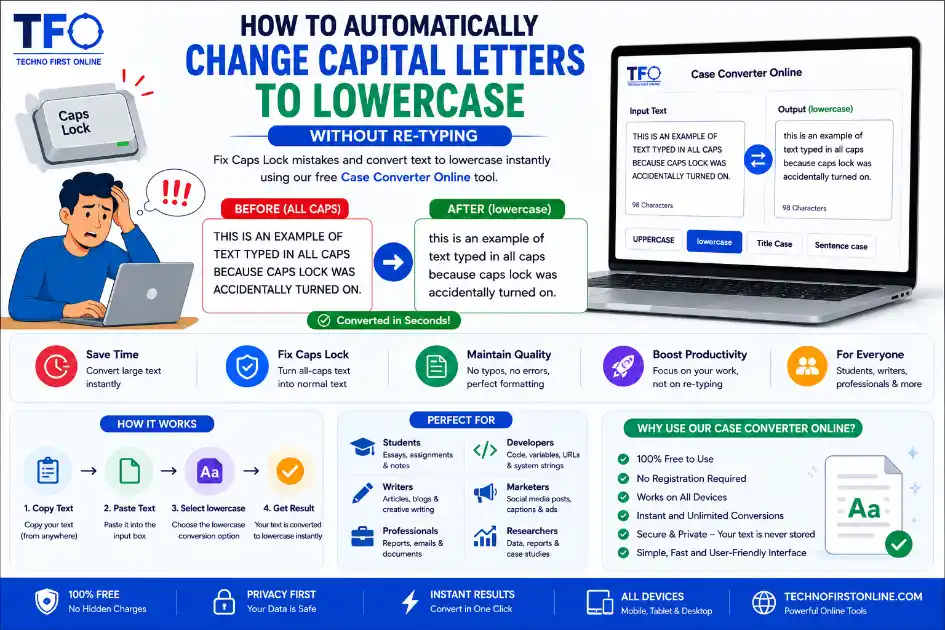
You can instantly change capital letters to lowercase by using a free online case converter tool. Simply paste your text and select the lowercase option to fix Caps Lock mistakes automatically.
How to Automatically Change Capital Letters to Lowercase Without Re-typing
The Accidental Caps Lock Nightmare: We Have All Been There
Picture this: You are deeply focused, typing out a long email, a detailed project report, or a creative story. Your eyes are fixed on your notes or you are just in the zone, flowing with ideas. When you finally look up at your screen, panic sets in. You accidentally hit the Caps Lock key, and now your entire paragraph looks like you are shouting at the reader in giant block letters.
Your first instinct might be frustration. The thought of hitting backspace, deleting your hard work, and re-typing everything from scratch is exhausting. It wastes your time, breaks your creative momentum, and drains your energy. Fortunately, you do not have to rewrite a single word. In the modern digital workspace, you can easily change capital letters to lowercase automatically within seconds. Learning how to manage text casing efficiently is a simple trick that can save professionals, students, and creators hours of tedious manual corrections.
Why Manual Re-typing Is a Thing of the Past
Many internet users still default to manual editing when they face formatting issues. They highlight the offending text, delete it, and type it all over again. While this might work for a short three-word phrase, it becomes a massive productivity bottleneck when you are dealing with full pages of documentation. Manual re-typing introduces new human errors, creates typos, and slows down your overall digital output.
With smart web-based utilities available at your fingertips, automating this process is incredibly simple. Using a dedicated case converter online allows you to execute text transformations globally. Whether you have ten words or ten thousand words locked in all-caps mode, an automated system updates the layout instantly, keeping your text pristine and error-free.
- * Prevent Typos: Re-typing increases the chances of adding spelling mistakes to your clean copy.
- * Maintain Your Workflow: Do not let a simple keyboard mistake ruin your concentration or delay your project deadlines.
- * Free up Mental Energy: Save your brainpower for writing great content rather than fixing basic capitalization slip-ups.
How to Shift All Caps to Lowercase Instantly
When you need to flip text from uppercase blocks to tiny, readable structures, the absolute fastest path is using an online script. The process requires zero technical knowledge and can be done from any device connected to the internet.
To convert your text, all you need to do is copy the corrupted, all-caps content from your document or text editor. Next, visit a free online platform that features formatting tools. Paste your text into the provided input box, and hit the dedicated lowercase conversion switch. The underlying system automatically loops through every alphabetical character, detects uppercase letters and converts them into lowercase text automatically, and rewrites them into matching lowercase strings within a fraction of a second.
This method is especially useful for web developers handling system code variations, data analysts sorting through messy spreadsheet entries, or virtual assistants organizing large batches of unformatted text strings.
Try our Case Convertor :– https://technofirstonline.com/case-converter-online/
Streamlining Workflows for Social Marketers and Creators
Digital marketers and social media managers frequently deal with text strings gathered from multiple external sources. When aggregating customer reviews, pulling quotes from digital books, or extracting data from PDF files, the font styling often arrives completely broken. Frequently, headings or whole testimonial paragraphs end up stuck in a rigid all-caps structure.
If you are trying to publish a quick update or craft a clean caption, shouting in all-caps looks highly unprofessional to your target audience. Running that raw text block through an optimized system to drop text down to lowercase lets you restructure your posts efficiently. Once everything is safely in lowercase, you can manually capitalize just the starting words of your sentences or use a smart tool to adjust it to an elegant title layout. This workflow guarantees your brand presentation stays professional across all digital touchpoints.
The Role of Case Conversion in Academic and Corporate Reports
Students writing lengthy research papers and corporate workers compiling multi-page spreadsheets often face the exact same formatting struggles. When copying data from legal case files, technical government archives, or old databases, the text is frequently locked in uppercase formatting to comply with ancient system requirements.
Leaving those blocks as all-caps in a modern business report or university thesis is a major formatting violation that lowers your overall score or presentation quality. Knowing how to quickly shift that text block to lowercase using a web-based utility keeps your work moving smoothly. It allows you to ingest heavy research data into your primary documents without destroying your carefully designed layout grids.

TechnoFirstOnline provides powerful free online tools, expert tutorials, and smart digital resources to simplify everyday tasks. Explore SEO, image, AI, PDF, and productivity tools designed for everyone.
Other Useful Tools




People Also Read






Modern writing platforms like Google Docs and Microsoft Word include text formatting systems that help users manage capitalization styles efficiently. Online case converter tools provide a faster and more flexible alternative for instant text transformation across devices.
Frequently Asked Questions
No, not at all. The tool only modifies the structural capitalization casing of the alphabetical characters. Your words, sentence structures, punctuation marks, and paragraph breaks remain exactly the same as you typed them.
The fastest way is to copy the entire paragraph, paste it into a free case converter online tool, and click the lowercase or sentence case option. This fixes the entire layout in a single second without requiring any manual editing.
Yes, it is completely safe. Modern text utilities process your text inputs entirely locally within your computer’s web browser using JavaScript. Because the text never travels to an external server or database, your confidential corporate or personal documents remain private.