
Merge PDF Online
Selected Files (0)
📱 Mobile Friendly: Drag ☰ or type position to sort instantly.
Merging PDFs...
Processing locally

Merge PDF Online Free
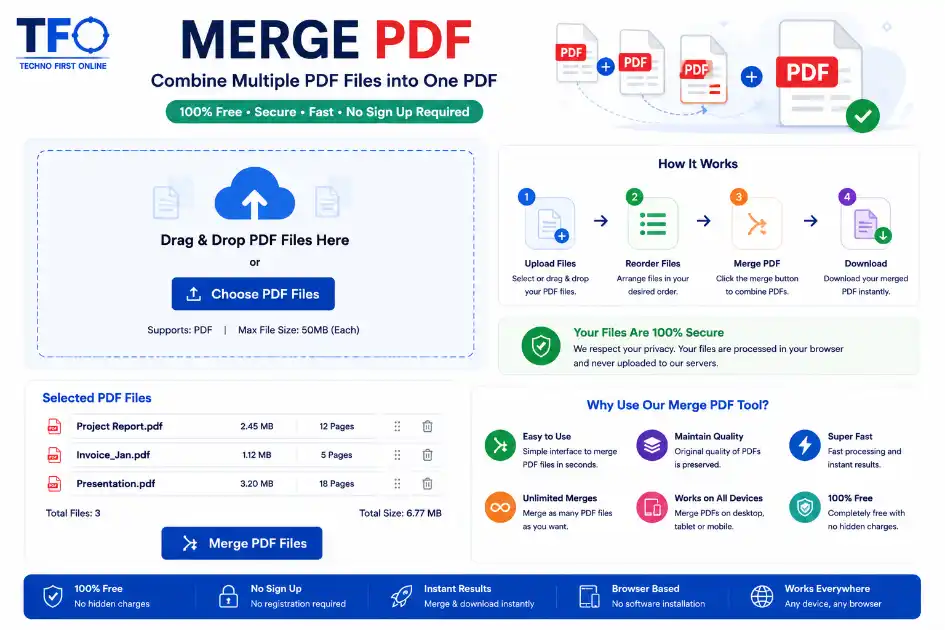
Merge PDF online free using TechnoFirstOnline. Upload multiple PDF files, arrange them in any order, and combine them into one secure PDF instantly without installing software.
Merge PDF Online Free – Combine Multiple PDF Files in Seconds
Handling multiple PDF documents separately can often create confusion, especially when you need to share important files together. Whether you are a student, office worker, freelancer, teacher, or business owner, combining documents into one file helps keep everything organized.
TechnoFirstOnline provides a simple and secure way to combine PDF documents directly from your browser. You do not need to install any application, create an account, or pay for premium access. The tool is designed for speed, simplicity, and ease of use.
What is a PDF Merger Tool?
A PDF merger tool allows users to join several PDF documents into one final file. Instead of managing separate PDFs individually, users can organize all pages inside one document.
This process is useful for:
- Assignment submission
- Office reports
- Business documents
- Contracts and invoices
- Project files
- Study material
- Scanned documents
- E-books and notes
Using an online solution saves time and avoids the need for heavy desktop software.
Why People Prefer Online PDF Tools
Modern users prefer browser-based tools because they are faster and easier to access from any device.
Some major benefits include:
No Installation Required
The entire process works online in your browser.
Works on Any Device
The tool supports desktops, laptops, tablets, and smartphones.
Fast File Processing
Documents are combined within seconds.
Better File Management
Organizing documents becomes easier when all pages are inside one PDF.
Simple User Interface
Even beginners can use the tool without technical knowledge.
Key Features of TechnoFirstOnline PDF Tool
TechnoFirstOnline focuses on creating lightweight productivity tools that are simple and user friendly.
Combine Multiple Documents
Users can upload several files and create one organized PDF.
Custom File Ordering
You can choose which document appears first, second, or last before processing.
Browser-Based Processing
Files are handled directly in the browser for better convenience.
Mobile Responsive Design
The tool works smoothly on Android and iPhone devices.
Secure Usage
No complicated registration process is required.
Unlimited Access
Use the tool as many times as needed.
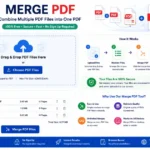
How to Combine PDF Documents Online
Using this tool is very simple.
Open Pdf merge Tool
Step 1: Upload Files
Select all PDF documents you want to combine.
Step 2: Arrange the Sequence
Choose the correct order of the documents.
Step 3: Start the Process
Click the processing button to create the final file.
Step 4: Download the Final PDF
Save the combined document instantly.
Advantages of Keeping PDFs in One File
Many professionals prefer sending a single document instead of multiple separate attachments.
Easy Sharing
One document is easier to upload and share.
Professional Presentation
A single organized file looks more professional.
Improved Accessibility
All important pages stay together.
Better Printing Experience
Printing one file is easier than managing multiple documents.
Time Saving
Users can quickly access all pages without opening separate files.
Best Uses for PDF Combination Tools
Online document tools are useful in many situations.
For Students
Students can organize assignments, notes, and projects.
For Offices
Companies can combine reports, contracts, and presentations.
For Teachers
Teachers can create study material and exam documents.
For Freelancers
Freelancers can organize portfolios and invoices.
For Business Owners
Business records and client documents become easier to manage.
Why PDF Format is So Popular
PDF is one of the most trusted document formats worldwide.
Consistent Layout
The document design remains the same on every device.
Better Compatibility
PDF files work on almost all operating systems.
Professional Appearance
The format is widely used in offices and educational institutions.
Secure Document Sharing
PDF files are commonly used for official communication.
Combine PDF Files Without Losing Quality
Many people worry about quality loss while processing documents online. The TechnoFirstOnline tool is designed to maintain document readability and preserve the original appearance of pages.
Whether the file contains:
- Images
- Text documents
- Certificates
- Scanned pages
- Reports
- Forms
The final document remains clean and readable.
Is It Safe to Use Online PDF Tools?
Security is an important concern while working with digital documents.
This browser-based solution helps users process files quickly without requiring unnecessary account creation. Since the tool is lightweight and easy to access, users can complete tasks more efficiently.
Why Choose TechnoFirstOnline?
TechnoFirstOnline offers multiple productivity tools that help users complete everyday tasks online without installing complicated software.
The platform focuses on:
- Fast performance
- User-friendly design
- Mobile compatibility
- Better accessibility
- Secure browser-based tools
The website is designed for users who want quick and reliable online utilities.
Tips for Better PDF Management
To manage PDF documents more efficiently, follow these simple tips:
- Keep file names organized
- Remove unnecessary pages before combining
- Arrange documents in the correct order
- Compress large files when required
- Store important documents in cloud storage
These small practices improve productivity and make document handling easier.
Final Thoughts
Keeping your documents organized is way easier when everything lives in one neatly arranged file. TechnoFirstOnline gives you a quick and hassle-free way to work with PDFs right in your browser — no fuss, no extra steps.
If you’re after a fast, mobile-friendly solution that works right in your browser without needing to install anything, this platform has you covered anytime you need it.
Frequently Asked Questions
You can upload multiple PDF files, arrange their order, and click the Merge PDF button to combine them into one file.
Yes, the tool is completely free to use without signup or subscription.
Yes, you can select the order of your PDF files before combining them.
Yes, the Merge PDF tool works on Android, iPhone, tablets, and desktop browsers.
Yes, the tool processes files securely and does not require unnecessary account creation.
Yes, scanned PDF files can also be combined easily.
No, the tool works completely online in your browser.
Yes, you can merge multiple PDF files depending on your browser and device performance.
According to Adobe PDF Standards and the PDF Association , PDF is one of the most secure and universally accepted document formats for sharing and preserving files across devices.
Merge PDF Online Free – Combine PDF Files Instantly #1
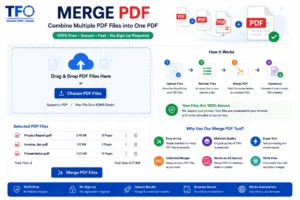
Merge PDF online free with TechnoFirstOnline. Combine multiple PDF files into one PDF instantly. Fast, secure, mobile-friendly PDF merger tool.
Price Currency: $
Operating System: All
Application Category: Application Utilities