Smart IT tools
stylish text generator for Instagram, Facebook & WhatsApp
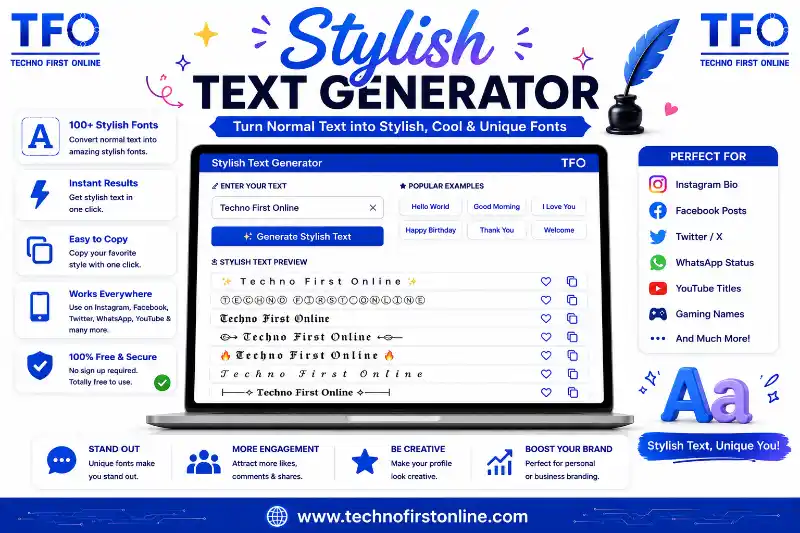
If your Instagram bio, Facebook post, or WhatsApp status still looks exactly like everyone else’s, there’s a simple reason — you probably haven’t tried a stylish text generator yet. This one small tool can completely change how your profile looks, without you needing to download an app, learn design software, or spend a single rupee.A stylish text generator takes your normal typed sentence and instantly turns it into dozens of decorative font styles. You then copy the one you like and paste it directly into your bio, caption, or status. That’s the entire process, and it takes less time than typing this sentence.In this guide, we’ll walk through exactly how a stylish text generator works, how to use it on Instagram, Facebook, and WhatsApp specifically, which styles work best on each platform, and answer the most common questions people have before they try it for the first time.
What Is a Stylish Text Generator?
A stylish text generator is a free online tool that converts plain text into styled versions using Unicode characters — a universal character-encoding standard supported by nearly every device, browser, and app in the world. Unlike a custom font you’d install in a design program, these styled characters already exist inside the Unicode standard maintained by the Unicode Consortium, which is why they display correctly across almost any platform without needing extra software.
In practical terms, this means the moment you generate a piece of stylish text, you can immediately paste it into Instagram, Facebook, WhatsApp, Twitter, Discord, or even a text message, and it will render exactly as shown in the tool.
Many people search for this kind of tool using slightly different terms — some type “stylish text maker,” others look specifically for an “instagram font generator” or “fancy text for instagram” — but all of these searches point to the same underlying tool and the same result: text that looks different from the default font on your screen.
Want to create stylish text instantly? Try our Fancy Text Generator and copy your favorite font in one click.
Why People Want Stylish Text in the First Place
Social media has become intensely visual, and even something as small as your bio font contributes to how your profile is perceived. A stylish text generator lets you stand out without any design skills. Here’s why so many users have made it part of their routine.
It makes your profile memorable. A plain name blends into a feed full of plain names. A styled name or bio line naturally draws the eye.
It reflects your personality or brand. Script fonts feel soft and personal. Bold fonts feel confident. Gothic fonts feel edgy. The style you pick says something about you before anyone reads a single word.
It’s genuinely free and instant. There’s no learning curve, no software to install, and no cost — you just type, preview, and copy.
It works everywhere. Because it’s based on Unicode rather than app-specific fonts, the same styled text works on Instagram, Facebook, and WhatsApp without any extra steps.
How to Use a Stylish Text Generator (Step-by-Step)
Getting started takes less than a minute, even if this is your first time using this kind of tool.
- Open the tool. Go to the stylish text generator on your phone or computer.
- Type your text. Enter your name, a short bio line, or the caption you want to style.
- Browse the live preview. As you type, the tool instantly shows your text rewritten in 29+ different fonts — bold, italic, script, gothic, circled, and more.
- Search if needed. If you already know the style you want, use the search box to filter results by name, like “bold” or “script,” instead of scrolling through everything.
- Copy your favorite. Every style has its own Copy button. One tap copies just that version.
- Paste it into your app. Open Instagram, Facebook, or WhatsApp, tap into the field you want to edit, and paste.
That’s the complete process from start to finish, and it works identically whether you’re on a phone or a desktop browser.
While creating stylish text, you may also need to change the letter case of your content before applying decorative fonts. If your text is written in all uppercase or lowercase, our Case Converter Tool lets you instantly switch between UPPERCASE, lowercase, Sentence case, and Title Case. It’s a quick way to prepare clean text before generating stylish fonts for your social media profiles or posts.
Creating Fancy Text for Instagram
Instagram is where stylish text generators get used the most, and for good reason — your bio is essentially a first impression. Since Instagram doesn’t offer built-in font options, using a stylish text generator is the only practical way to add bold, italic, or script text to your bio, name, or captions.
To style your Instagram bio, generate your text using the tool, copy the style you like, then go to Edit Profile on Instagram and paste it into your Name or Bio field. For captions, simply paste the styled text directly into the caption box before posting.
Script and italic styles tend to work particularly well for lifestyle, fashion, and beauty pages, giving a soft and elegant feel. Bold and gothic styles suit gaming, fitness, and streetwear accounts, giving a stronger, more confident tone. Small caps and clean sans-serif styles work nicely for professional or personal branding pages where readability matters most.
One small tip: Instagram’s username field (not your display name) can be stricter about which special characters it accepts, so if a style doesn’t save in your username, try it in your display name or bio instead, where there’s usually more flexibility.
Social media platforms often have character limits for bios, captions, and status updates. Before copying your stylish text, it’s a good idea to check its length using our Character Counter. This helps ensure your Instagram bio, Facebook post, or WhatsApp status stays within the allowed limit while keeping your message clear and attractive.
Creating Fancy Text for Facebook
Facebook doesn’t support custom fonts natively either, so a stylish text generator works exactly the same way here as it does on Instagram. Page admins commonly use it for announcement posts, event headlines, and pinned rules in groups, while personal users often style their display name for a more distinctive profile.
Since Facebook feeds tend to be more text-heavy, readability matters slightly more here than on Instagram. Bold, sans-serif, and small caps styles are usually the safest picks for full sentences, while script or circled styles work nicely for short highlights or single-word emphasis within a longer post.
If a particular style doesn’t save correctly in a Facebook Page name field (which can have stricter validation), switch to a simpler style like bold or small caps — these tend to have the widest acceptance across Facebook’s various input fields.
If you’re writing longer captions, social media posts, or marketing content, tracking the number of words can be just as important as styling the text. Our Word Counter Tool instantly counts words, characters, sentences, and paragraphs, making it easier to create well-structured content before converting it into stylish fonts.
Creating Fancy Text for WhatsApp
WhatsApp is one of the most widely used messaging apps, and a styled “About” line or status message is a small but popular way people personalize their profile. Unlike Instagram and Facebook, WhatsApp does offer built-in bold, italic, and strikethrough formatting using symbols like asterisks and underscores — but a stylish text generator gives you access to a much wider range of styles beyond WhatsApp’s limited built-in options, including script, gothic, circled, and double-struck fonts.
To use it, generate your styled text, copy it, then paste it directly into your WhatsApp status, About section, or even into a chat message. It will display the same way for the person receiving it, as long as their device supports standard Unicode rendering, which nearly all modern smartphones do.
Choosing the Right Style for the Right Platform
While there’s no strict rule about which style belongs where, a few patterns tend to work consistently well across all three platforms:
- For a professional or clean look: small caps, sans-serif, or monospace styles
- For a soft, personal, or artistic look: script or italic styles
- For a bold, confident, or gaming-oriented look: bold, gothic, or double-struck styles
- For a fun, playful touch: circled letters, squared letters, or upside-down text
Testing a few different styles side by side with the same piece of text is often the fastest way to figure out which one fits your profile’s personality best.
Common Mistakes to Avoid
A few small mistakes can undercut an otherwise great-looking stylish text setup.
Overusing styles in long captions. A styled first line looks great, but styling an entire paragraph can actually reduce readability and make your post harder to skim.
Ignoring platform character limits. Some fields, like Instagram usernames or WhatsApp About sections, have length restrictions, so check that your styled text fits before finalizing it.
Mixing too many styles together. Combining three or four different fonts in a single bio can look cluttered rather than creative. Sticking to one or two styles usually looks more intentional.
Why a Free Tool Is All You Need
Because stylish text relies on characters that are already part of the public Unicode standard, there’s no legitimate reason a converter tool needs to charge for access or limit how many times you can use it. A well-built stylish text generator should let you create unlimited styled text, with no sign-up and no hidden restrictions — which is exactly the kind of tool worth bookmarking for whenever you refresh your bio, post a new caption, or update your status.
If you also game on the side, it’s worth checking out how the same styling approach applies to fancy text for gaming names on PUBG and Free Fire, since many of the same fonts that work well on Instagram also make a strong impression on a leaderboard. And if you’re completely new to the copy-paste process itself, this step-by-step guide to copying and pasting fancy fonts walks through it in more detail.
Creating a unique online identity doesn’t stop with stylish text. Protecting your social media accounts is equally important. After customizing your profile with fancy fonts, use our Password Generator to create a strong and secure password for Instagram, Facebook, WhatsApp, and other online accounts. A secure password is one of the simplest ways to keep your accounts safe from unauthorized access.
Why Trust TechnoFirstOnline?
At TechnoFirstOnline, we build browser-based productivity and text tools that work instantly without requiring sign-up or software installation. Our Fancy Text Generator is regularly updated to ensure compatibility with modern social media platforms.

TechnoFirstOnline provides powerful free online tools, expert tutorials, and smart digital resources to simplify everyday tasks. Explore SEO, image, AI, PDF, and productivity tools designed for everyone.
Other Useful Tools


















Password Generator
Open
People Also Read


keyword density checker chrome extension

website keyword density

Best free keyword density checker tools

Ideal Keyword Density

keyword density analyzer

Keyword Stuffing Checker

Keyword Density Calculator

How to Check Keyword Density

Word Density Checker vs Keyword Density Checker

What Is a Password Hash Generator

SHA-1 vs SHA-256 vs SHA-512 comparison

what is bcrypt beginners guide

md5 vs sha256 vs bcrypt

Is MD5 Still Secure Hash Collisions Explained

How Generate Hash Online

MD5 Hash Generator Online guide

How to Create a Custom QR Code for Free




How to change to sentence case online
How to Automatically Change Capital Letters to Lowercase
Grammarly Word Count vs Free Word Counter

word counter google docs — How to Check Word Count

Word Count Checker — Check Word Count in PDFs & Documents
Free Character Counter Online — Count Letters & Spaces

How to Word Counter Online Free




| Platform | Stylish Text Supported |
| --------- | ---------------------- |
| Instagram | ✅ |
| Facebook | ✅ |
| WhatsApp | ✅ |
| Discord | ✅ |
| Telegram | ✅ |
| X | ✅ |
| Stylish Text | Normal Text |
| ------------ | ----------- |
| 𝓗𝓮𝓵𝓵𝓸 | Hello |
| 🅷🅴🅻🅻🅾 | Hello |
| 𝐇𝐞𝐥𝐥𝐨 | Hello |
| 𝕳𝖊𝖑𝖑𝖔 | Hello |
Frequently Asked Questions
A stylish text generator is a free online tool that converts normal text into decorative Unicode fonts — such as bold, italic, script, and circled letters — which you can copy and paste into Instagram, Facebook, WhatsApp, and other apps.
Yes. Since the tool relies on Unicode characters that are already part of the public character standard, a properly built stylish text generator can be used for free, with no sign-up and no limit on how many times you generate text.
Yes, as long as the app supports standard Unicode rendering, which almost every modern version of Instagram, Facebook, and WhatsApp does. The styled text will display exactly as it appeared in the generator.
This usually happens when the receiving app or an older device doesn’t support a specific Unicode range. Switching to a more common style, like bold or italic, usually solves the issue since these have the widest support.
You can try, but Instagram’s username field has stricter validation rules than the bio or display name field. If a style doesn’t save as your username, use it in your display name or bio instead.
WhatsApp’s built-in formatting only offers a few basic options like bold, italic, and strikethrough. A stylish text generator gives you access to many more styles, including script, gothic, and circled fonts, that WhatsApp doesn’t offer natively.
Yes, as long as you’re using a reputable tool that processes text directly in your browser without asking for personal information, login details, or unnecessary permissions.
Yes, but it’s best to use it sparingly. Clean styles like small caps or sans-serif fonts work well for a subtle, professional touch, while overly decorative styles are usually better suited for personal or casual profiles.
There is no evidence that stylish Unicode text negatively affects reach or engagement on Instagram, Facebook, or WhatsApp. That said, using it in moderation, rather than for entire paragraphs, keeps your content easy to read, which generally supports better engagement.
In practice, these terms are used interchangeably. Both refer to the same type of tool — one that converts plain text into decorative Unicode styles for use across social media and messaging apps.