Smart IT tools
MD5 vs SHA-256 vs Bcrypt
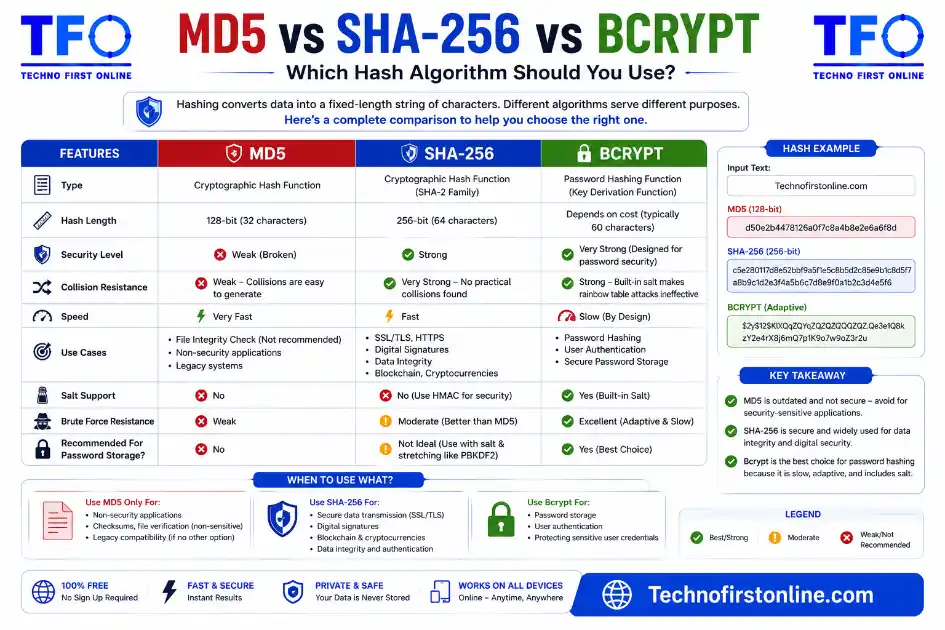
MD5 → Fast, 32-char hash. Good for file integrity checks and
deduplication. NOT safe for passwords or digital signatures.SHA-256 → Secure, 64-char hash. Great for data verification,
digital signatures, and certificates. Still too fast
for storing passwords.Bcrypt → Slow, salted password hash. Designed specifically for
storing passwords securely. Not suitable for general
data hashing or file checksums.Rule of thumb: Files → SHA-256. Passwords → Bcrypt.
Legacy/speed-only tasks → MD5 (if no adversary is involved).
Which Hashing Algorithm Should You Use?
Not all hash functions are created equal, and picking the wrong one for the wrong job is one of the most common mistakes developers make when building applications. md5 vs sha-256 vs bcrypt all produce hashes — but they were designed for completely different purposes, and using one in place of another can leave your system either over-engineered or dangerously insecure.
we will learn here breaks down exactly what each algorithm does, what it was built for, and how to decide which one your project actually needs. We’ve covered the basics of what MD5 is and how to generate one, and we’ve also explained why MD5 is no longer considered secure for cryptographic use. This post brings it all together with a direct comparison so you can make the right call.
Why This Comparison Matters
The reason people get confused about these three algorithms is that they all look like they do the same thing: you put data in, a hash comes out. But speed, collision resistance, output length, and whether the algorithm includes salting all vary dramatically — and those differences determine whether a given algorithm is safe for a particular use.
A faster and reaible hash isn’t always better. In password storage, speed is actually the enemy. A fast algorithm lets an hackers try billions of guesses per second against a stolen database. A slow algorithm forces them to spend far more time and computational resources on each guess — which is the whole point of using bcrypt for passwords. On the other hand, if you’re checking whether a 10GB file downloaded correctly, you don’t want to wait 30 seconds for bcrypt to finish.
MD5 at a Glance
MD5 (Message Digest Algorithm 5) was designed in 1991 and remains one of the most widely searched and widely used hash functions in the world — not because it’s the most secure option, but because it’s fast, short, and built into virtually every programming language and tool out there.
Algorithm:      MD5
Standard:       RFC 1321 (1992)
Output length:  128-bit → 32 hexadecimal characters
Speed:          Extremely fast (billions of operations/sec on modern hardware)
Collision safe: No — collisions can be deliberately engineered
Salting:        No built-in salting
Password use:   Never — too fast and collision-vulnerable
Ideal for:      File integrity, deduplication, cache keys, legacy systems
The short version: MD5 is fast and predictable, which makes it useful for quick data fingerprinting tasks, but those same properties make it dangerous for anything security-related. An attacker with a modern GPU can generate billions of MD5 hashes per second, which means any password stored as a plain MD5 hash could be cracked in seconds to minutes if your database is ever leaked.
We’ve explained in detail what a hash collision actually is and why it breaks MD5’s security model — if you want to understand the deeper “why” behind this, that guide covers it with real-world examples.
SHA-256 at a Glance
SHA-256 is part of the SHA-2 family of hash functions, which was developed by the U.S. National Security Agency and standardized by NIST (the National Institute of Standards and Technology). It produces a 256-bit output displayed as a 64-character hexadecimal string — twice the length of an MD5 hash — and has no known practical collision attacks, making it the current standard for most security-sensitive hashing tasks.
NIST formally approves SHA-256 (along with SHA-384 and SHA-512) for security-sensitive applications in government and federal systems under NIST Special Publication 800-131A, which provides official guidance on transitioning away from weaker cryptographic algorithms. SHA-256’s approval status under this framework is why you see it as the backbone of HTTPS certificates, code signing, blockchain systems, and most modern software distribution pipelines.
Algorithm:      SHA-256 (part of SHA-2 family)
Standard:       FIPS 180-4, NIST SP 800-131A
Output length:  256-bit → 64 hexadecimal characters
Speed:          Fast (still billions of operations/sec on GPU)
Collision safe: Yes — no practical collision attack known
Salting:        No built-in salting
Password use:   Not recommended — too fast for brute-force resistance
Ideal for:      Digital signatures, certificates, file integrity,
                software verification, blockchain, API tokens
The critical nuance here is that SHA-256 is fast — and that’s still a problem for password storage, even though SHA-256 has no collision vulnerability. Speed and security aren’t the same thing. On a modern GPU, an attacker can attempt hundreds of billions of SHA-256 computations per second, which means even a strong, complex password stored as a raw SHA-256 hash could be brute-forced relatively quickly with enough hardware. SHA-256 was designed for speed because its primary job is data integrity checking, not stopping brute-force password attacks.
Bcrypt at a Glance
Bcrypt is where password security actually lives. Unlike md5 vs sha-256 vs bcrypt wasn’t designed as a general-purpose hash function — it was designed specifically and exclusively for storing passwords, and every design decision reflects that.
Bcrypt’s key features are intentional slowness and automatic salting. Slowness here is a feature, not a bug: bcrypt includes a configurable “cost factor” (also called a work factor) that controls how long each hash computation takes. Increasing the cost factor by 1 roughly doubles the computation time, which means as hardware gets faster over time, you can keep raising the cost factor to keep bcrypt slow enough to frustrate attackers. The automatic salting means every password gets a unique random component added before hashing, which prevents precomputed lookup tables (rainbow tables) from being effective even if two users have the same password.
Algorithm:      Bcrypt
Standard:       Designed by Niels Provos & David Mazières (1999)
Output length:  60-character fixed-length string (includes salt + cost)
Speed:          Intentionally slow — controlled by cost factor
Collision safe: Yes (but irrelevant — it's not a general hash function)
Salting:        Yes — automatic, unique salt per password
Password use:   Ideal for this purpose
Ideal for:      Storing user login passwords in any application
Max input:      72 bytes (longer passwords are truncated)
One important limitation: bcrypt has a maximum input length of 72 bytes. Passwords longer than 72 bytes are silently truncated, which means two passwords that differ only beyond the 72nd character would produce the same hash. For most real-world users, this isn’t a practical problem, but it’s something to be aware of when building systems that accept very long passphrases.
Side-by-Side Comparison
Feature               MD5          SHA-256       Bcrypt
─────────────────────────────────────────────────────────
Output length         32 chars     64 chars      60 chars
Speed                 Very fast    Very fast     Intentionally slow
Collision resistant   No           Yes           N/A
Built-in salting      No           No            Yes
Password storage      Never        Not ideal     Yes — designed for it
File integrity        Yes          Preferred     No
Digital signatures    No           Yes           No
Certificate signing   No           Yes           No
Legacy compatibility  Very high    High          Moderate
Configurable cost     No           No            Yes (work factor)
Which Algorithm Should You Actually Use?
The honest answer is that there’s no single “best” algorithm — only the right algorithm for the specific job.
Use MD5 when:
- You need a quick way to verify a downloaded file matches a known checksum, and the file came from a trusted source you’re comparing against (not an adversary trying to fool you).
- You’re working with legacy systems that were built around MD5 and changing them would be more disruptive than beneficial.
- You’re generating internal identifiers, cache keys, or deduplication fingerprints where speed matters and no one is trying to attack the system.
You can generate MD5 hashes instantly using our free Hash Generator tool, which also supports SHA-1, SHA-256, and SHA-512 for when you need a more future-proof option.
Use SHA-256 when:
- You’re verifying files, software downloads, or API payloads and you want a more future-proof option than MD5.
- You’re signing data digitally, working with SSL/TLS certificates, or building anything that involves a certificate authority.
- You need a checksum that will hold up to scrutiny — SHA-256 is the current standard recommended by NIST and used across internet infrastructure.
Use Bcrypt when:
- You’re storing any kind of user password in a database, full stop. This isn’t a close call — bcrypt (or Argon2, if available) is the correct tool for this job, and MD5 or SHA-256 are categorically wrong for it.
What Does OWASP Recommend?
OWASP (the Open Web Application Security Project) is the most widely referenced authority on application security practices. <cite index=”20-1″>Their Password Storage Cheat Sheet is explicit: passwords must be protected using strong, slow hashing algorithms such as Argon2id, bcrypt, or PBKDF2 — and fast hashing algorithms like SHA-256 are not suitable for password storage because they allow attackers to perform a very large number of guesses quickly.</cite>
Their guidance also specifies concrete configuration parameters — not just which algorithms to use, but exactly how to configure them. For bcrypt, they specify a minimum work factor of 10, with 12 or higher being preferable on systems where performance allows. For new applications where Argon2id is available, that’s now their first recommendation over bcrypt.
OWASP Recommended Priority for Password Storage:
─────────────────────────────────────────────────
1st choice:   Argon2id  (modern, memory-hard, PHC winner)
2nd choice:   Bcrypt     (widely supported, still strong)
3rd choice:   PBKDF2     (FIPS-compliant environments)
Never use:    MD5, SHA-1, SHA-256, SHA-512 (for passwords)
A Note on Argon2
Argon2 isn’t the main focus here, but it deserves a mention. It’s a newer password hashing algorithm that won the Password Hashing Competition in 2015 and is now standardized in RFC 9106. It’s memory-hard — requiring large amounts of RAM to compute — which makes it even more resistant to GPU-based brute-force attacks than bcrypt. If you’re building something new and your platform supports it, Argon2id is the strongest password hashing option currently available.
Common Mistakes to Avoid
- Storing passwords as MD5 hashes — this was once common practice and is now a serious security risk. Any database leak exposes these passwords almost instantly.
- Using SHA-256 for passwords because it “sounds more secure than MD5” — SHA-256 is stronger than MD5 for data integrity, but it’s still far too fast for password storage. Fast algorithms make brute-force attacks cheap.
- Forgetting to use a unique salt with SHA-256 — if you’re using SHA-256 in a context where uniqueness matters (like generating per-user tokens), you need to add a salt manually since SHA-256 doesn’t include one automatically.
- Not updating bcrypt’s work factor over time — bcrypt’s strength depends partly on how slow it is relative to current hardware. A work factor that was adequate a few years ago may not provide the same protection today. Reviewing and incrementing it periodically keeps pace with hardware improvements.

TechnoFirstOnline provides powerful free online tools, expert tutorials, and smart digital resources to simplify everyday tasks. Explore SEO, image, AI, PDF, and productivity tools designed for everyone.
Other Useful Tools










Password Generator
Open
People Also Read


NTLM Hsah vs MD5 vs SHA
decrypt md5 hash
password salting explained
php password hash guide
What Is a Password Hash Generator

SHA-1 vs SHA-256 vs SHA-512 comparison

what is bcrypt beginners guide
Is MD5 Still Secure Hash Collisions Explained

How Generate Hash Online

MD5 Hash Generator Online guide

WiFi QR Code Generator

LastPass vs Norton vs Bitwarden

Password Manager Pros & Cons

16 Character Password Generator

What Makes a Password Strong

Different Password for Every Website
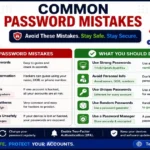
Common Password Mistakes
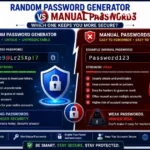
Random Password Generator vs Manual Passwords

Strong Password Examples
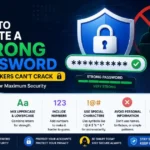
How to Create a Strong Password
Want to compare MD5, SHA-256, and SHA-512 hashes in one place? Try our Hash Generator Online Free to generate secure hashes instantly for text and files directly in your browser.
Need to share a file download link or website securely after verifying its checksum? Create a scannable code using our Free QR Code Generator to instantly generate QR codes for URLs, text, email addresses, WiFi networks, SMS messages, and digital contact cards.
Frequently Asked Questions
For most purposes, yes. SHA-256 produces a longer hash, has no known practical collision attacks, and is the current standard recommended by NIST for digital signatures, certificates, and data integrity verification. For password storage, however, neither MD5 nor SHA-256 is appropriate — use bcrypt or Argon2 instead.
Technically yes, but you shouldn’t. SHA-256 is extremely fast, and on modern hardware an attacker can attempt billions of SHA-256 computations per second. This makes it easy to brute-force even complex passwords from a stolen database. Bcrypt or Argon2 are the correct choices for passwords because they’re intentionally slow.
No. Like all hash functions, bcrypt is one-way — you can’t reverse the output back to the original password. The way authentication works is that the system hashes whatever the user types and compares it to the stored hash, rather than ever decrypting the stored value.
A salt is a random unique value added to each password before hashing, which prevents attackers from using precomputed lookup tables. Bcrypt and Argon2 add a unique salt automatically. MD5 and SHA-256 do not include salting, so if you use them in a context where salting matters, you have to implement it yourself.
This is a limitation of bcrypt’s original design. Any characters beyond 72 bytes are silently ignored, meaning two passwords that differ only after the 72nd character would produce the same hash. For most users this isn’t a concern, but it’s worth knowing if you’re designing a system that accepts very long passphrases.
OWASP currently recommends Argon2id as the first choice for new applications, followed by bcrypt for systems where Argon2 isn’t available. SHA-256, SHA-512, and MD5 are all explicitly listed as unsuitable for password storage.
Yes. Our Hash Generator supports MD5, SHA-1, SHA-256, and SHA-512 — all running locally in your browser with no server upload required.