Smart IT tools
What Is Bcrypt? A Beginner's Guide
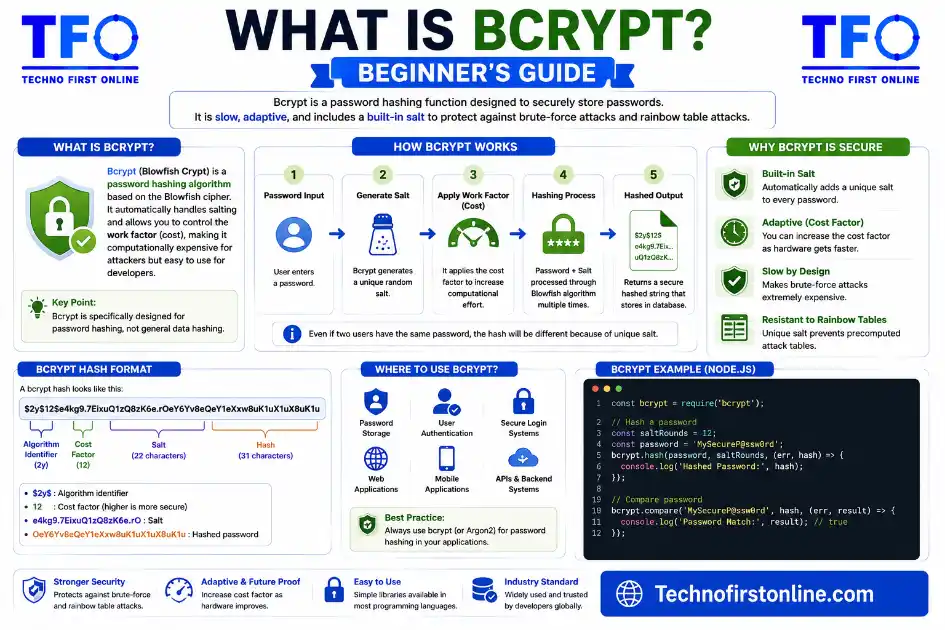
Bcrypt is a password hashing function — not encryption. It takes
a password, adds a random “salt,” and runs it through an
intentionally slow algorithm to produce a fixed-length hash.
That hash is stored in a database instead of the real password.
When you log in, the system hashes what you typed and compares
it to the stored hash.What makes bcrypt special:
✓ Automatically adds a unique salt to every password
✓ Configurable “cost factor” makes it slower as hardware
gets faster
✓ Designed specifically for passwords — not general data
✗ Not reversible — the original password cannot be recovered
What Is Bcrypt? The Password Hashing Method That Hackers Hate
If you’ve ever signed up for a website and later heard that the company’s “passwords were stored securely using bcrypt,” you might have wondered what that actually means. Is it encryption? Is it some kind of lock? And why does it matter which method a website uses to store your password?
This guide answers all of that in plain English. We’ll cover what bcrypt is, how it works, why it was built the way it was, and what makes it a genuinely good choice for storing passwords compared to alternatives like MD5 or SHA-256. If you’re new to hashing entirely, you might also want to read our beginner’s guide to MD5 and how hash functions work before diving in here — the concepts there lay the foundation for what we’re covering now.
What Is Bcrypt, Really?
Bcrypt is a password hashing function — meaning its entire job is to take a password and turn it into a fixed-length string of characters that gets stored in a database in place of the actual password. It was created by cryptographers Niels Provos and David Mazières and first introduced to the world in their paper “A Future-Adaptable Password Scheme”, presented at the 1999 USENIX Annual Technical Conference. The name itself is a blend of “Blowfish” (the cipher it’s based on) and “crypt” (the name of the original UNIX password hashing system it was designed to replace).
The key thing to understand from the start: bcrypt is not encryption. Encryption is reversible — you can lock and unlock it with the right key. Bcrypt is a one-way function. Once a password goes in, there’s no mathematical way to get it back out. This is intentional, because a website should never need to know your actual password. It only needs to be able to check whether what you just typed matches what was originally stored.
The Problem Bcrypt Was Designed to Solve
Before bcrypt, most systems used fast hash functions — like MD5 or the older DES-based UNIX crypt — to store passwords. The problem was that these functions were designed for speed, and speed is exactly what you don’t want when it comes to password storage.
Here’s why: if an attacker gets hold of a database full of hashed passwords, they can try to guess each one by hashing billions of possible inputs and comparing the results. The faster the hash function, the more guesses they can attempt per second. By the mid-1990s, hardware had improved to the point where the old UNIX crypt function — which was considered secure when only a few passwords could be hashed per second — could be defeated far too easily with modern hardware.
Provos and Mazières specifically designed bcrypt to be configurable — meaning you could deliberately make it slow, and then make it slower still as hardware improved over time. That adaptability is what gives bcrypt its staying power decades after its introduction.
How Bcrypt Works (Without the Math)
You don’t need to understand cryptography to understand bcrypt. Here’s what happens step by step when a new password gets hashed:
Step 1 — Salt generation. Bcrypt automatically generates a unique 128-bit random salt for every single password. A salt is a random string that gets mixed into the password before hashing, ensuring that even if two users have the same password, their stored hashes will look completely different. This destroys the effectiveness of precomputed lookup tables (called rainbow tables) that attackers use to crack simple hash functions.
Step 2 — Key setup (the expensive part). The password and salt are fed into an algorithm called EksBlowfish — short for “Expensive Key Schedule Blowfish.” This is where the intentional slowness comes from. The algorithm performs a large number of operations (determined by the cost factor) to produce an internal key. The number of operations grows exponentially with the cost factor, meaning that increasing it by 1 doubles the computation time.
Step 3 — Hash output. The final result is a 60-character string that includes the algorithm version, the cost factor, the salt, and the actual hash — all packed into one portable string. This means the same stored value contains everything the system needs to verify a future login attempt.
Example bcrypt output string (60 characters):
$2b$12$LQv3c1yqBWVHxkd0LHAkCOYz6TtxMQJqhN8/lewmMliV9IFBnYhDK
 │   │  │                  │
 │   │  └── Salt (22 chars)└── Hash (31 chars)
 │   └── Cost factor (12 = 2^12 = 4096 rounds)
 └── Algorithm version (2b = current standard)
Step 4 — Login verification. When you try to log in later, the system takes the password you just typed, extracts the salt and cost factor from the stored string, runs the same hashing process, and compares the result to what’s stored. If they match, you’re in. Your original password is never stored anywhere.
The Cost Factor: Bcrypt’s Most Important Feature
The cost factor (sometimes called the work factor) is what separates bcrypt from most other hash functions. It’s a number, typically between 10 and 14 for production systems, that controls how computationally expensive each hash operation is.
The math is logarithmic: a cost factor of 10 means 2¹⁰ = 1,024 rounds of key setup. A cost factor of 12 means 2¹² = 4,096 rounds — roughly 4 times more work per hash. A cost factor of 14 means 2¹⁴ = 16,384 rounds.
Cost Factor Reference (approximate time per hash, modern server):
──────────────────────────────────────────────────────────────────
Cost  10  →  ~100ms per hash   (minimum acceptable for new systems)
Cost  12  →  ~400ms per hash   (OWASP recommended default)
Cost  14  →  ~1.5s per hash    (high-security environments)
Cost  16  →  ~6s per hash      (extreme — impacts user experience)

A legitimate login attempt → 1 hash = ~400ms (barely noticeable)
Attacker brute-forcing    → 1 billion attempts = 400,000,000 seconds
That last line is the point. A few hundred milliseconds per login is completely acceptable from a user experience standpoint. But if someone steals your password database and tries to crack it by brute force, that same time penalty applies to every single guess — turning what could be a weekend-long cracking job into something that would take longer than a human lifetime.
What OWASP and NIST Say About Bcrypt
Two of the most authoritative sources in application security both have clear guidance on this topic.
<cite index=”1-1″>The OWASP Password Storage Cheat Sheet states that passwords must be protected using strong, slow hashing algorithms such as Argon2id, bcrypt, or PBKDF2, and that fast hashing algorithms like SHA-256 are not suitable for password storage because they allow attackers to perform a very large number of guesses quickly. For bcrypt specifically, OWASP recommends a minimum work factor of 10, preferably 12 or higher on systems where performance allows.</cite>
OWASP bcrypt Configuration Minimum (from Password Storage Cheat Sheet):
──────────────────────────────────────────────────────────────────────────
Algorithm:     Bcrypt
Work factor:   Minimum 10 (12+ preferred)
Password max:  72 bytes (enforce at application level)
Salt:          Automatic — do not add manually
Output format: Full PHC string (includes version, cost, salt, hash)
Source:        cheatsheetseries.owasp.org/cheatsheets/Password_Storage_Cheat_Sheet.html
On the NIST side, the Digital Identity Guidelines SP 800-63B-4 — the US government’s official framework for digital authentication — requires that stored passwords be salted and hashed using a suitable password hashing scheme, and explicitly states that the cost factor should be as high as practical without negatively impacting system performance, and should be increased over time as computing hardware improves. Bcrypt, along with Argon2 and PBKDF2, satisfies these requirements.
These aren’t just suggestions. For systems handling sensitive data or federal infrastructure, these guidelines carry real compliance weight.
Bcrypt vs MD5 vs SHA-256: The Short Version
We’ve done a full breakdown in our MD5 vs SHA-256 vs Bcrypt comparison guide, but here’s the condensed version of why bcrypt wins for password storage specifically:
Property              MD5          SHA-256       Bcrypt
───────────────────────────────────────────────────────
Designed for          General      General       Passwords only
Intentionally slow    No           No            Yes
Automatic salting     No           No            Yes
Collision resistant   No           Yes           N/A
Cost configurable     No           No            Yes
OWASP-approved for    ✗ Passwords  ✗ Passwords   ✓ Passwords
MD5 and SHA-256 were built to be fast because their job is processing large amounts of data quickly. That speed is a feature for file integrity checks and digital signatures, but a dangerous liability for password storage. Bcrypt was built from the ground up to be the opposite of fast — and it’s better at its specific job because of it.
If you want to understand why MD5 in particular is considered broken for any security use, we’ve covered that in detail in our guide on hash collisions and MD5’s security vulnerabilities.
Bcrypt’s Known Limitations
Bcrypt is a strong algorithm, but it’s not without trade-offs worth knowing:
72-byte password limit. Bcrypt truncates any password longer than 72 bytes (not characters — bytes, which affects multi-byte Unicode characters). A password that’s 73 bytes long and one that’s 200 bytes long produce the same hash. For most users, this doesn’t matter — but if you’re building a system that accepts very long passphrases, this is worth knowing.
Not memory-hard. Modern algorithms like Argon2 are “memory-hard” — they require significant RAM to compute, making them more resistant to GPU-based cracking where thousands of cores can be parallelized cheaply. Bcrypt still resists these attacks reasonably well, but Argon2id is considered the stronger choice on this front for new applications.
Slower to migrate than to adopt. If you’re inheriting a system that stores passwords in MD5 or plain SHA-256, you can’t simply rehash the database — you don’t have the original passwords. The standard approach is to rehash transparently on each successful login, converting the database gradually over time.
When Should You Use Bcrypt?
The answer is simple: whenever you’re storing user passwords in a database. This applies whether you’re building a basic login form, a multi-tenant SaaS product, or anything in between. If users have passwords, and those passwords need to be stored, bcrypt (or Argon2id if your platform supports it) is the right tool.
You should not use bcrypt when:
- You’re generating a checksum or fingerprint for a file — use SHA-256 instead.
- You need to verify data integrity for an API request — use HMAC-SHA-256.
- You need to hash data for fast lookup or caching — use MD5 or SHA-256.
- You’re not storing passwords at all — bcrypt has no role outside password storage.
You can generate and verify MD5, SHA-1, SHA-256, and SHA-512 hashes instantly using our free Hash Generator tool — everything runs locally in your browser, so nothing you type or upload ever leaves your device.

TechnoFirstOnline provides powerful free online tools, expert tutorials, and smart digital resources to simplify everyday tasks. Explore SEO, image, AI, PDF, and productivity tools designed for everyone.
Other Useful Tools










Password Generator
Open
People Also Read


NTLM Hsah vs MD5 vs SHA
decrypt md5 hash
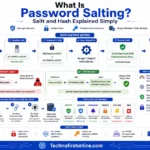
password salting explained
php password hash guide
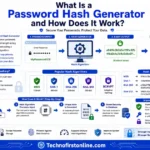
What Is a Password Hash Generator

SHA-1 vs SHA-256 vs SHA-512 comparison
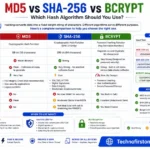
md5 vs sha256 vs bcrypt
Is MD5 Still Secure Hash Collisions Explained

How Generate Hash Online

MD5 Hash Generator Online guide

WiFi QR Code Generator
LastPass vs Norton vs Bitwarden

Password Manager Pros & Cons

16 Character Password Generator

What Makes a Password Strong

Different Password for Every Website
Common Password Mistakes
Random Password Generator vs Manual Passwords

Strong Password Examples
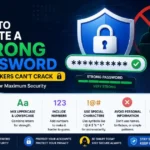
How to Create a Strong Password
Need to share login pages, security resources, or password setup instructions more conveniently? Create scannable codes with our Free QR Code Generator to generate QR codes for URLs, text, email addresses, WiFi networks, SMS messages, and digital contact cards directly in your browser.
Bcrypt is a password hashing algorithm designed specifically for storing passwords securely. Unlike MD5 and SHA-256, bcrypt automatically adds a unique salt and uses an intentionally slow, configurable cost factor to make brute-force attacks significantly more difficult.
Frequently Asked Questions
Bcrypt is used specifically for storing passwords securely in a database. It converts a password into a fixed-length hash that can’t be reversed, making it safe to store without exposing the original password even if the database is compromised.
No. Bcrypt is a one-way hash function, not encryption. Encryption is reversible with the right key. A bcrypt hash cannot be reversed — the original password is mathematically unrecoverable from the stored hash.
The cost factor (also called the work factor) controls how computationally expensive each hash operation is. A cost of 12 means bcrypt performs 2¹² = 4,096 rounds of processing. Increasing the cost factor by 1 doubles the computation time, making brute-force attacks more difficult as hardware gets faster.
Yes. Bcrypt generates a unique 128-bit random salt for every password automatically. You don’t need to add or manage salts manually — they’re built into the output string.
Bcrypt processes a maximum of 72 bytes of input. Passwords longer than 72 bytes are silently truncated, meaning characters beyond that point are ignored. This is a known limitation, and most security guidelines recommend enforcing a maximum password length of 72 bytes at the application level.
Yes, bcrypt remains secure for password storage when configured with a work factor of 10 or higher (12+ recommended). It has no known practical vulnerabilities when used correctly. Argon2id is now generally preferred for new applications, but bcrypt is still widely trusted and actively used.
MD5 and SHA-256 are fast, general-purpose hash functions not designed for passwords. Bcrypt is intentionally slow, includes automatic salting, and has a configurable cost factor — all of which make it far more resistant to brute-force attacks on stolen password databases.