Smart IT tools
NTLM hash vs MD5 vs SHA: Which Hash Type Does Windows Use?
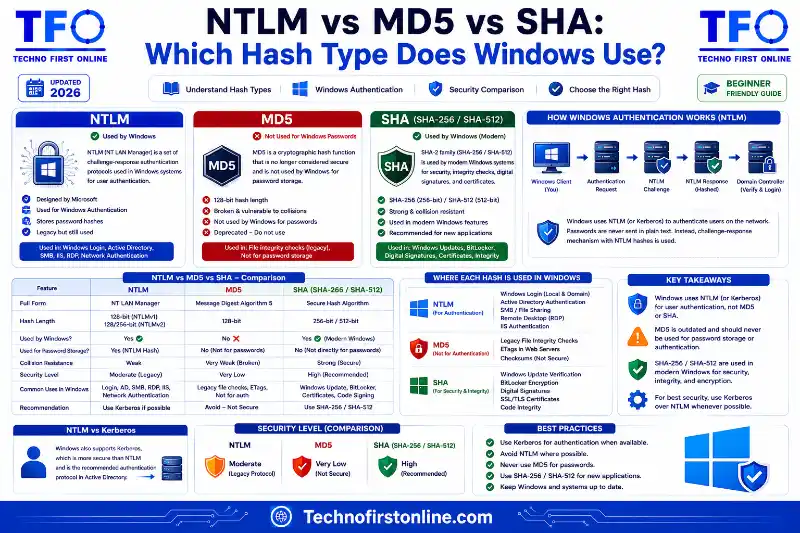
Windows uses different hash types for different purposes:NTLM hash → Used for Windows local account authentication.
Based on MD4 (not MD5). Stored in SAM database.
Old, fast, no salting — considered weak.NTLMv2 → Improved authentication protocol. Still uses
NTLM hash underneath, but adds challenge-response
and HMAC-MD5 for session security.Kerberos → Modern Windows domain authentication. Uses
AES-256 or RC4. Preferred over NTLM in domains.MD5 / SHA → Used by Windows for file integrity (SFC), code
signing, certificates — NOT for login passwords.Rule: Windows logins → NTLM/Kerberos.
File/cert verification → SHA-256.
MD5 → legacy checksums only.
Understanding Windows Password Hashes
If you’ve ever worked in IT security, managed a Windows network, or read a penetration testing report, you’ve almost certainly come across the term “NTLM hash.” People often ask what is NTLM hash and how it differs from MD5 and SHA — and the answer is that NTLM is a different beast entirely. It serves a completely different purpose, lives in a completely different part of the computing stack, and has a security history that’s both fascinating and sobering.
This guide explains what an NTLM hash is, how it compares to MD5 and SHA, what hash types Windows actually uses for different purposes, and why NTLM’s age is still causing real security problems in modern networks.
We’ve covered what MD5 hashing is and how it works, why MD5 is no longer considered secure, and done a full comparison of MD5 vs SHA-256 vs Bcrypt. This guide adds the Windows-specific piece — what NTLM is, where it sits, and how it relates to the hash functions we’ve discussed throughout this series.
What Is an NTLM Hash?
NTLM stands for NT LAN Manager — a suite of Microsoft security protocols originally introduced in Windows NT 3.1 in the early 1990s. The “NTLM hash” (also called the NT hash or Windows password hash) specifically refers to the way Windows stores and uses passwords for local account authentication.
Despite what the name might suggest, the NTLM hash is not based on MD5. It’s based on MD4 — an even older hash function designed by Ronald Rivest, the same cryptographer who created MD5. When a Windows user sets a password, Windows computes the NT hash (often called the NTLM hash) by:
How the NTLM Hash Is Generated:
─────────────────────────────────────────────────────────────
Step 1: Take the user's plain-text password
Step 2: Convert it to UTF-16 Little Endian encoding
Step 3: Run it through the MD4 hash algorithm
Step 4: Store the resulting 16-byte (32 hex char) hash

Example:
  Password: "Welcome1"
  NTLM Hash: e19ccf75ee54e06b06a5907af13cef42

Properties:
  ✗ No salting
  ✗ No iterations or cost factor
  ✓ Fast (by design — terrible for security)
  ✓ Fixed 32-character output (same length as MD5)
  ✓ Stored in Windows SAM database or Active Directory
─────────────────────────────────────────────────────────────
The fact that there’s no salting and no cost factor is the NTLM hash’s biggest weakness. Every user with the same password has the exact same NTLM hash — which is exactly the problem that password salting was invented to solve. We covered why salting matters so fundamentally in our complete guide to password salting.
A Brief History: LM Hash → NTLM → NTLMv2
Windows has gone through several generations of password hash formats — each NTLM hash type addressing weaknesses in the previous version:
Windows Authentication Hash Timeline:
──────────────────────────────────────────────────────────────────
Hash Type   Introduced    Algorithm    Status
──────────────────────────────────────────────────────────────────
LM Hash     Windows 3.1   DES-based    Obsolete. Disabled by default
                                        in Windows Vista and later.
                                        Extremely weak.

NTLM Hash   Windows NT    MD4          Still used for local accounts.
(NT Hash)   3.1 (1993)                 No salt, no cost — fast
                                        and crackable.

NTLMv2      Windows NT    HMAC-MD5     Authentication protocol.
            4.0 (1996)    over NT hash Still uses NT hash underneath.
                                        Better than NTLMv1 but
                                        still legacy.

Kerberos    Windows 2000  AES-256      Modern standard for domain
            (Active Dir)  (or RC4)     authentication. Preferred
                                        over NTLM in domain envs.
──────────────────────────────────────────────────────────────────
The progression tells a clear story. Each generation tried to address what came before — LM hashes were so weak they could be cracked in seconds, so NTLM replaced them. NTLMv2 improved the authentication protocol around NTLM. Kerberos replaced the whole approach for domain-joined machines. But NTLM never went away — it’s still used for local accounts, workgroup environments, and as a fallback in many Windows configurations.
NTLM vs MD5: What’s the Actual Difference?
People often assume NTLM and MD5 are related because both produce a 32-character hexadecimal hash. Here’s the full comparison:
NTLM Hash vs MD5:
──────────────────────────────────────────────────────────────────
Property          NTLM Hash              MD5
──────────────────────────────────────────────────────────────────
Underlying algo   MD4                    MD5
Output length     32 hex chars (128-bit) 32 hex chars (128-bit)
Salted?           No                     No
Purpose           Windows authentication General hashing
Where stored      SAM / Active Directory Your database
Created by        Microsoft (1993)       Ronald Rivest (1991)
Collision safe?   No (MD4 is weaker)     No (known collisions)
Speed             Very fast              Very fast
NIST approved?    No                     No (for security use)
Current status    Legacy — still in use  Non-security use only
──────────────────────────────────────────────────────────────────
The two hash types share the same weaknesses — no salting, no cost factor, fast computation — but exist in completely different contexts. MD5 shows up in file checksums, deduplication, and legacy codebases. NTLM shows up in Windows login flows, Active Directory, and network authentication. Neither should be relied on for security-critical work in a new system, but NTLM is particularly difficult to eliminate because it’s baked deeply into how Windows handles local authentication.
NTLM vs SHA: Which One Does Windows Use Where?
Windows actually uses multiple hash algorithms across different parts of the operating system — and SHA appears in very different places than NTLM:
Windows Hash Usage by Function:
──────────────────────────────────────────────────────────────────
Function                        Hash Used       Notes
──────────────────────────────────────────────────────────────────
Local account password storage  NTLM (MD4)      SAM database
Domain authentication           Kerberos/AES    Preferred in domains
Legacy network auth fallback    NTLMv2          Still common
Code signing (EXE, DLL, etc.)   SHA-256         Authenticode
Windows Update verification     SHA-256         Catalog signing
BitLocker integrity check       SHA-256         TPM-based
File integrity (SFC /scannow)   SHA-256         System File Checker
TLS/HTTPS certificates          SHA-256         All modern certs
Driver signing                  SHA-256         Required for 64-bit
──────────────────────────────────────────────────────────────────
This split is worth understanding clearly. For everything related to files, certificates, code signing, and system integrity — Windows has modernized and uses SHA-256 throughout. For password storage and network authentication in legacy and local-account scenarios — Windows still relies on NTLM/NT hash, because changing that core mechanism would break compatibility across decades of enterprise infrastructure.
Why Is NTLM Still a Security Risk?
Despite Kerberos being available for domain environments since Windows 2000, NTLM authentication is still extraordinarily common in real-world Windows networks. There are a few reasons for this:
Local accounts always use NTLM. Kerberos requires a domain controller. If you’re logging into a standalone Windows machine — or a domain machine with a local account — NTLM handles the authentication regardless of your Kerberos settings.
NTLM is the fallback. When Kerberos fails (due to DNS issues, clock skew, or connectivity problems), Windows automatically falls back to NTLM. Many environments don’t even realize NTLM is active until a security audit reveals it.
Pass-the-Hash attacks. Because NTLM hash storage has no salting, an attacker who extracts the NT hash from the SAM database (or from memory via tools like Mimikatz) can use that hash directly to authenticate — without ever knowing the real password. This is called a pass-the-hash attack, and it’s one of the most well-documented attack techniques in Windows environments.
Microsoft’s own security documentation acknowledges NTLM’s weaknesses and recommends moving to Kerberos wherever possible. The Microsoft Security documentation on NTLM explicitly states that NTLM is a legacy authentication protocol and that organizations should restrict NTLM usage in favor of Kerberos in Active Directory environments.
NTLM Security Risks Summary:
──────────────────────────────────────────────────────────────────
Risk                    Description
──────────────────────────────────────────────────────────────────
No salting              Same password = same hash for all users
Pass-the-Hash           Hash alone can authenticate without password
Offline cracking        Fast algorithm = billions of guesses/sec
Rainbow table attacks   Unsalted hashes easily looked up
Relay attacks           NTLM auth can be relayed to other systems
──────────────────────────────────────────────────────────────────
Where Does SHA Fit in Windows Security?
As the table above shows, SHA-256 is the workhorse of Windows integrity and verification — not authentication. When Windows verifies that a system file hasn’t been corrupted, it uses SHA-256. When a driver is signed to prove it came from a trusted publisher, SHA-256 signs it. When Windows Update downloads a patch, SHA-256 confirms the package matches what Microsoft published.
This is exactly the right use of SHA-256 — data integrity and trust verification, not password storage. As we covered in our complete guide to SHA-1 vs SHA-256 vs SHA-512, SHA-256 is genuinely excellent for these purposes. It’s fast, collision-resistant (unlike SHA-1, which Windows has largely retired), and NIST-approved under FIPS 180-4 for exactly these kinds of integrity verification tasks.
SHA-256 should never be used for password storage — that’s where bcrypt and Argon2 belong, as we covered in our beginner’s guide to what bcrypt is and our guide to PHP password hashing. But for file signing, certificates, and integrity checks? SHA-256 is exactly the right tool.
How Do You Extract or Test an NTLM Hash?
In security research, penetration testing, and IT forensics, there are legitimate reasons to work with NTLM hashes — auditing password strength, testing detection systems, or verifying how credentials are stored.
The NT hash is stored in the Windows SAM (Security Account Manager) database, which is locked by the OS while Windows is running. Forensic tools and authorized penetration testing frameworks can extract these hashes from the SAM database or from memory. Once extracted, the hash can be:
What Can Be Done With an Extracted NTLM Hash:
──────────────────────────────────────────────────────────────────
Action               Method              Defense
──────────────────────────────────────────────────────────────────
Crack offline        Brute force /       Strong passwords +
                     dictionary attack   MFA + Credential Guard
Pass-the-Hash        Use hash to auth    Disable NTLM where
                     without password    possible + tiered admin
Rainbow table lookup Look up in          Strong, unique passwords
                     precomputed DB      (> 14 chars)
──────────────────────────────────────────────────────────────────
The best defenses against NTLM hash attacks are: strong, long, unique passwords (rainbow tables become useless for complex passwords), enabling Windows Defender Credential Guard (which protects hashes in memory), restricting NTLM through Group Policy where Kerberos is available, and using multi-factor authentication to reduce the value of credential theft.

TechnoFirstOnline provides powerful free online tools, expert tutorials, and smart digital resources to simplify everyday tasks. Explore SEO, image, AI, PDF, and productivity tools designed for everyone.
Other Useful Tools















Password Generator
Open
People Also Read



stylish text generator

How to change to sentence case online
How to Automatically Change Capital Letters to Lowercase

Grammarly Word Count vs Free Word Counter

word counter google docs — How to Check Word Count

Word Count Checker — Check Word Count in PDFs & Documents
Free Character Counter Online — Count Letters & Spaces

How to Word Counter Online Free
decrypt md5 hash
password salting explained
php password hash guide
What Is a Password Hash Generator

SHA-1 vs SHA-256 vs SHA-512 comparison
what is bcrypt beginners guide
md5 vs sha256 vs bcrypt
Is MD5 Still Secure Hash Collisions Explained

How Generate Hash Online
MD5 Hash Generator Online guide

WiFi QR Code Generator
LastPass vs Norton vs Bitwarden
Password Manager Pros & Cons

16 Character Password Generator

What Makes a Password Strong

Different Password for Every Website
Common Password Mistakes
Random Password Generator vs Manual Passwords

Strong Password Examples
How to Create a Strong Password
Want to compare how Windows authentication hashes differ from modern cryptographic hash algorithms? Try our Hash Generator Online Free to generate MD5, SHA-1, SHA-256, and SHA-512 hashes instantly for learning, testing, and integrity verification directly in your browser.
NTLM is a Windows authentication hash based on the older MD4 algorithm and is primarily used for local account authentication. Unlike SHA-256, which Windows uses for file integrity and digital signatures, NTLM was designed for password authentication and lacks modern protections such as salting and configurable work factors, making it more vulnerable to credential attacks.
Frequently Asked Questions
An NTLM hash (more precisely called an NT hash) is the format Windows uses to store local account passwords. It’s generated by running the password through the MD4 algorithm after converting it to UTF-16 encoding. It produces a 32-character hexadecimal string, similar in appearance to an MD5 hash but based on a different underlying algorithm.
No. NTLM hash uses MD4 as its underlying algorithm, while MD5 is a separate hash function. Both produce 32-character hexadecimal output and both lack salting, but they’re different algorithms used in completely different contexts — NTLM for Windows authentication, MD5 for general data hashing.
Yes. Despite being a legacy protocol, NTLM is still widely used for local account authentication, workgroup environments, and as a Kerberos fallback in domain environments. Microsoft recommends restricting NTLM in favor of Kerberos where possible, but it remains deeply embedded in Windows infrastructure.
A pass-the-hash attack exploits the fact that NTLM authentication can be performed using just the hash — without knowing the actual password. If an attacker extracts the NT hash from the SAM database or from memory, they can use it directly to authenticate as that user on other systems, bypassing the need to crack the password first.
Windows uses SHA-256 for file integrity verification, code signing (Authenticode), driver signing, Windows Update verification, and TLS/HTTPS certificates. SHA-256 has largely replaced SHA-1 in all of these contexts following SHA-1’s deprecation.
No. Windows login passwords are stored as NTLM hashes (based on MD4), not SHA-256. SHA-256 is used by Windows for file and code integrity verification, not for user authentication.
Use long, complex, unique passwords (which resist rainbow table and brute-force cracking), enable Windows Defender Credential Guard to protect hashes in memory, restrict NTLM usage via Group Policy where Kerberos is available, and implement multi-factor authentication to reduce the impact of credential theft.