Smart IT tools
MD5 Hash Generator Guide
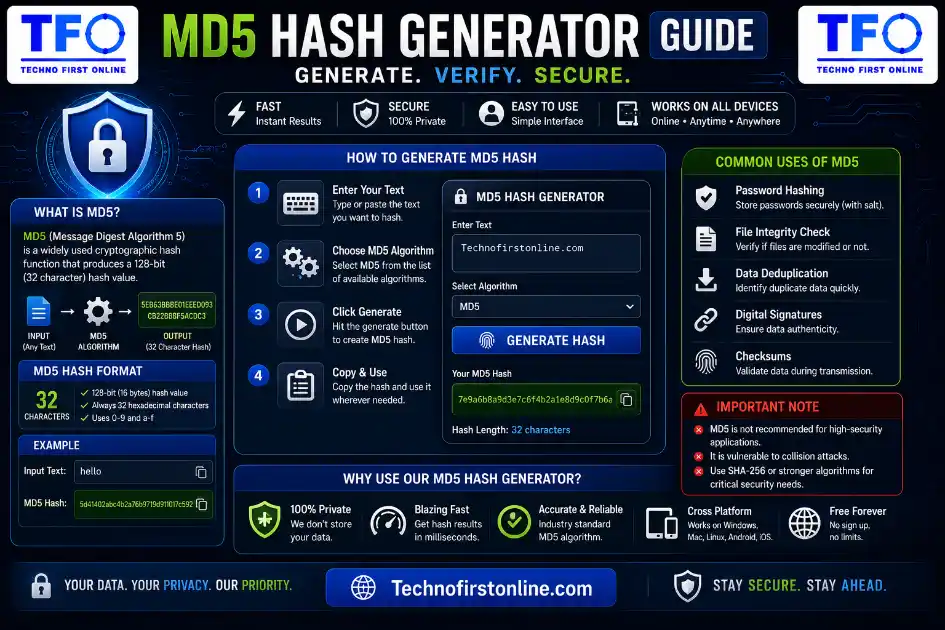
An MD5 hash generator is a tool that converts any text or file into a
fixed 32-character code called a hash. The same input always produces
the same hash, but the process can’t be reversed. It’s commonly used
to verify downloaded files, detect duplicates, and check data integrity
— not for storing passwords, since MD5 is no longer considered secure
for that purpose.
How to Create and Verify MD5 Hashes Online (Free Tool)
If you’ve ever downloaded a file and seen a strange string of letters and numbers next to it called a “checksum,” or you’ve worked with passwords, databases, or file verification, you’ve probably run into MD5 hashing. It sounds like technical, but the things behind it is actually very simple once you break it down.
In this blog guide, we’ll explain you exactly what an md5 hash generator is, why people still use it in 2026, and how you can generate or verify one in seconds using a completely free, browser-based MD5 Hash Generator — no signup, no file upload to any server, and no waiting around and its Free.
What Is an MD5 Hash?
MD5 stands for Message Digest Algorithm 5. It’s a function that takes any input — a word, a sentence, an entire file — and converts it into a fixed-length string of 32 characters, made up of letters and numbers (In technical Language its called a hexadecimal value).
For example, if you run the word “hello” through MD5, you’ll always get:
5d41402abc4b2a76b9719d911017c592No matter how many times you run it, or where you run it, the output stays exactly the same. That’s the whole point of a hash function — it’s predictable and repeatable, but it only works in one direction. You can turn “hello” into that string easily, but you can’t reverse the string back into “hello” mathematically. This is sometimes called a “one-way function,” and it’s the foundation of how hashing is used for security and verification.
A few things make MD5 (and hash functions in general) genuinely useful:
- Fixed output size — whether you hash one letter or a 10GB file, the result is always 32 characters long.
- Deterministic — the same input always produces the same hash, every single time.
- Sensitive to change — even changing a single character in the input completely changes the output hash. This is what makes hashes so good at detecting tampering or corruption.
How Does MD5 Hashing Actually Work?
You don’t need to understand the underlying math to use MD5, but a simple mental model helps. Think of MD5 like a blender. You put any ingredient in — a short word or a massive document — and it always comes out as a simple of the exact same size. Change even one tiny ingredient, and the smoothie tastes completely different, even though it still looks the same size and texture from the outside.
Behind the scenes, MD5 processes data in blocks, runs it through a series of mathematical operations (bitwise shifts, additions, and logical functions), and compresses everything down into that final 128-bit value, which is then displayed as a 32-character hexadecimal string.
What Is an MD5 Hash Generator Used For?
People search for “MD5 generator,” “md5 hash generator”, “hash calculator,” and “hash creator” for a surprising number of different reasons. Here are the most common real-world use cases:
1. File integrity verification. This is probably the biggest use case today. When you download software, ISO files, or large datasets, many websites publish an MD5 (or SHA) checksum alongside the download. After downloading, you generate the MD5 hash of your file and compare it to the published value. If they match, your file downloaded correctly with zero corruption. If they don’t match, something went wrong during download or the file was tampered with.
2. Detecting duplicate files. Instead of comparing entire files byte-by-byte, many backup tools and storage systems generate an MD5 hash for each file. If two files produce the same hash, they’re identical — making deduplication fast and efficient.
3. Database and legacy login systems. Many older systems used MD5 to store password hashes instead of storing plain text passwords. While this is now considered outdated and insecure for new systems (more on that below), millions of legacy systems, scripts, and codebases still reference MD5 for backward compatibility.
4. Data fingerprinting. Developers often use MD5 as a quick way to “fingerprint” a piece of data — like generating a unique short identifier for a long string, a URL, or a cache key — without needing the actual content to be readable.
5. Cache busting. Web developers sometimes append an MD5 hash of a file’s content to its filename (like style.a1b2c3.css) so that browsers automatically fetch the new version whenever the file content changes.
How to Generate an MD5 Hash Online (Step-by-Step)
Using our free MD5 Hash Generator takes less than 10 seconds:
- Open the tool in your browser — no installation or account required.
- Type or paste your text into the input box, or upload the file you want to hash.
- Select MD5 from the available hash algorithm options (the tool also supports SHA-1, SHA-256, and SHA-512 if you need a different algorithm).
- Copy the generated hash instantly using the copy button.
That’s it. Because the tool runs entirely inside your browser using client-side JavaScript, your text or file is never uploaded to any server. The hash is calculated locally on your own device, which means it’s both faster and more private than tools that process your data remotely.
How to Verify a File Using an MD5 Checksum
If you’re checking whether a downloaded file is genuine and uncorrupted, here’s the simple process:
- Find the official MD5 checksum published by the source (usually on the download page, right next to the file link).
- Upload the downloaded file into the MD5 Hash Generator.
- Compare the generated hash with the published checksum.
- If both strings match exactly, your file is intact. If even one character is different, the file is either corrupted or has been modified — and you shouldn’t trust it.
This single step can save you from installing corrupted software or, in worse cases, a tampered file that’s been injected with malicious code.
Is MD5 Still Safe to Use in 2026?
This is where it’s important to separate two very different use cases.
For security purposes — no. MD5 was officially broken for cryptographic security years ago. Researchers demonstrated that it’s possible to create “hash collisions,” meaning two completely different inputs can produce the exact same MD5 hash. Because of this, MD5 should never be used today for storing passwords, generating digital signatures, or anything related to security-sensitive verification. Modern systems use algorithms like bcrypt, Argon2, or SHA-256 — the SHA-2 family standardized by NIST in FIPS 180-4 — instead.
For everyday integrity checks — yes, mostly fine. If you’re just checking whether a downloaded file got corrupted, deduplicating files, or generating non-security identifiers, MD5 is still fast, widely supported, and perfectly practical. The “collision” risk only matters when someone is deliberately trying to fool a security system — not when you’re casually verifying a download.
We’ve covered this topic in much more depth, including real examples of MD5 collisions and what algorithms you should use instead, in our dedicated guide on whether MD5 is still secure.
MD5 vs Other Hashing Algorithms
MD5 isn’t the only hashing algorithm out there, and it’s not always the right one for the job:
- SHA-256 / SHA-512 — Part of the SHA-2 family, these produce longer, more collision-resistant hashes and are the current standard for most security-related checksums and blockchain applications.
- Bcrypt — Specifically designed for password storage. Unlike MD5, bcrypt is intentionally slow and includes a “salt” automatically, making it far more resistant to brute-force attacks. OWASP’s Password Storage Cheat Sheet recommends it as an acceptable choice when stronger options like Argon2 aren’t available.
- SHA-1 — Faster than SHA-256 but, like MD5, has known collision vulnerabilities and is being phased out of security-critical applications.
If you’re choosing an algorithm for a new project, our full breakdown of MD5 vs SHA-256 vs Bcrypt walks through exactly which one fits which use case.
Common Real-Life Examples of MD5 in Action
- Software vendors publishing checksums for ISO files, installers, and firmware updates.
- Git and version control systems using hash-based identifiers (though Git itself has moved toward SHA-1/SHA-256).
- Content delivery networks (CDNs) using hashes for cache invalidation.
- Forensic and IT teams verifying that evidence files or backups haven’t been altered.
- Legacy CMS and forum software (some older WordPress plugins, phpBB installs, etc.) still referencing MD5 in their codebase.
Why MD5 Is Still So Popular Despite Its Age
You might wonder why a 30-year-old algorithm with known weaknesses is still one of the most searched hashing terms online. The answer comes down to convenience and legacy support. MD5 is fast to compute, built into virtually every programming language by default, and produces a short, easy-to-read 32-character output — making it ideal for non-security tasks where speed matters more than cryptographic strength.
It’s also deeply embedded in older infrastructure. Replacing every instance of MD5 in a 15-year-old codebase, database schema, or CMS plugin is a lot of work for very little practical benefit if that particular use case isn’t security-sensitive in the first place. This is exactly why MD5 hasn’t disappeared — it’s simply been reclassified from a “security tool” to a “convenience tool.”
Tips for Using an Online md5 hash generator Safely
- Avoid hashing sensitive information through random websites. Always check whether a tool processes data locally in your browser (client-side) rather than uploading it to a server you don’t control. Our MD5 Hash Generator runs 100% client-side, so nothing you type or upload ever leaves your device.
- Don’t use MD5 for new password systems. If you’re building a login system today, use bcrypt or Argon2 instead.
- Double-check checksums character by character — even a single mismatched character means the file isn’t verified.
- Use the right algorithm for the job. For quick integrity checks, MD5 is fine. For anything security-related, switch to SHA-256 or bcrypt.
Final Guide
MD5 might be an older hashing algorithm, but it’s still genuinely useful for everyday tasks like checking file integrity, spotting duplicate files, and quick data fingerprinting. Just remember to keep it away from anything security-critical, like password storage or digital signatures, where modern alternatives like bcrypt and SHA-256 do a much better job.
Want to try it yourself? Head over to our free, privacy-friendly MD5 Hash Generator — generate or verify MD5 hashes instantly, right in your browser, with zero data ever leaving your device.

TechnoFirstOnline provides powerful free online tools, expert tutorials, and smart digital resources to simplify everyday tasks. Explore SEO, image, AI, PDF, and productivity tools designed for everyone.
Other Useful Tools










Password Generator
Open
People Also Read


NTLM Hsah vs MD5 vs SHA
decrypt md5 hash

password salting explained

php password hash guide
What Is a Password Hash Generator

SHA-1 vs SHA-256 vs SHA-512 comparison

what is bcrypt beginners guide

md5 vs sha256 vs bcrypt
Is MD5 Still Secure Hash Collisions Explained

How Generate Hash Online

WiFi QR Code Generator

LastPass vs Norton vs Bitwarden

Password Manager Pros & Cons

16 Character Password Generator

What Makes a Password Strong

Different Password for Every Website
Common Password Mistakes
Random Password Generator vs Manual Passwords

Strong Password Examples
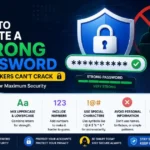
How to Create a Strong Password
A WiFi QR Code is only as secure as the password behind it. If your network is still using a weak or easy-to-guess password, sharing it through a QR code won't improve security. Before generating a WiFi QR Code, consider creating a stronger password using our Password Generator Tool. A long, random password helps protect your network from unauthorized access while still allowing guests to connect easily by scanning the QR code instead of typing complex credentials manually.
According to the Android Help Center, Android devices can connect to WiFi networks by scanning QR codes directly from the camera or WiFi settings. Similarly, Apple Support confirms that iPhone users can scan QR codes using the built-in Camera app, making QR-based WiFi sharing a fast and convenient way to connect devices without manually entering passwords.
Frequently Asked Questions
No. MD5 is a one-way function, meaning you cannot mathematically convert a hash back into its original input. Tools claiming to “decrypt” MD5 hashes are actually using precomputed lookup tables (rainbow tables) of common values — they don’t reverse the algorithm itself.
Encryption is reversible (you can decrypt it with the right key); hashing is not. MD5 produces a fixed-length fingerprint of your data, not a way to securely store and later retrieve the original content.
Yes, this is called a “collision,” and it’s a known weakness of MD5. While rare in everyday accidental use, it can be deliberately engineered, which is why MD5 isn’t trusted for security purposes anymore.
It depends on the tool. Always use one that processes files locally in your browser rather than uploading them to a remote server. Our MD5 Hash Generator works entirely client-side for this exact reason.
Publishers include checksums so users can confirm the file downloaded correctly and wasn’t corrupted or tampered with during transfer.
Yes, but mainly for non-security purposes like file integrity checks, deduplication, and caching — not for passwords or digital security.
Every MD5 hash is exactly 32 characters long when written in hexadecimal format, regardless of how large or small the original input was.
Use bcrypt or Argon2. Both are specifically designed to be slow and resistant to brute-force attacks, unlike MD5, which is fast and was never built with password security in mind.