Smart IT tools
What Is a Password Hash Generator and How Does It Work?
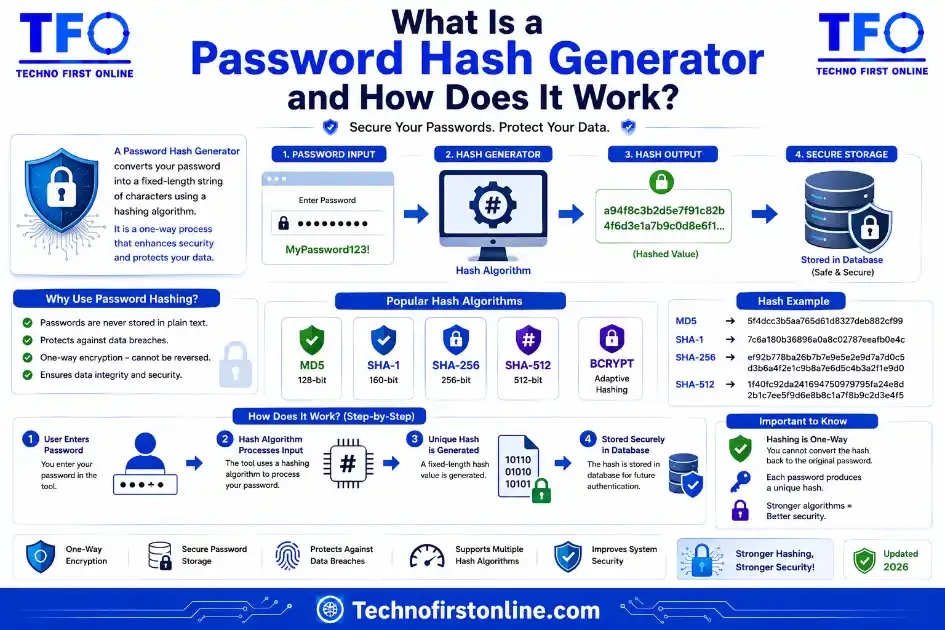
A password hash generator is a tool or function that converts a
plain-text password into a fixed-length string (called a hash)
using a one-way mathematical algorithm.How it works:
1. You enter a password
2. The generator adds a random salt (unique per password)
3. The salted password runs through a hashing algorithm
4. A fixed-length hash is stored in the databaseThe original password is never stored and cannot be recovered
from the hash. When you log in, the system hashes what you
typed and compares it to the stored hash.Best algorithms for password hashing:
✓ Argon2id (strongest — recommended for new systems)
✓ Bcrypt (widely supported — still excellent)
✓ PBKDF2 (FIPS-compliant environments)
✗ MD5 (never use for passwords)
✗ SHA-256 (never use for passwords — too fast)
The Secret Behind Secure Password Storage
Every time you create an account on a website and set a password on website, something important happens behind the scenes — something most people never think about. The website almost certainly doesn’t store your password the way you typed it. Instead, it stores a completely different string of characters that looks nothing like your original password. That string is called a hash, and the tool or function that creates it is called a password hash generator.
Understanding how a password hash generator works isn’t just an interesting technical detail — it explains why some data breaches are catastrophic and others barely affect users, why “forgot password” buttons always reset rather than reveal your password, and why some authentication systems are genuinely secure while others are dangerously fragile.
This guide covers everything from the basics of what a password hash actually is, to how a password hash generator produces one, to which algorithms you should be using and why. We’ve already covered how to generate MD5 hashes online, whether MD5 is still secure, and done a full comparison of MD5 vs SHA-256 vs Bcrypt — this post brings the password-specific side of that conversation together in one place.
What Is a Password Hash?
Before getting into how a password hash generator works, it helps to understand what a password hash actually is.
A hash is the output of a hash function — a mathematical operation that takes any input and converts it into a fixed-length string of characters. The key properties that make hashing useful for passwords are:
One-way: You can turn a password into a hash easily, but you cannot reverse the hash back into the original password mathematically. This is the most important property. A correctly stored password hash reveals nothing about the original password.
Deterministic: The same password always produces the same hash when run through the same algorithm with the same settings. This is what makes login verification possible — the system can check whether what you typed matches what was stored on website, without ever knowing the original.
Sensitive to change: Change even a single character of the input, and the entire hash changes completely. “password” and “Password” would produce entirely different hashes.
Fixed output length: Whether your password is 4 characters or 40, the hash output is always the same length. A bcrypt hash is always 60 characters; a SHA-256 hash is always 64 characters.
These properties work together to create a system where a website can verify your identity without ever needing to store or see your actual password.
How Does a Password Hash Generator Work?
A password hash generator — whether it’s a standalone online tool or a function built into your application’s code — follows the same core process. Here it is step by step:
Step 1: Accept Input
────────────────────
  User provides: "MyPassword123!"

Step 2: Generate a Salt
────────────────────────
  A unique random string is created for THIS password only.
  Salt example: "k9Xm2pLqN7rT"
  (A new salt is generated every time — even same passwords
   get different salts)

Step 3: Combine Password + Salt
────────────────────────────────
  Combined input: "MyPassword123!" + "k9Xm2pLqN7rT"

Step 4: Run Through Hashing Algorithm
───────────────────────────────────────
  The combined input is processed by the chosen algorithm
  (bcrypt, Argon2, PBKDF2, etc.) with the configured
  cost/iteration settings.

Step 5: Store the Output Hash
──────────────────────────────
  The database stores the hash string — NOT the password.
  Hash stored: "$2b$12$k9Xm2pLqN7rT....[60 chars total]"
  (The salt and cost factor are embedded in the hash string)

Step 6: Login Verification
───────────────────────────
  User types password → system extracts salt from stored hash
  → rehashes the input → compares to stored hash → match = login
The beauty of this system is that even the website’s own developers cannot look up your password in their database. All they can see is the hash. If you forget your password, they can’t tell you what it was — which is why every legitimate website sends a password reset link rather than emailing you your original password. If a site can email you your existing password, it means they stored it in plain text, which is a serious red flag.
What Makes a Password Hash Generator Different from a Regular Hash Generator?
Not all hash generators are built for passwords — and this distinction matters more than most people realize.
A general-purpose hash generator (like our Hash Generator tool for MD5, SHA-256, and SHA-512) is designed for speed. It can hash millions of inputs per second, which is exactly what you want when verifying large files or processing API requests. Speed is the goal.
A password hash generator is deliberately designed to be slow. This sounds counterintuitive until you understand why: if an attacker steals a database full of hashed passwords and tries to crack them by guessing billions of inputs, a slow hash function forces them to spend enormous amounts of computing time and money on each attempt. A few hundred milliseconds per hash barely affects the login experience for a real user — but multiplied across billions of guesses, it makes a brute-force attack practically infeasible.
Speed Comparison (approximate, modern hardware):
─────────────────────────────────────────────────────────────
Algorithm     Speed              Attacker guesses/second
─────────────────────────────────────────────────────────────
MD5           ~10 billion/sec    10,000,000,000
SHA-256       ~3 billion/sec     3,000,000,000
Bcrypt (12)   ~2.5/sec           2-3
Argon2id      ~2-3/sec           2-3
─────────────────────────────────────────────────────────────
That table makes the case better than any argument could. MD5 allows an attacker to try ten billion guesses per second. Bcrypt at cost factor 12 allows roughly two or three. The difference is not marginal — it’s the difference between a password database that gets cracked in hours and one that would take longer than a human lifetime to work through.
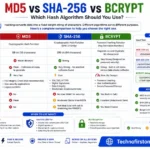
This is exactly why using MD5 or SHA-256 as a password hash is considered a serious security failure, even though both are valid cryptographic hash functions for other purposes. We covered this in detail in our SHA-1 vs SHA-256 vs SHA-512 guide — SHA functions are built for speed, and speed is the enemy of password security.
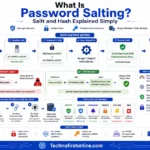
What Is Salting and Why Does It Matter?
Salting is one of the most important parts of how a password hash generator protects passwords — and it’s also one of the most misunderstood.
A salt is a random, unique string that gets added to each password before it’s hashed. Every password in the database gets its own unique salt, even if two users have the exact same password. This solves a critical problem: without salts, identical passwords would produce identical hashes, which means an attacker could look for duplicate entries in the hash database and immediately know which accounts share the same password. More importantly, they could use precomputed “rainbow tables” — massive lookup databases of common passwords and their hashes — to crack millions of entries instantly without doing any real computation.
With unique salts, none of that works. Two users with the password “password123” would have completely different stored hashes because their salts are different. A rainbow table built for one hash is completely useless against another.
Good password hash algorithms like bcrypt and Argon2 handle salting automatically — you don’t need to write any extra code or manage salts yourself. We covered bcrypt’s automatic salting in much more depth in our complete guide to what bcrypt is and how it works.
Which Algorithms Should a Password Hash Generator Use?
Not every algorithm is appropriate for password hashing. Here’s how the main options stack up:
Algorithm    Designed For     Auto-Salt   Configurable   Recommended
             Passwords?                   Cost?
────────────────────────────────────────────────────────────────────
Argon2id     Yes              Yes         Yes            ✓ First choice
Bcrypt       Yes              Yes         Yes            ✓ Excellent
PBKDF2       Yes              Yes         Yes            ✓ FIPS compliant
SHA-256      No               No          No             ✗ Not for passwords
SHA-512      No               No          No             ✗ Not for passwords
MD5          No               No          No             ✗ Never
────────────────────────────────────────────────────────────────────
This guidance is consistent across the two most authoritative sources in application security:
The OWASP Password Storage Cheat Sheet is explicit that passwords must be hashed using slow, purpose-built algorithms — Argon2id as the first choice, followed by bcrypt and PBKDF2. It specifically warns that general-purpose fast hash functions like SHA-256 are not appropriate for password storage because they allow attackers to attempt an enormous number of guesses per second.
OWASP Recommended Configuration:
──────────────────────────────────────────────────────────────
Argon2id:  m=64MB, t=1, p=1  (or m=37MB with t=2)
Bcrypt:    Work factor ≥ 10  (12+ preferred)
PBKDF2:    600,000+ iterations with SHA-256
Source:    cheatsheetseries.owasp.org/cheatsheets/Password_Storage_Cheat_Sheet.html
──────────────────────────────────────────────────────────────
On the government standards side, NIST Special Publication 800-63B-4 — the US federal framework for digital identity and authentication — requires that memorized secrets (passwords) be stored using a suitable one-way key derivation function that is salted and configured with an appropriate cost factor. This requirement applies to any system handling federal data or needing to meet US government security compliance.
How to Use a Password Hash Generator Online
An online password hash generator is useful for developers testing how a specific algorithm handles input, verifying that a hash was generated correctly, or learning how different algorithms and cost factors affect output format.
Our free Hash Generator tool lets you generate MD5, SHA-1, SHA-256, and SHA-512 hashes directly in your browser — no text or files are ever uploaded to any server, making it safe to use even for sensitive test inputs.
What a good online password hash generator should offer:
──────────────────────────────────────────────────────────
✓ Client-side processing (nothing sent to a server)
✓ Support for multiple algorithms (MD5, SHA-256, bcrypt, etc.)
✓ Salt display so you can verify it's being added
✓ No account required, no data stored
Why Websites Can’t Tell You Your Own Password
This question comes up constantly, and the answer flows directly from how password hashing works. A properly built system never stores your password — only the hash. When you log in, the system doesn’t decrypt anything. It hashes what you typed and compares that result to the stored hash. If they match, you’re authenticated.
There is nothing to “look up” or “decrypt.” The original password simply doesn’t exist anywhere in the system after the hash is generated. This is intentional and correct. A website that can email you your original password has stored it in a recoverable format — either plain text or encrypted — which is a serious security problem because it means a database breach exposes real passwords directly.

TechnoFirstOnline provides powerful free online tools, expert tutorials, and smart digital resources to simplify everyday tasks. Explore SEO, image, AI, PDF, and productivity tools designed for everyone.
Other Useful Tools














Password Generator
Open
People Also Read


NTLM Hsah vs MD5 vs SHA
decrypt md5 hash
password salting explained
php password hash guide

SHA-1 vs SHA-256 vs SHA-512 comparison

what is bcrypt beginners guide
md5 vs sha256 vs bcrypt
Is MD5 Still Secure Hash Collisions Explained

How Generate Hash Online
MD5 Hash Generator Online guide

WiFi QR Code Generator

LastPass vs Norton vs Bitwarden

Password Manager Pros & Cons

16 Character Password Generator

What Makes a Password Strong

Different Password for Every Website
Common Password Mistakes
Random Password Generator vs Manual Passwords

Strong Password Examples
How to Create a Strong Password
Need to share login pages, password reset links, or security documentation? Use our Free QR Code Generator to instantly create QR codes for URLs, WiFi credentials, email addresses, text, SMS messages, and digital contact cards.
A password hash generator converts a plain-text password into a secure one-way hash using algorithms such as bcrypt or Argon2id. Instead of storing the actual password, websites store the generated hash, making it extremely difficult for attackers to recover the original password even if the database is compromised.
Frequently Asked Questions
A password hash generator is a tool or function that converts a plain-text password into a fixed-length hash string using a one-way mathematical algorithm. The hash is stored instead of the actual password, so the original can never be recovered from the stored value.
It takes your password, adds a random unique salt, runs the combined input through a hashing algorithm like bcrypt or Argon2, and produces a fixed-length hash string. That string is stored in the database. When you log in, the same process runs on whatever you typed and the result is compared to the stored hash.
Argon2id is the current top recommendation from OWASP for new systems. Bcrypt is an excellent alternative with wide framework support. Both are intentionally slow and include automatic salting — properties that make them specifically suited for password storage.
Because a correctly built system never stores your original password. It only stores the hash. Since hashing is a one-way process, there is no way to recover the original password from the stored hash — which is exactly why legitimate sites always reset passwords rather than reveal them.
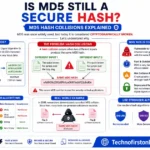
No. MD5 is a general-purpose hash function designed for speed, not password security. On modern hardware, an attacker can attempt billions of MD5 computations per second, making it trivial to crack MD5-hashed passwords from a leaked database. Use bcrypt or Argon2id instead.
A salt is a random unique string added to each password before hashing. It ensures that two users with the same password produce different hashes, and it makes precomputed rainbow table attacks completely ineffective. Good password hashing algorithms like bcrypt and Argon2 add salts automatically.
No. Hashing is a one-way mathematical process — there is no algorithm or key that can reverse a hash back into the original password. Tools that claim to “decrypt” hashes are actually using lookup tables of common passwords, not reversing the hash itself.