Smart IT tools
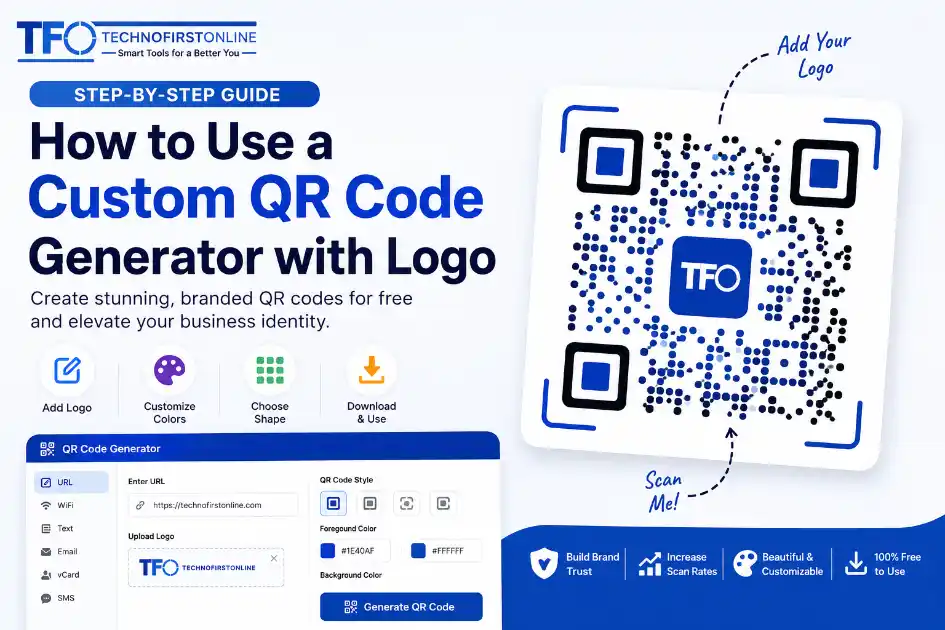
According to recent QR adoption reports published by Statista, global QR code interactions continue to grow rapidly as businesses shift toward contactless digital experiences.
How to Use a Custom QR Code Generator with Logo for Free
Look around. Traditional marketing asset designs are changing fast. A few years ago, you could put a generic, blocky, black-and-white square code on a store counter or a business card, and people would scan it out of pure curiosity.
Not anymore. In today’s digital environment, consumer security awareness is high. People hesitate to scan blind links. More importantly, standard monochrome layouts look ugly on premium product packaging and clean corporate displays.
If you want your audience to take action, you need a visual identity. You need a setup that speaks for your brand instantly. That is exactly where learning how to utilize a custom QR code generator with logo can transform your offline-to-online marketing conversion rates.
Let’s dive into exactly why customized data matrices are exploding in popularity and how you can create your own for your business without spending a single penny.
The Massive Shift Toward Branded Data Matrices
Why are custom layouts suddenly taking over the market? The statistics hidden inside global search data paint a striking picture. Look at consumer habits: search volumes for highly stylized designs, personalized layouts, and custom frames have seen massive year-over-year increases.
Users do not just want a portal; they want an aesthetic presentation. When you use a specialized layout featuring a clean business image right in the center, you achieve three distinct advantages:
* Higher Consumer Trust: A recognizable icon instantly tells a user that the destination link is safe, authentic, and belongs to your verified business.
* Increased Visual Appeal: Instead of breaking up a beautiful brochure design with a harsh contrast block, custom shapes blend cleanly into corporate branding.
* Superior Scan Rates: Real-world marketing campaigns report a notable boost in daily conversion engagement when shifting from a generic square to a customized design.
Demystifying the Tech: How a QR Code with a Logo in the Middle Still Works
You might be wondering: “If I drop a corporate icon over a block of data pixels, won’t it corrupt the system and break the link?”
It sounds like it should, but the fundamental science behind modern barcode matrices is incredibly resilient. The solution relies on an engineering asset known as Reed-Solomon Error Correction.
When data is compiled into a matrix layout, the engine doesn’t just write your destination URL once. It builds repeating backup copies of that identical data stream across the remaining surface modules. Depending on the configuration profile chosen, an internal calculation engine can self-correct up to 30% of missing or covered space.
This means a premium builder can safely clear out a precise circular or square window directly in the center of the asset, drop in your brand icon, and leave the surrounding framework fully functional. When a smartphone camera passes over the surface, it effortlessly ignores the center image and reads the peripheral backup data without a single millisecond of delay.
Step-by-Step Guide to Creating a Custom QR Code with Logo
Building a highly professional, stylized design does not require expensive graphic design certifications or premium software subscriptions. You can complete the entire process natively within your web browser in less than a minute.
Follow these simple structural steps to execute your design perfectly:
Step 1: Input Your Destination Core Content
Open your browser and navigate directly to our dedicated web platform at https://technofirstonline.com/free-custom-qr-code-generator/. Begin by selecting the specific operational data track you require. Whether you want to send users directly to a website URL, share a complex local WiFi password, broadcast an SMS template, or provide a full electronic vCard business contact sheet, input the source characters clearly into the central field.
Step 2: Configure Shape and Stylized Layout Options
Move away from generic layouts by exploring alternative structure variables. Use the layout settings to shift border styles or experiment with smooth structural patterns. Softening the edges instantly yields a premium, modern tech aesthetic that feels human-designed rather than machine-generated.
Step 3: Integrate and Center Your Corporate Logo
Locate the native placement manager inside your generation panel. Here, you can click to select and upload your brand icon or signature logo file directly from your device. For optimal execution, use a high-resolution square or circular image file with a clean background. The system will automatically compute the spatial restrictions, placing your asset squarely in the center while maintaining maximum data readability around it.
Step 4: Export and Test Your Branded Asset
Once you are fully satisfied with the layout visualization panel, export your completed file. For standard digital layouts or web banners, a clean PNG file is incredibly efficient. If you plan to send the asset to print shops for corporate banner installations, shop window decals, or cardboard product packages, ensure you pull the asset down in a sharp, lossless format like SVG to guarantee crisp pixel edges at any physical scale.
Best Practices for High-Performance QR Printing
Before you rush to print five thousand business cards or distribute a major flyers campaign across your local city market, keep these professional marketing tips in mind:
* Check Your Color Contrast Profiles: Always ensure there is a clear, distinct contrast between your data pixel paths and the background canvas. If your background is too dark or matches your pixel lines too closely, mobile camera sensors will struggle to map the matrix accurately.
* Guard the Quiet Zone Border: Leave a clear, open border of white space completely surrounding the external edges of your grid framework. This blank space is known technically as the “Quiet Zone,” and it signals to mobile phone lenses where the background noise ends and your scannable data grid officially begins.
* Perform a Physical Scan Test: Always pull up your design on a screen or print out a single scrap-paper proof first. Test scanning the layout using two or three distinct phone models under various lightning conditions to ensure flawless operation.
Final Thoughts: It is Time to Upgrade Your Assets
A corporate asset is only useful if your target consumer actually engages with it. Continuing to rely on outdated, industrial-looking black blocks means you are leaving valuable clicks and customer connections on the table.
Transforming your presentation is entirely free, requires zero account creation hurdles, and keeps your private customer data completely confined to your own local web browser session. It is time to create beautiful corporate assets that match the pride and identity you put into your everyday business operations.
Ready to see how incredible your logo looks in the center of a premium scannable layout?
Create your high-performance custom design right now → https://technofirstonline.com/free-custom-qr-code-generator/

TechnoFirstOnline provides powerful free online tools, expert tutorials, and smart digital resources to simplify everyday tasks. Explore SEO, image, AI, PDF, and productivity tools designed for everyone.
People Also Used



People Also Read
Frequently Asked Questions
Placing a brand logo in the center increases professional trust, making users more likely to scan it. It turns a generic matrix code into an identifiable piece of marketing material while retaining full technical scannability.
Not if you use standard error correction configurations. A high-quality custom QR code generator accounts for central obstructions by utilizing built-in error handling protocols, leaving plenty of readable data modules intact around the edges.
Yes, our integrated design platform allows users to export customized layouts instantly into vector graphics like SVG or standard PNG formats perfect for large print displays, product packaging, and brochures.