Smart IT tools
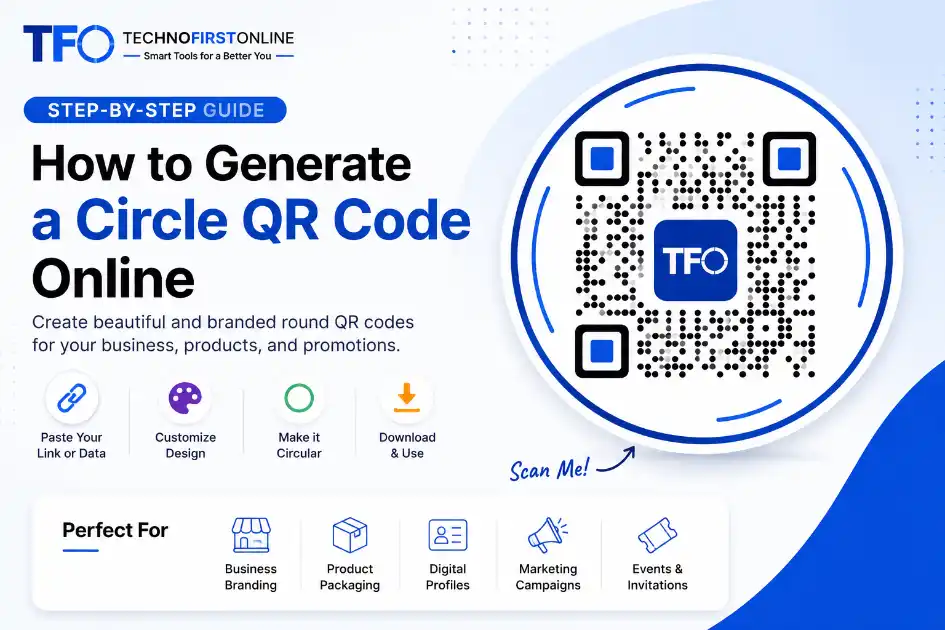
According to evolving digital engagement trends published on Google Trends, search demand for visually customized QR layouts has continued to increase as businesses focus more on premium branding and interactive packaging experiences.
How to Generate a Circle QR Code Online
Open any design portfolio, walk into a premium retail storefront, or scroll through a modern digital flyer campaign. You will instantly notice a massive visual transformation taking place across branding materials. The boxy, rough, industrial-looking black blocks that used to sit on the back of products are undergoing a serious aesthetic makeover.
People love clean curves. From modern smartphone hardware edges to elegant logo designs, rounded aesthetics fit naturally into professional creative layouts. This explains why the online interest in finding a reliable circle qr code generator has grown by thousands of percentage points over the recent months.
If you are a business owner, a dynamic social media marketer, or a creative brand strategist, sticking with ancient box grids means your print media looks dated. Upgrading your visual presentation with a custom round layout can dramatically improve user interaction.
Let us explore the creative shift behind geometric shape variations and discover exactly how you can build a gorgeous, high-converting Circle QR code completely for free.
Why a Circle QR Code is the Ultimate Branding Secret
Most brands treat digital access grids like a late addition to their marketing collateral. They invest days creating a flawless poster, sticker, or card layout, only to drop a harsh black contrast block right over their hard work at the very last second.
Shifting over to an organic, curved layout balances your entire marketing design language. When you break the box framework, your materials immediately gain distinct advantages:
- * Seamless Design Integration: Round layouts wrap naturally alongside circular logos, social media profile badges, round product decals, and stylish promotional stickers.
- * Premium Visual Aesthetic: A smooth silhouette stands out cleanly against a page, turning a basic utility block into a beautiful graphic asset that people want to look at.
- * Drastically Improved Scan Volume: Audiences are drawn to fresh, unique designs. Because rounded styles look sleek and custom-made, users scan them with significantly higher confidence.
The Engineering Reality: How Round Data Layouts Remain Scannable
A common question that makes people hesitate is: “If the standard barcode structure was born as a square matrix, won’t rounding it break the core technical tracking system?”
The short answer is absolutely not. To understand why, we need to take a quick peek behind the lens of modern scanning engines.
Smartphone cameras do not read the outer boundaries of your file structure. Instead, they scan for specific alignment markers inside the code matrix, which are typically placed around the three main corners of the layout. These markers tell the camera lens exactly how to orient the field of view.
Once orientation is calculated, the lens maps the internal network of data modules. A professional qr code shape generator styles the custom frame paths along the safe margins while keeping the critical tracking nodes mathematically intact. This ensures your smartphone scanner can translate the link smoothly, without a single microsecond of delay, under any lighting condition.
Step-by-Step Guide to Using a Circle QR Code Generator
Creating an advanced, beautiful design is incredibly fast and simple. You do not need complex engineering expertise or subscriptions to expensive vector graphics programs. Everything runs natively inside your computer browser.
Follow these direct steps to assemble your custom round layout:
Step 1: Provide Your Destination Link or Asset Characters
Head over to your internet browser window and load our specialized application directly at https://technofirstonline.com/free-custom-qr-code-generator/. Pick the specific type of channel data path you wish to share. Pop your core link characters directly into the configuration module, whether you are distributing an online portfolio URL, a shop location map link, or an email signature line.
Step 2: Select Form Styles and Soft Curved Margins
Skip the old-school sharp corners entirely by navigating to the layout styling panel. Adjust the shape paths to smooth out the hard angles of your matrix pattern. Softening the internal nodes into organic drops or rounded shapes helps you immediately move away from an automated machine look toward a fluid corporate presentation style.
Step 3: Wrap Your Layout in a Custom Frame Template
To give your data grid a gorgeous circular format, use the design styling module to anchor a premium circular outline frame over your customized layout. This gives you a balanced, continuous outer border that frames your data seamlessly, locking down that high-end look your marketing material deserves.
Step 4: Check, Verify, and Export Your Asset File
Once your visual preview dashboard matches your corporate brand standard, download your custom output file. For everyday web pages and social media graphics, pulling down a standard PNG graphic is perfect. If you are preparing to send your file to professional print shops for product boxes, car decals, or giant banner flags, make sure to save it as a high-fidelity SVG vector graphic to ensure perfectly crisp lines at any size.
Expert Rules for Styling Custom Matrix Shapes
To ensure your custom shaped code works beautifully across all devices, follow these three professional layout rules:
- * Maintain Bold Color Value Contrast: Your data nodes must remain distinctly readable against your background card base. Avoid matching subtle pastels too closely, as weak contrast can cause camera scanners to lose track of the module pattern.
- * Check the Text Scale in Frames: If you embed a text call-to-action like “SCAN ME” inside the curved outer frame border, ensure your font is clean and legible so it remains easily readable in print.
- * Run a Real-World Device Scan Test: Always print out a quick paper draft first. Scan your custom design using a couple of different smartphone models to confirm your custom curves look spectacular and function flawlessly before launching your campaign.
Summary: Bring Modern Innovation to Your Business Identity
Every tiny pixel on your branding materials affects how prospective customers see your company. Continuing to stick with heavy, harsh square blocks means missing out on an effortless chance to showcase your commitment to modern digital innovation.
Moving to polished, round curves is 100% free, takes zero login configuration steps, and runs entirely on your local machine to keep your sensitive asset data secure. Give your business the premium identity it deserves.
When printed on matte business cards, rounded QR designs usually blend much better than traditional square grids.
Ready to see how elegant your brand looks with a sleek curved design?
Generate your round design right now → https://technofirstonline.com/free-custom-qr-code-generator/

TechnoFirstOnline provides powerful free online tools, expert tutorials, and smart digital resources to simplify everyday tasks. Explore SEO, image, AI, PDF, and productivity tools designed for everyone.
People Also Used



People Also Read


Frequently Asked Questions
Yes, they are 100% scannable. Standard smartphone cameras and lens scanners look for the core data modules and structural alignment points, which remain technically perfect when styling shapes using a professional framework.
Absolutely. You can use our online custom builder to generate unlimited round or stylized data layouts for your URLs, digital portfolios, or web links without running into paywalls.
No, it will not expire. Since our engine creates static layouts, the data is directly woven into the visual pattern. As long as your destination link remains valid, your code will work indefinitely.