Smart IT tools
What Is a Hash Generator?
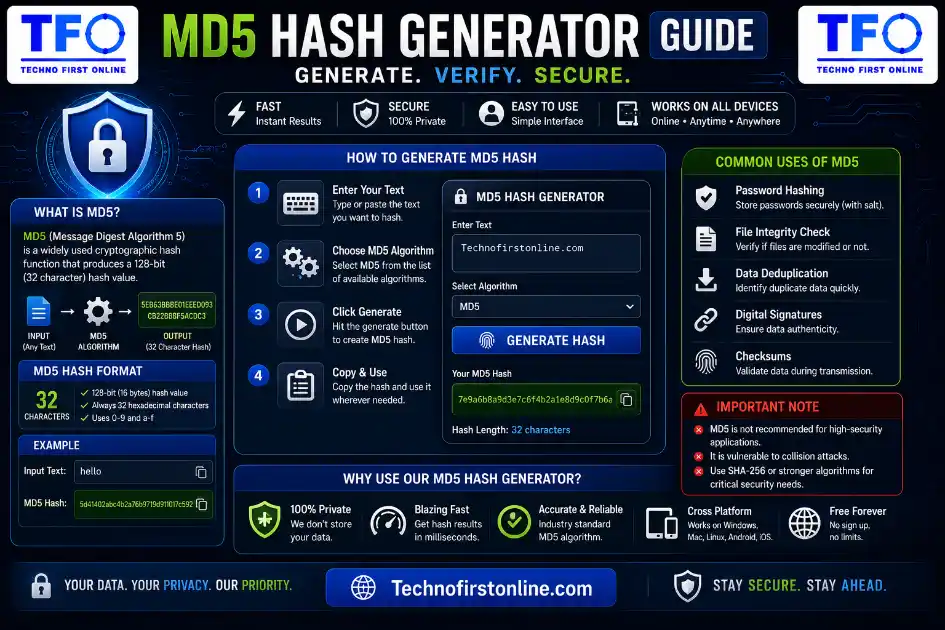
An MD5 hash generator is a tool that converts any text or file into a
fixed 32-character code called a hash. The same input always produces
the same hash, but the process can’t be reversed. It’s commonly used
to verify downloaded files, detect duplicates, and check data integrity
— not for storing passwords, since MD5 is no longer considered secure
for that purpose.
Complete Beginner's Guide
In today’s digital world, data security and integrity are more important than ever. Whether you are downloading software, storing passwords, transferring files, or building applications, you often need a reliable way to verify that information has not been changed or tampered with. This is where a Hash Generator becomes extremely useful.
A Hash Generator is an online tool that converts text, passwords, or files into a unique string of characters called a hash value. Even the smallest change in the original data produces a completely different output, making hashing one of the most effective methods for verifying information and enhancing security.
If you want to generate hash online, our free Hash Generator Online Free tool lets you create secure hashes instantly without installing software or uploading your data to a server.
What Is a Hash Generator?
A Hash Generator is a tool that uses mathematical algorithms to convert input data into a fixed-length value known as a hash.
The input can be:
- Plain text
- Passwords
- Documents
- Images
- Software files
- Any digital data
For example:
Input:
Hello TFOSHA-256 Output:
7fc7122eed5737fc4028d45d90a4a48664209a1da591a6d40bf420404a011733cfb7b190d62c65bf0bcda32b57b277d9ad9f146eNo matter how many times you enter the same input, the generated hash remains identical. However, changing even a single letter creates a completely different hash.
How Does a Hash Generator Work?
A Hash Generator Online applies a cryptographic algorithm to the input data and produces a fixed-length output.
The process generally works in three simple steps:
Open Free Hash Generator Online Free
Step 1: Enter Data
Type text or upload a file.
Step 2: Select a Hash Algorithm
Examples include:
- SHA-1
- SHA-256
- SHA-384
- SHA-512
Step 3: Generate the Hash
The algorithm calculates and returns the unique hash value.
This entire process usually takes less than a second.
Why Is Hashing Important?
Hashing has become a fundamental part of modern computing and cybersecurity.
1. Data Integrity Verification
Organizations use hashes to confirm that files have not been modified during transfer or storage.
For example, many software companies publish SHA-256 checksums for their downloads. Users can compare the published hash with the hash generated from the downloaded file.
If both values match, the file is considered authentic.
2. Password Security
Modern websites do not store passwords in plain text.
Instead, they store password hashes. Even if a database is compromised, the original passwords remain protected because hashes are designed to be one-way functions.
3. Cybersecurity Applications
Hashing plays an important role in:
- Digital signatures
- SSL certificates
- Authentication systems
- Blockchain technology
- Secure communications
- Software verification
4. File Verification
A File Hash Generator helps users determine whether files have been corrupted or altered.
This is particularly useful when downloading:
- Operating systems
- Software packages
- Drivers
- Large archives
- Security tools
Common Hash Algorithms Explained
SHA-1
SHA-1 generates a 160-bit hash value.
Although it is still used in certain legacy systems, it is generally no longer recommended for highly sensitive security applications.
SHA-256
SHA-256 is one of the world’s most widely used cryptographic hash algorithms.
It is commonly used in:
- Software verification
- Digital certificates
- Cybersecurity tools
- Blockchain applications
- Authentication systems
Because of its strong security properties, SHA-256 is often the preferred choice for modern applications.
SHA-384
SHA-384 produces a larger hash output and provides enhanced security compared to smaller algorithms.
It is frequently used in enterprise and government environments.
SHA-512
SHA-512 generates a 512-bit hash and offers an even larger output size.
It is commonly implemented in systems that require advanced data protection and integrity verification.
Real-World Examples of Hashing
Download Verification
Suppose you download software from a website.
The publisher provides this SHA-256 checksum:
98c7ab3f4d9330a9f47c0d7f...If both values match, you know the file has not been changed.
Password Protection
When users create accounts on websites, passwords are typically converted into hashes before being stored.
This process significantly improves security and helps reduce the risks associated with data breaches.
Data Comparison
Developers often use hashes to determine whether two files are identical.
Instead of comparing entire files, they simply compare hash values.
If the hashes match, the files are usually identical.
Benefits of Using an Online Hash Generator
A good Hash Calculator Online offers several advantages:
Fast Processing
Generate hashes in seconds.
Improved Privacy
Browser-based tools process data locally without requiring uploads.
Better Security
Hashes help detect modifications and verify authenticity.
Easy Verification
Users can quickly compare files and text values.
No Installation Required
Everything works directly inside your browser.
Who Uses Hash Generators?
A Hash Generator Online Free tool can be useful for many types of users:
Developers
To validate data and verify application files.
Cybersecurity Professionals
To perform integrity checks and security analysis.
Students
To learn cryptographic concepts and understand hashing algorithms.
IT Administrators
To verify downloads and maintain system security.
Everyday Users
To confirm that files have not been corrupted or modified.
How to Generate Hash Online
Using a hash generator is extremely simple.
Step 1
Open our Hash Generator Online Free tool.
Step 2
Enter text or upload a file.
Step 3
Choose the desired hash algorithm.
Step 4
Generate and copy the hash value.
The tool works directly inside your browser, which means your information remains private and is not uploaded to external servers.
Why Use Our Hash Generator Online Free?
Our Hash Generator Online Free has been designed to be simple, fast, and privacy-focused.
Key Features
✔ Browser-based processing
✔ No software installation
✔ No account registration required
✔ Support for multiple hash algorithms
✔ File hashing capability
✔ One-click copy feature
✔ Mobile-friendly interface
✔ Completely free to use
Whether you need to generate hash online, verify downloads, compare files, or simply understand how hashing works, our tool provides a fast and reliable solution.

TechnoFirstOnline provides powerful free online tools, expert tutorials, and smart digital resources to simplify everyday tasks. Explore SEO, image, AI, PDF, and productivity tools designed for everyone.
Other Useful Tools



Password Generator
Open
People Also Read



MD5 Hash Generator Online guide

WiFi QR Code Generator

LastPass vs Norton vs Bitwarden

Password Manager Pros & Cons

16 Character Password Generator

What Makes a Password Strong

Different Password for Every Website
Common Password Mistakes
Random Password Generator vs Manual Passwords

Strong Password Examples
How to Create a Strong Password
A WiFi QR Code is only as secure as the password behind it. If your network is still using a weak or easy-to-guess password, sharing it through a QR code won't improve security. Before generating a WiFi QR Code, consider creating a stronger password using our Password Generator Tool. A long, random password helps protect your network from unauthorized access while still allowing guests to connect easily by scanning the QR code instead of typing complex credentials manually.
According to the Android Help Center, Android devices can connect to WiFi networks by scanning QR codes directly from the camera or WiFi settings. Similarly, Apple Support confirms that iPhone users can scan QR codes using the built-in Camera app, making QR-based WiFi sharing a fast and convenient way to connect devices without manually entering passwords.
Frequently Asked Questions
No. MD5 is a one-way function, meaning you cannot mathematically convert a hash back into its original input. Tools claiming to “decrypt” MD5 hashes are actually using precomputed lookup tables (rainbow tables) of common values — they don’t reverse the algorithm itself.
Encryption is reversible (you can decrypt it with the right key); hashing is not. MD5 produces a fixed-length fingerprint of your data, not a way to securely store and later retrieve the original content.
Yes, this is called a “collision,” and it’s a known weakness of MD5. While rare in everyday accidental use, it can be deliberately engineered, which is why MD5 isn’t trusted for security purposes anymore.
It depends on the tool. Always use one that processes files locally in your browser rather than uploading them to a remote server. Our MD5 Hash Generator works entirely client-side for this exact reason.
Publishers include checksums so users can confirm the file downloaded correctly and wasn’t corrupted or tampered with during transfer.
Yes, but mainly for non-security purposes like file integrity checks, deduplication, and caching — not for passwords or digital security.
Every MD5 hash is exactly 32 characters long when written in hexadecimal format, regardless of how large or small the original input was.
Use bcrypt or Argon2. Both are specifically designed to be slow and resistant to brute-force attacks, unlike MD5, which is fast and was never built with password security in mind.