
TechnoFirstOnline - Pro Edition
Color Picker
Pick, convert and build color palettes in your browser. HEX, RGB, HSL and HSV stay in sync — nothing uploads, nothing installs.
HUE
ALPHA
Color Harmony
Palettes generated from your active color.
Recent colors
Saved colors will appear here.
Contrast Checker
WCAG 2.1 contrast ratio for text on your active color.
Aa Light Text
Aa Dark Text
Quick shades & tints
Copied!







Online Color Picker Free tool
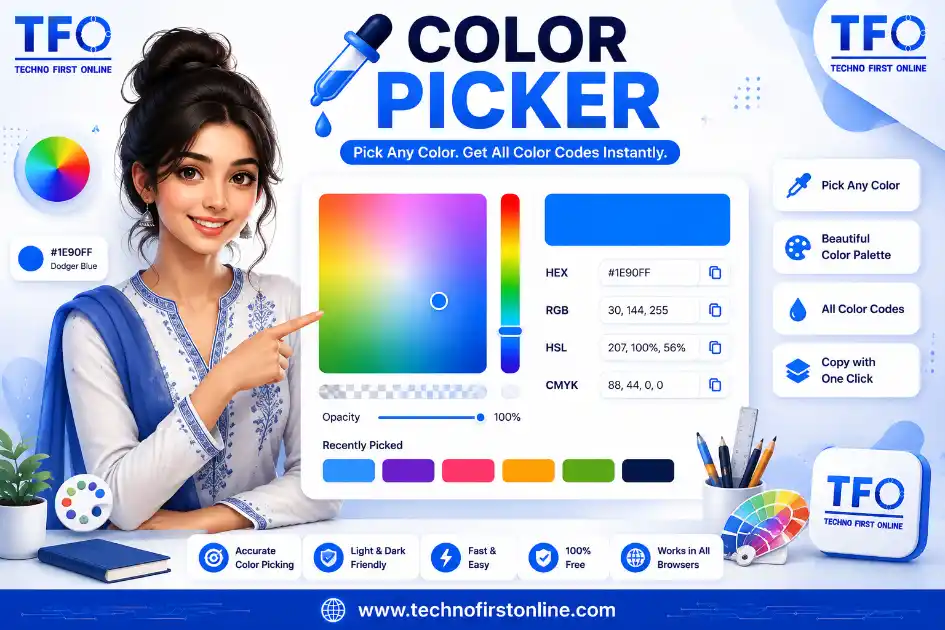
Use our free Color Picker tool to instantly select and copy accurate color codes for your design and development projects. Easily generate HEX, RGB, HSL, and CSS color values in just one click, making it simple to create consistent color schemes for websites, apps, graphics, and branding. The tool works entirely in your browser, requires no installation, and is compatible with all modern devices, making it a fast and reliable solution for designers, developers, and creative professionals.
What Is a Color Picker and Why Does Every Designer Need One?
A color picker is a small tool with a big job. Whether you are designing a website, building a brand identity, painting a digital illustration, or simply trying to match the exact shade of blue from a photo, you need a fast and accurate way to pick, read, and convert colors. That is exactly what our free online Color Picker does. It runs entirely in your browser, works instantly, and gives you every color format a designer or developer could ask for — HEX, RGB, HSL, and HSV — all updating together in real time.
Unlike old-school desktop software that needs installation and updates, this tool opens directly in your browser tab and works on any device. There is nothing to download, no account to create, and no file ever leaves your computer. You simply drag, click, and copy. For students learning color theory, freelancers building client mockups, or hobbyists experimenting with palettes, this kind of instant access removes the friction between “I need this color” and “I have this color.”
If you’re working with colors for web design or development, you may also find our other free online tools useful. Easily convert color values using the HEX to RGB Converter or RGB to HEX Converter, create smooth backgrounds with the CSS Gradient Generator, and optimize your website’s code using the CSS Minifier. If you’re extracting colors from visuals, try our Image Color Picker, and for web graphics, use the SVG Viewer to inspect scalable vector files. You can also improve website performance with our Image Compressor, convert modern image formats using the WebP Converter, or check text readability with the Color Contrast Checker. Together, these browser-based tools help designers and developers complete their projects faster without installing any software.
How to Use the TechnoFirstOnline Color Picker
Getting started takes less than ten seconds. Here is the simple process:
- Drag on the saturation-value field to move between light, dark, dull, and vivid versions of a hue.
- Slide the hue bar to jump across the full color spectrum, from red to violet.
- Use the eyedropper button to grab any color directly from your screen — a logo, an image, or even another website.
- Copy the value you need — HEX for CSS and design tools, RGB for digital screens, HSL for readable adjustments, or HSV for lighting and photo software.
- Explore harmony palettes to instantly generate colors that pair well with your chosen shade.
Every change happens live, so you can see the exact color update on the canvas before you commit to it. This makes it far easier to fine-tune a shade instead of guessing hex codes by trial and error.
Why Choose TechnoFirstOnline Color Picker?
Choosing the right color shouldn’t be complicated, and that’s exactly what TechnoFirstOnline Color Picker is designed for. Our tool combines speed, accuracy, and ease of use in a clean, browser-based interface that works instantly on desktop, tablet, and mobile devices. Whether you’re creating a website, designing graphics, building a brand, or writing CSS, you can quickly select colors, view HEX, RGB, HSL, and HSV values, and copy them with a single click. There’s no software to install, no registration required, and no hidden limitations—just a fast, reliable Color Picker that helps you work more efficiently.
Beyond basic color selection, the TechnoFirstOnline Color Picker is built for real-world design and development workflows. You can explore color harmonies, identify colors from your screen with the eyedropper feature, and create consistent palettes for professional projects. Because everything runs securely in your browser, your work stays private while delivering instant results. If you’re looking for a free online Color Picker that’s accurate, user-friendly, and available whenever you need it, TechnoFirstOnline offers a simple solution trusted by designers, developers, students, and creative professionals.
Understanding the Color Wheel Picker
At the heart of every good design decision is color theory, and the easiest way to understand it visually is through a color wheel picker. The color wheel arranges hues in a circle, showing how they relate to one another. Colors sitting opposite each other on the wheel are called complementary colors, and they create strong, high-contrast combinations. Colors sitting close together are analogous, producing a calm and cohesive feel. Colors spaced evenly around the wheel — triadic or tetradic combinations — give a balanced yet vibrant palette.
Our tool includes a built-in color wheel picker experience through the harmony section. Once you select a base color, you can switch between complementary, analogous, triadic, tetradic, and monochromatic modes, and the tool automatically calculates matching shades based on real color-wheel mathematics rather than guesswork. This is especially useful for beginners who understand color relationships visually but struggle to translate them into exact hex values.
Color Finder and Color Identifier: Turning Guesses Into Exact Values
Have you ever looked at a color and thought, “I know this shade, but what is it actually called or coded as?” That is where a color finder or color identifier becomes essential. Instead of eyeballing a shade and hoping your manual hex guess is close enough, a proper identifier tool reads the pixel data and tells you the precise value.
Our eyedropper feature works as a built-in color identifier. Click the eyedropper button, hover over any pixel on your screen, whether it is inside this tool, an open image, or another browser tab, and the exact color is instantly captured and converted into HEX, RGB, HSL, and HSV formats. This removes all the guesswork that usually comes with manually matching brand colors, screenshots, or design references. It is particularly useful for:
- Matching a client’s existing brand color from their old logo or website
- Recreating a color you liked in a photograph or piece of art
- Verifying that two elements on a page are using the exact same shade
- Cross-checking colors between design software and the final live website
Using a Color Picker From Image
One of the most common searches among designers is for a color picker from image, and for good reason. Most design work does not start from nothing; it starts from a reference. Maybe it is a product photo, a mood board, a screenshot of inspiration, or an existing brand asset. Being able to pull an exact color straight out of that image saves enormous time compared to manually adjusting sliders until it looks “close enough.”
To pick a color from an image using our tool, simply open the image in another tab or have it visible on your screen, click the eyedropper button, and click anywhere on the image. The tool reads that exact pixel and loads it into the color studio, ready to be copied, adjusted, or turned into a full harmony palette. This browser-based approach means you never need separate image-editing software just to extract a single color value, which is a huge advantage for quick design decisions.
TechnoFirstOnline Color Picker vs Adobe Color Picker
Many designers are familiar with the Adobe color picker found inside Photoshop, Illustrator, and other Creative Cloud apps. It is a powerful tool, but it comes with a catch: you need an active Adobe subscription and the full application open just to pick a single color. That is a lot of overhead for a task that should take a few seconds.
Our free Color Picker was built to solve exactly that problem. It gives you the same core functionality, a visual saturation-value field, a hue slider, real-time format conversion, and an eyedropper, without needing any software installation or subscription. You do not need to open a heavy design application just to check what a hex code translates to, or to build a quick harmony palette for a client presentation. For freelancers, students, marketers, and small business owners who need color accuracy without the Adobe price tag, this tool covers the vast majority of everyday use cases in a lightweight, browser-based package.
That said, if you are already deep inside a Photoshop or Illustrator workflow, the Adobe color picker remains tightly integrated with layers and brushes. Our tool is best used as the fast, always-available companion for quick lookups, palette planning, contrast checking, and sharing exact color codes with developers or teammates who may not have Adobe software installed at all.
Practical Use Cases for a Color Picker Tool
A color picker is not just for professional designers. Here are some everyday situations where this tool comes in handy:
- Web design and development: Grab the exact HEX code needed for CSS styling, buttons, backgrounds, and brand elements.
- Branding and logo work: Keep brand colors consistent across every touchpoint by identifying and reusing the exact values.
- Social media graphics: Match colors from a brand kit when designing posts, stories, or banners.
- Interior design and art: Extract and experiment with palettes inspired by photographs, fabrics, or paint swatches.
- Accessibility checks: Use the built-in contrast checker to confirm your text and background combination meets WCAG readability standards before publishing.
- Presentations and documents: Quickly find matching accent colors for slides, charts, and reports.
Tips for Building a Better Color Palette
Picking one good color is easy. Building a palette that works together takes a bit more intention. A few practical guidelines can help:
- Start with one dominant color that represents the mood of your project, then use the harmony tool to generate supporting shades.
- Use complementary colors sparingly, for buttons, highlights, or calls to action, rather than large background areas, since high contrast can be visually tiring in big doses.
- Analogous palettes are safer for backgrounds and large surfaces because neighboring hues naturally feel harmonious.
- Always run your final text and background combination through the contrast checker. A palette can look beautiful and still fail basic readability standards.
- Save shades you like to your color history so you are not starting from scratch every time you open the tool.
Color choices carry more weight than most people realize. The right palette can make a website feel trustworthy, a brand feel premium, or an illustration feel alive, while the wrong combination can quietly undermine otherwise great work. Taking a few extra minutes with a proper color wheel picker and contrast checker pays off well beyond the design stage.
People Also Read









stylish text generator

How to change to sentence case online
How to Automatically Change Capital Letters to Lowercase

Grammarly Word Count vs Free Word Counter
word counter google docs — How to Check Word Count

Word Count Checker — Check Word Count in PDFs & Documents
Free Character Counter Online — Count Letters & Spaces

How to Word Counter Online Free
Other Useful Tools









youtube thumbnail downloader
Open








Frequently Asked Questions
Yes, the Color Picker on TechnoFirstOnline is completely free with no sign-up, no watermark, and no hidden limits. It runs entirely in your browser and can be used as many times as you need.
Click the eyedropper icon on the tool, then click anywhere on your screen, including an open image, another tab, or a design file. The exact color under your cursor is instantly captured and converted into HEX, RGB, HSL, and HSV values.
The two terms are generally used interchangeably. Both describe a tool that reads an existing color, from an image, screen, or design element, and returns its precise code, rather than requiring you to manually match it by adjusting sliders.
Yes. For everyday tasks like finding a hex code, converting between color formats, building a harmony palette, or checking contrast, this tool covers the same core needs as the Adobe color picker without requiring a subscription or software installation.
A color wheel picker visually maps out how colors relate to each other, making it easier to build combinations like complementary, analogous, triadic, and tetradic palettes. It takes the guesswork out of choosing colors that look good together.
Yes, colors you add to your history are saved locally in your browser, so they will still be there the next time you open the tool on the same device and browser.
Understanding how colors work in web design can help you create more consistent and accessible digital experiences. If you’d like to learn about official web color standards and CSS color values, the documentation from MDN Web Docs is an excellent resource for developers. You can also explore the W3C Web Content Accessibility Guidelines (WCAG) to understand how proper color contrast improves readability and accessibility for all users. Combining these best practices with the TechnoFirstOnline Color Picker helps you create visually appealing, accurate, and accessible websites.
Color Picker – Free HEX, RGB & HSL Color Picker Online
Use our free Color Picker tool to select, copy, and convert colors instantly. Get HEX, RGB, HSL, and CSS color codes online without any software.
Price Currency: $
Operating System: All
Application Category: Utilities Application