Smart IT tools
How to Generate Password Hashes in PHP, Laravel, and MySQL
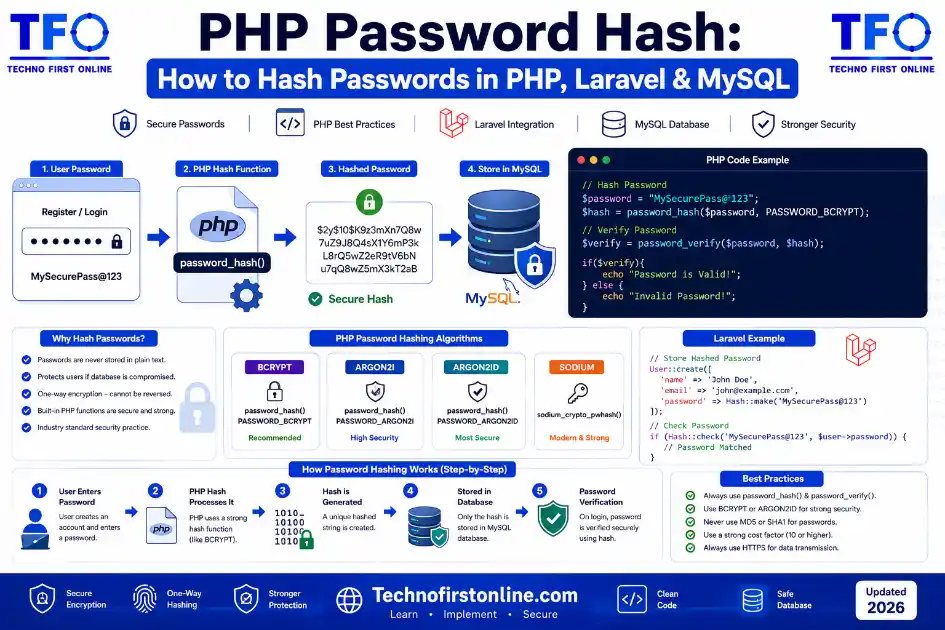
PHP Password Hashing — The Short Version:// Hash a password (use this when user registers/sets password)
$hash = password_hash($password, PASSWORD_BCRYPT);// Verify a password (use this at login)
if (password_verify($input, $storedHash)) {
// Login successful
}// Laravel equivalent
$hash = Hash::make($password);
$valid = Hash::check($input, $storedHash);// MySQL — store the hash in a VARCHAR(255) column
// Never use MySQL’s MD5() or SHA1() functions for passwordsRules:
✓ Always use password_hash() — never MD5 or SHA1
✓ Store the full hash string in VARCHAR(255)
✓ Never store plain-text passwords
✓ Use password_needs_rehash() for future upgrades
Secure Password Hashing in PHP, Laravel & MySQL
If you’re building a login system in PHP, one of the most important questions you’ll face early on is: how do you store user passwords safely? The answer is a PHP password hash — and specifically, using the right function in the right way.
This guide covers exactly that. We’ll go through how to hash a password in PHP using native functions, how Laravel handles it differently (and why that’s actually easier), what MySQL’s role is in the process, and which common mistakes to avoid. All the code examples here are copy-paste ready and production-safe.
Before jumping in — if you’re new to hashing in general, our beginner’s guide to MD5 and how hash functions work and our complete guide to what bcrypt is cover the foundational concepts behind everything we’re doing here.
Why You Should Never Use MD5 or SHA1 for Passwords in PHP
Before getting into the right approach, it’s worth understanding why the wrong approach is so common. If you search for “how to store passwords in PHP” and look at older tutorials, you’ll find a lot of code that does something like this:
php
// WRONG — Do not use this
$hashed = md5($password);
$hashed = sha1($password);
$hashed = hash('sha256', $password);
These functions all work — they produce a hash — but they are the wrong tool for this job. MD5, SHA-1, and even SHA-256 are fast hashing algorithms. On modern hardware, an attacker can run billions of them per second. If your database is ever leaked, a simple brute-force or dictionary attack will crack most of these hashes in hours or minutes.
We’ve covered this in detail in our explanation of why MD5 is no longer secure and our comparison of MD5 vs SHA-256 vs Bcrypt. The short version: fast hash functions are the wrong choice for passwords. You need something intentionally slow, with automatic salting built in.
PHP has had exactly that built in since version 5.5.
PHP password_hash() — The Right Way
PHP’s password_hash() function was introduced specifically to make secure password storage simple and difficult to get wrong. It handles the algorithm selection, salt generation, and output formatting automatically.
php
// Basic usage
$password = 'MySecurePassword123!';
$hash = password_hash($password, PASSWORD_BCRYPT);

// $hash will look something like:
// $2y$10$92IXUNpkjO0rOQ5byMi.Ye4oKoEa3Ro9llC/.og/at2.uheWG/igi

echo $hash; // Always 60 characters for bcrypt
What PASSWORD_BCRYPT does automatically:
✓ Generates a unique cryptographic salt for this password
✓ Runs bcrypt with cost factor 10 (default)
✓ Embeds the algorithm, cost, salt, and hash into one string
✓ Never produces the same output twice — even for identical passwords
You can also use PASSWORD_ARGON2ID if your PHP version supports it (PHP 7.3+), which is now the preferred choice for new systems:
php
// Argon2id — stronger than bcrypt, recommended for new projects
$hash = password_hash($password, PASSWORD_ARGON2ID);

// With custom options
$hash = password_hash($password, PASSWORD_ARGON2ID, [
    'memory_cost' => 65536,  // 64MB
    'time_cost'   => 4,      // 4 iterations
    'threads'     => 1,
]);
PHP password_verify() — How to Check Passwords at Login
Storing a PHP password hash is only half the job. You also need to verify it correctly when a user tries to log in.
php
// At login — compare user's input against the stored hash
$inputPassword  = $_POST['password'];
$storedHash     = // ... retrieved from your database

if (password_verify($inputPassword, $storedHash)) {
    // Passwords match — login successful
    echo "Welcome!";
} else {
    // Passwords don't match — login failed
    echo "Invalid credentials.";
}
A few things that make password_verify() important over a manual comparison:
✓ Timing-safe comparison — prevents timing attacks
✓ Extracts the algorithm and salt automatically from the stored hash
✓ Works with any hash generated by password_hash() regardless of algorithm
✓ Returns true/false — no string comparison needed
Never use == or === to compare password hashes directly. Use password_verify() every time.
PHP password_needs_rehash() — Future-Proofing Your System
As hardware gets faster, the cost factor that was strong today may not be adequate tomorrow. PHP gives you a clean way to handle this without forcing every user to reset their password:
php
$currentCost = 12; // Your current target cost factor

// After a successful login (you have the raw password here)
if (password_needs_rehash($storedHash, PASSWORD_BCRYPT, ['cost' => $currentCost])) {
    // Hash with the new settings and update the database
    $newHash = password_hash($verifiedPassword, PASSWORD_BCRYPT, ['cost' => $currentCost]);
    // UPDATE users SET password = $newHash WHERE id = $userId
}
This is the cleanest upgrade path available — hashes automatically get stronger over time as users log in, without requiring any forced password resets.
Laravel Password Hash — Built-In and Easier
Laravel wraps PHP’s password functions into a clean, framework-integrated Hash facade. If you’re working in a Laravel project, this is the standard approach:
php
use Illuminate\Support\Facades\Hash;

// Hash a password (registration or password reset)
$hashed = Hash::make($plainPassword);
// Store $hashed in the database

// Verify a password at login
if (Hash::check($plainPassword, $storedHash)) {
    // Login successful
}

// Check if rehashing is needed
if (Hash::needsRehash($storedHash)) {
    $newHash = Hash::make($plainPassword);
    // Update the hash in the database
}
By default, Laravel uses bcrypt with a configurable cost factor. You can adjust it in config/hashing.php:
php
// config/hashing.php
'bcrypt' => [
    'rounds' => env('BCRYPT_ROUNDS', 12),
    // Increase this as your server hardware improves
],
Laravel also supports Argon2i and Argon2id as alternatives. You can switch the default driver in the same config file:
php
'driver' => 'argon2id', // Switch from 'bcrypt' to 'argon2id'PHP’s official documentation for password_hash() — available at php.net/manual/en/function.password-hash.php — is the definitive reference for all supported algorithms, options, and return value specifications. It also documents the PASSWORD_DEFAULT constant, which always points to the strongest algorithm considered safe at the time of each PHP release.
PHP Password Constants Reference:
──────────────────────────────────────────────────────────
PASSWORD_DEFAULT    → Currently bcrypt; may change in future PHP versions
PASSWORD_BCRYPT     → Always bcrypt regardless of PHP version
PASSWORD_ARGON2I    → Argon2i (PHP 7.2+)
PASSWORD_ARGON2ID   → Argon2id (PHP 7.3+) — recommended for new projects
Source: php.net/manual/en/function.password-hash.php
──────────────────────────────────────────────────────────
MySQL and Password Hashing — What MySQL’s Role Actually Is
A lot of developers search for “mysql password hash” or “how to store password in mysql” and end up finding solutions that use MySQL’s built-in functions. Here’s the important clarification: when it comes to a PHP password hash workflow, MySQL’s job is storage only — not hash generation.
MySQL has built-in functions like MD5(), SHA1(), and SHA2(), but you should never use these to hash passwords. These are SQL utility functions designed for checksums and data comparison — not for secure password storage. They’re fast, they don’t add any salt, and they expose you to all the vulnerabilities we’ve already discussed.
The correct pattern is:
Application (PHP) creates the hash → MySQL stores the hash string
                     ↑
         Never let MySQL generate password hashes
Database column setup for storing PHP password hashes:
sql
-- Always use VARCHAR(255) to future-proof for longer hashes
CREATE TABLE users (
    id          INT AUTO_INCREMENT PRIMARY KEY,
    email       VARCHAR(255) NOT NULL UNIQUE,
    password    VARCHAR(255) NOT NULL,  -- Store the full hash here
    created_at  TIMESTAMP DEFAULT CURRENT_TIMESTAMP
);
Why VARCHAR(255) and not something smaller? Bcrypt hashes are always 60 characters today, but if your system later upgrades to Argon2id, those hashes are longer. Using VARCHAR(255) means you’ll never need to alter the column schema just because you switched algorithms.
Common Mistakes and How to Avoid Them
Mistake                          Fix
──────────────────────────────────────────────────────────────────
Using md5($pass) or sha1($pass)  Use password_hash() instead
Hardcoding a salt manually       Let password_hash() handle salting
Storing in VARCHAR(60)           Use VARCHAR(255) for future-proofing
Using == to compare hashes       Use password_verify() only
Not rehashing on login           Add password_needs_rehash() check
Low cost factor (< 10)           Use cost 12 or higher
Logging passwords in error logs  Sanitize all log output carefully
──────────────────────────────────────────────────────────────────
One of the most common issues we see is developers who read old Stack Overflow answers and end up building MD5 or SHA-256 password systems. For context on why that’s a serious risk, our password hash generator explainer covers the specific attack scenarios in plain English.
What OWASP Says About PHP Password Hashing
The OWASP Password Storage Cheat Sheet is the most widely referenced application security guide for exactly this topic. Their guidance maps directly to what we’ve covered here: use Argon2id as first choice, bcrypt as a strong second, and configure both with appropriate cost parameters.
OWASP Recommendation for PHP Applications:
──────────────────────────────────────────────────────────────────
Algorithm:      Argon2id (PASSWORD_ARGON2ID in PHP)
Fallback:       Bcrypt (PASSWORD_BCRYPT, cost ≥ 12)
Never use:      MD5, SHA-1, SHA-256, SHA-512 for passwords
PHP functions:  password_hash(), password_verify(),
                password_needs_rehash()
Source:         cheatsheetseries.owasp.org/cheatsheets/Password_Storage_Cheat_Sheet.html
──────────────────────────────────────────────────────────────────
The OWASP cheat sheet also notes that the maximum input length for bcrypt is 72 bytes — a limitation we covered in detail in our SHA-1 vs SHA-256 vs SHA-512 comparison. For most user passwords this isn’t a practical issue, but it’s worth knowing if you accept very long passphrases.

TechnoFirstOnline provides powerful free online tools, expert tutorials, and smart digital resources to simplify everyday tasks. Explore SEO, image, AI, PDF, and productivity tools designed for everyone.
Other Useful Tools














Password Generator
Open
People Also Read


NTLM Hsah vs MD5 vs SHA
decrypt md5 hash
password salting explained
What Is a Password Hash Generator
SHA-1 vs SHA-256 vs SHA-512 comparison
what is bcrypt beginners guide
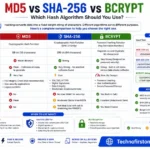
md5 vs sha256 vs bcrypt
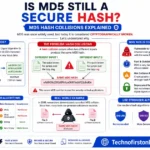
Is MD5 Still Secure Hash Collisions Explained
How Generate Hash Online
MD5 Hash Generator Online guide

WiFi QR Code Generator
LastPass vs Norton vs Bitwarden
Password Manager Pros & Cons

16 Character Password Generator

What Makes a Password Strong
Different Password for Every Website
Common Password Mistakes
Random Password Generator vs Manual Passwords

Strong Password Examples
How to Create a Strong Password
Want to see how different hashing algorithms generate unique outputs? Try our Hash Generator Online Free to create MD5, SHA-1, SHA-256, and SHA-512 hashes instantly for learning, testing, and file verification—all directly in your browser.
PHP password hashing should always use the built-in password_hash() and password_verify() functions instead of MD5 or SHA-1. These functions automatically generate secure salts, support modern algorithms such as bcrypt and Argon2id, and provide a safe way to store and verify user passwords.
Frequently Asked Questions
Use password_hash($password, PASSWORD_BCRYPT) or password_hash($password, PASSWORD_ARGON2ID) (PHP 7.3+). Both handle salting automatically and produce a secure output string. Never use md5(), sha1(), or hash('sha256', ...) for storing passwords.
Use password_verify($inputPassword, $storedHash). It returns true if the password matches the hash and false if not. Always use this function instead of comparing hash strings directly with == or ===.
Use VARCHAR(255). Bcrypt hashes are 60 characters, but Argon2 hashes are longer. Using VARCHAR(255) future-proofs your database so you can switch algorithms without altering the schema.
Laravel uses the Hash facade with Hash::make($password) to hash and Hash::check($input, $storedHash) to verify. By default it uses bcrypt with a configurable cost factor in config/hashing.php. It also supports Argon2id as an alternative driver.
No. password_hash() generates a cryptographically secure unique salt automatically for every password. Adding your own salt is unnecessary and can actually cause problems. Let the function handle it.
No. SHA-256 is a fast, general-purpose hash function that can be computed billions of times per second on modern hardware. This makes it trivially easy to brute-force from a leaked database. Use bcrypt or Argon2id, which are intentionally slow and designed specifically for password storage.
You can’t rehash directly because you don’t have the original passwords. The standard approach is to check at login — if the user’s stored hash is MD5, verify it the old way, then immediately rehash the verified password with password_hash() and update the database. Over time, all active users get migrated transparently.