Smart IT tools
How to Check Website Keyword Density
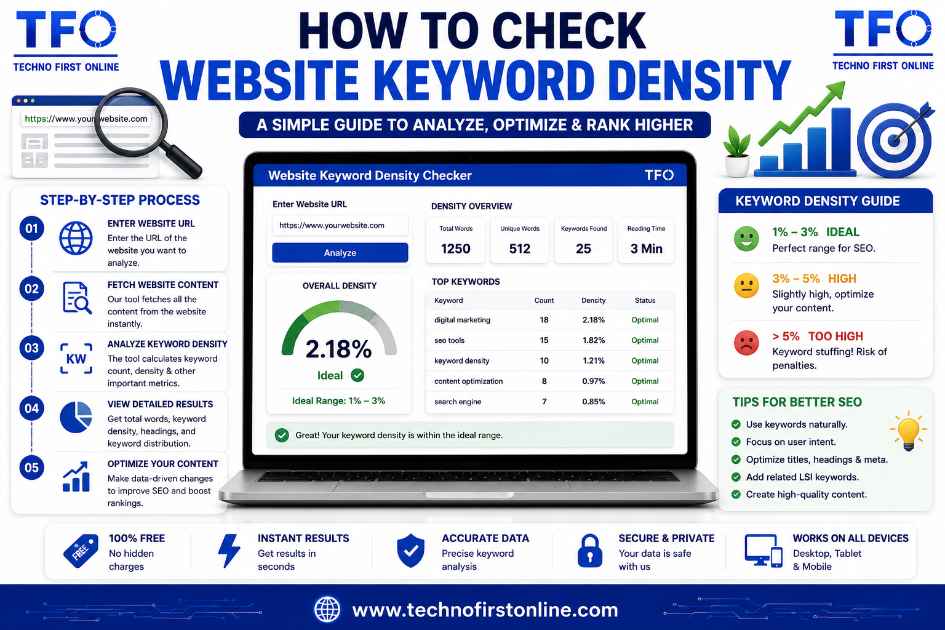
To check website keyword density across multiple pages, run each page individually through a density checker, since the calculation applies per page rather than site-wide, then compile the results into a simple audit sheet. This reveals which pages are well-optimized, which are under-targeted, and which risk over-optimization, giving you a complete picture rather than checking pages one at a time without any broader tracking.
Why a Site-Wide Perspective Matters
Most guides on keyword density focus on a single article in isolation, walking through how to check one page’s percentage before publishing. That’s useful, but it misses a bigger question that matters just as much for established websites: how do you check website keyword density across dozens or hundreds of pages, especially when some were written months or years apart, by different writers, targeting slightly different variations of the same core topics? Learning to check website keyword density at this broader scale is what separates a one-off content check from a genuine SEO audit habit.
This becomes particularly relevant during a full on-page SEO audit, where the goal isn’t just confirming one page reads naturally, but understanding patterns across an entire site. Are multiple pages accidentally competing for the same keyword? Has an older page drifted away from its original target after years of small edits? Is there a cluster of thin, under-optimized pages dragging down topical authority for a subject the site should be ranking well for?
Step 1: Build a Page Inventory
Before you can check website keyword density meaningfully, you need a clear list of what you’re actually auditing. Export a full list of published URLs, ideally alongside their intended target keyword if that information exists in your content planning documents, or your best guess at the primary topic if it doesn’t.
This step matters more than it seems. Auditing pages randomly, without a structured list, makes it easy to miss pages entirely or duplicate effort checking the same URL twice while skipping others.
Before reviewing keyword density, it’s helpful to understand the overall size of each page. Our “Free Word Counter Tool” quickly calculates total words, characters, sentences, paragraphs, and estimated reading time, making it easier to compare pages consistently during a site-wide content audit.
Step 2: Run Density Checks Page by Page
Density is inherently a per-page metric, not a site-wide average, so each URL needs its own individual check. Paste each page’s content into a keyword density calculator, confirm the primary target keyword’s percentage, and note the result alongside the URL in your audit sheet.
For efficiency during a large-scale audit, focus first on your highest-priority pages, cornerstone content, top traffic pages, and anything currently ranking on page two of search results where a small optimization push might make a meaningful difference, before working through lower-priority pages.
Step 3: Flag Outliers in Both Directions
Once you’ve compiled results across multiple pages, look specifically for two categories of outliers.
Under-optimized pages typically show a primary keyword density well below 0.3%, or in more extreme cases, a target keyword that barely appears at all despite the page supposedly being built around that topic. This often happens on older pages where the content has expanded significantly over time without anyone revisiting whether the original keyword still gets adequate coverage.
Over-optimized pages show density climbing above 3%, sometimes a leftover from older SEO practices that treated heavy repetition as a ranking tactic. These pages are worth revisiting specifically with a keyword stuffing checker to identify exactly which paragraphs need rebalancing, rather than assuming the entire page needs a rewrite.
Step 4: Check for Keyword Cannibalization
A site-wide density audit often surfaces a problem that’s invisible when checking pages one at a time: keyword cannibalization, where multiple pages on the same site all target the identical or near-identical keyword, splitting ranking potential between them instead of consolidating authority onto one strong page.
While density itself doesn’t directly diagnose cannibalization, compiling density results alongside each page’s actual target keyword during your audit often reveals it as a side effect. If three separate pages all show a healthy 1.5% density for the exact same phrase, that’s usually a sign those pages are competing against each other rather than covering genuinely distinct angles of the topic.
Step 5: Cross-Reference With Search Performance Data
Density numbers alone don’t tell you whether a page is actually performing well, so cross-referencing your audit results with actual search traffic and ranking data adds meaningful context. A page with a perfectly healthy density that still isn’t ranking likely has issues beyond keyword usage, weak backlinks, thin content depth, or poor user engagement signals, none of which a density check alone would reveal.
Conversely, a page ranking reasonably well despite a lower-than-ideal density might not need aggressive changes, since disrupting content that’s already performing to chase a theoretically “better” percentage sometimes does more harm than good.
Step 6: Prioritize Fixes Based on Impact
Not every flagged page deserves equal attention. Prioritize your fix list based on realistic impact:
- High-traffic pages with density issues — small optimization gains here compound across significant existing traffic.
- Pages ranking just outside page one — a modest content refresh sometimes pushes borderline rankings meaningfully higher.
- Cannibalized keyword clusters — consolidating or differentiating competing pages often unlocks ranking potential currently split between them.
- Severely under- or over-optimized pages — even without strong current traffic, these represent clear, low-effort wins once identified.
- Everything else — worth revisiting eventually, but rarely urgent compared to the categories above.
A Simple Audit Sheet Template
A basic spreadsheet structure works well for tracking a site-wide density audit:
| URL | Target Keyword | Word Count | Keyword Count | Density % | Flag |
|---|---|---|---|---|---|
| /page-1 | example phrase | 1,500 | 12 | 0.8% | Healthy |
| /page-2 | example phrase | 900 | 3 | 0.33% | Under-optimized |
| /page-3 | different phrase | 2,000 | 68 | 3.4% | Over-optimized |
Even this simple structure, populated across your full page inventory, makes patterns immediately visible that would be nearly impossible to spot by checking pages individually without any centralized tracking.
Where Google’s Guidance Fits Into a Site-Wide Audit
According to Google’s documentation on helpful content, content quality is evaluated with an understanding that not every single page needs to be perfect in isolation, but that a pattern of thin, unhelpful, or over-optimized pages across a site can affect how the broader domain is perceived. This is precisely why checking website keyword density at scale, rather than only reviewing new content before publishing, catches issues that accumulate slowly and often go unnoticed until a wider audit specifically looks for them.
Common Mistakes When Auditing Website Keyword Density
Treating density as a site-wide average. Since the metric applies per page, averaging results across an entire site obscures exactly which individual pages need attention, defeating the purpose of running the audit in the first place.
Skipping older, low-traffic pages entirely. It’s tempting to only check website keyword density on high-traffic pages, but older neglected pages sometimes represent the easiest wins, since even a modest optimization on a previously ignored page can produce a noticeable ranking improvement.
Auditing once and never returning. A single audit provides a snapshot, not an ongoing solution. Content keeps evolving through edits, new sections, and updates, all of which shift density numbers that were accurate at the time of the original check.
Confusing correlation with causation. Finding that your best-ranking pages happen to share a similar density range doesn’t necessarily mean that density caused the strong ranking. Many other factors, backlinks, content depth, and site authority chief among them, likely play a far larger role.
Tools That Support a Full Website Audit
While no single free tool automates an entire site-wide keyword density audit end to end, a practical combination usually covers the process well: a per-page density calculator for the actual measurement, paired with a spreadsheet or content management system for tracking results across your full page inventory. Some SEO platforms bundle limited site-crawling density features into paid plans, but for most independent site owners, manually running each priority page through a dedicated checker and logging results remains the most reliable, cost-free approach.
Why Choose TechnoFirstOnline Website Keyword Density Checker?
If you’re auditing an entire website, you need a tool that’s fast, reliable, and easy to use across multiple pages. Our “Free Keyword Density Checker” is built for exactly that purpose. It analyzes keyword density, keyword frequency, and one-word to four-word phrases in real time while also providing word count, character count, sentence statistics, and readability insights. Because the tool runs entirely in your browser using JavaScript, your content never leaves your device, making it ideal for reviewing unpublished articles, client projects, and confidential website content. Whether you’re auditing a handful of pages or maintaining a large content library, it offers a simple, privacy-friendly way to identify optimization opportunities before publishing or updating your pages.

TechnoFirstOnline provides powerful free online tools, expert tutorials, and smart digital resources to simplify everyday tasks. Explore SEO, image, AI, PDF, and productivity tools designed for everyone.
Other Useful Tools

















Password Generator
Open
People Also Read


keyword density checker chrome extension

Best free keyword density checker tools

Ideal Keyword Density

keyword density analyzer

Keyword Stuffing Checker

Keyword Density Calculator

How to Check Keyword Density

Word Density Checker vs Keyword Density Checker

What Is a Password Hash Generator

SHA-1 vs SHA-256 vs SHA-512 comparison

what is bcrypt beginners guide

md5 vs sha256 vs bcrypt

Is MD5 Still Secure Hash Collisions Explained

How Generate Hash Online

MD5 Hash Generator Online guide

How to Create a Custom QR Code for Free




stylish text generator

How to change to sentence case online
How to Automatically Change Capital Letters to Lowercase
Grammarly Word Count vs Free Word Counter

word counter google docs — How to Check Word Count

Word Count Checker — Check Word Count in PDFs & Documents
Free Character Counter Online — Count Letters & Spaces

How to Word Counter Online Free



Why Website Owners Prefer Our Tool
- ✔ Browser-Based Processing
- ✔ No Registration Required
- ✔ No Content Uploads
- ✔ Keyword Density & Frequency Analysis
- ✔ One-Word to Four-Word Phrase Detection
- ✔ Word, Character, Sentence & Paragraph Statistics
- ✔ Fast Analysis for Multiple Pages
- ✔ Works on Desktop, Tablet & Mobile
- ✔ Free Forever
Once your audit is complete, small formatting improvements can make your content look more professional. Whether you're updating headings, adjusting title capitalization, or standardizing keyword lists, our Case Converter lets you convert text into sentence case, title case, uppercase, or lowercase instantly without manual editing.
Frequently Asked Questions
Not directly, since density is calculated per page rather than as a site-wide average. The practical approach is running individual checks on each page and compiling results into a centralized audit sheet.
A full audit once or twice a year catches most drift, while high-priority or frequently updated pages benefit from a quick individual check any time significant edits are made.
Cannibalization happens when multiple pages target the same keyword, splitting ranking potential between them. A site-wide density audit often surfaces this when several pages show similar healthy density for the identical target phrase.
No. Prioritize based on impact, high-traffic pages, near-page-one rankings, and cannibalized clusters typically deserve attention first, while low-traffic pages with minor issues can wait.
No. Density is one diagnostic signal among many. Backlinks, content depth, user engagement, and overall site authority all significantly influence rankings beyond keyword usage alone.
A combination of a per-page density calculator alongside a spreadsheet or content tracking system works well, since no single tool typically automates the entire site-wide comparison and prioritization process on its own.