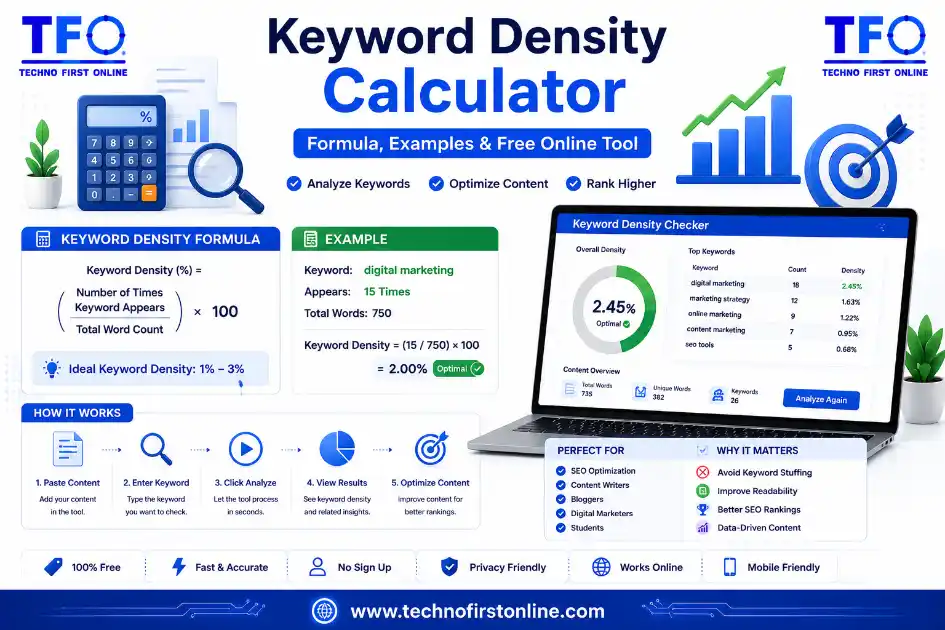
A keyword density calculator measures how often a target keyword appears in a piece of content relative to the total word count, expressed as a percentage. The formula is simple — (keyword count ÷ total words) × 100 — but doing it by hand for long-form content gets tedious fast, which is why most writers rely on a free keyword density calculator instead of counting manually.
At its core, this kind of tool automates a single arithmetic task: counting occurrences of a word or phrase and expressing that count as a share of the total content. It sounds almost too simple to matter, yet this small calculation has stayed relevant in SEO for over two decades, because it answers a question every content writer eventually asks — am I using my target keyword enough, or have I gone overboard?
Unlike a general word counter, a proper tool built to calculate keyword density needs to handle a few things a basic count doesn’t: multi-word phrases, case sensitivity, stop-word filtering, and sometimes stemmed variations of the same root word. A calculator that only counts single words in isolation will miss whether your actual target phrase, such as “content marketing strategy,” appears together as a unit, even if all three words individually show up often.
The Keyword Density Formula, Explained
The underlying math behind every keyword density calculator is straightforward:
Keyword Density (%) = (Number of keyword occurrences ÷ Total word count) × 100
Let’s break this down with a concrete example. Say you’ve written an 1,200-word product review, and your target phrase, “best wireless earbuds,” appears 18 times throughout the article. Plugging those numbers in:
(18 ÷ 1,200) × 100 = 1.5%
That result sits comfortably within the range most SEO practitioners consider healthy. If the same phrase had appeared 45 times instead, the density would jump to 3.75%, which starts to look like forced repetition rather than natural writing.
This is exactly the kind of calculation you’d want to run through a dedicated tool for checking keyword density in an article rather than counting manually, especially once your content passes a few hundred words and manual tallying becomes genuinely error-prone.
Why the Formula Alone Isn’t Enough
Knowing the formula is useful, but a good way to calculate keyword density becomes far more valuable when it goes beyond a single number. Here’s what separates a basic calculator from a genuinely useful one:
Phrase-level counting. As mentioned, real target keywords are rarely single words. A calculator needs to scan text in sliding windows, checking two-word and three-word combinations, not just isolated terms.
Total content breakdown. Beyond your one target phrase, a strong calculator also shows which other words and phrases appear frequently, giving you a broader view of what your content actually emphasizes. This ties closely into the difference explored in our comparison of word density checkers versus keyword density checkers, where a full frequency scan and a targeted phrase check serve two different but complementary purposes.
Instant, browser-based results. Calculators that process everything client-side, without uploading your draft to a server, are worth prioritizing for speed and privacy, especially when checking unpublished or client work.
Stop-word handling. Without filtering common words like “the,” “of,” and “and,” your results get cluttered with terms that offer zero SEO insight.
Why Choose Our Free Keyword Density Calculator?
A reliable Keyword Density Calculator should do more than simply display a percentage. It should help you understand how naturally your target keywords are used throughout your content while making the optimization process quick and effortless. Our tool analyzes single-word keywords as well as two-word and three-word phrases in one scan, giving you a clearer picture of keyword usage without requiring manual calculations. Because it runs directly in your browser, your content stays private, results appear instantly, and there’s no sign-up or software installation required. Whether you’re writing a blog post, optimizing a landing page, or updating existing content, this simple workflow helps you improve on-page SEO while keeping your writing natural and reader-friendly.
Step-by-Step: Using a Keyword Density Calculator
- Finish your draft first. Running a calculator on unfinished content gives you numbers that will shift once you add or cut sections.
- Paste your full article into the calculator’s text box.
- Enter your target keyword or phrase in the dedicated search field, if the tool supports direct phrase lookup.
- Review the percentage against the generally accepted healthy range of 0.5% to 2.5% for most content types.
- Check the broader frequency table to confirm related terms and supporting phrases appear naturally throughout the piece, not just your one exact target.
- Adjust only where needed, prioritizing natural readability over hitting an exact number.
What Counts as a Healthy Density Range?
There’s no universally “correct” percentage a keyword density calculator will confirm as perfect, but based on years of SEO practice, most professionals work within these general bands:
| Density Range | Interpretation |
|---|
| Below 0.3% | Likely under-optimized; topic may not be sufficiently covered |
| 0.5% – 1.5% | Safe, natural range for most content |
| 1.5% – 2.5% | Acceptable, especially for shorter or highly focused pages |
| Above 3% | Risky; often reads as forced or repetitive |
Content length changes how these numbers feel in practice. A 400-word product page hitting 2% density might use its keyword eight times, which reads naturally. A 3,000-word pillar guide hitting the same 2% would need the keyword 60 times, which almost always sounds repetitive regardless of how carefully it’s placed. This is why longer content generally performs better with a calculator result on the lower end of the range.
A Worked Example With Multiple Keywords
Imagine you’re optimizing a 2,000-word article with one primary keyword and two secondary phrases:
- Primary: “email marketing automation” — appears 16 times → (16 ÷ 2,000) × 100 = 0.8%
- Secondary: “automated email campaigns” — appears 8 times → (8 ÷ 2,000) × 100 = 0.4%
- Secondary: “email workflow tools” — appears 6 times → (6 ÷ 2,000) × 100 = 0.3%
None of these individually looks excessive, but running them through a keyword density calculator together shows a content piece with strong, distributed topical coverage rather than one phrase repeated to exhaustion. This kind of layered approach tends to perform better than obsessively optimizing a single exact-match phrase, since it mirrors how people naturally write and search.
If you’re unsure how your own draft compares once finished, walking through the density-checking process step by step before publishing catches most issues before they become a problem.
When to Reach for a Calculator vs. When Not To
Not every piece of content needs a formal density check. A quick social media caption or a two-line product blurb doesn’t warrant running numbers, since the sample size is too small for a percentage to mean much. Where this becomes genuinely useful is longer-form content: blog posts, landing pages, product descriptions, and pillar guides where repetition patterns are easy to lose track of simply because there’s too much text to scan by eye.
A reasonable rule of thumb: if your content crosses roughly 500 words, it’s worth a quick check before publishing. Below that, focus on writing naturally and trust that a short piece won’t accumulate problematic repetition in the first place.
It’s also worth running a check whenever you’re updating or expanding older, already-published content. Adding a new section to a two-year-old article changes the total word count, which shifts every previously calculated percentage, even for keywords you didn’t touch during the update. Skipping this step is one of the more common reasons older pages drift into over- or under-optimization without anyone noticing until a ranking drop prompts a closer look.
Integrating Density Checks Into a Content Calendar
For teams publishing regularly, building a keyword density check into a standard pre-publish checklist saves far more time than treating it as an occasional troubleshooting step. A simple workflow looks like this: draft the content, run it through spell-check and a plagiarism scanner, then finish with a quick pass through a keyword density calculator before scheduling the post. Because checking density in an article takes under a minute once your draft is finalized, it fits easily alongside other routine pre-publish steps without slowing down a content calendar.
Common Errors When Using a Density Calculator
Counting variations as identical. “Email marketing” and “email marketing automation” are different phrases with different densities. Mixing them up inflates your numbers inaccurately.
Ignoring context around the number. A calculator tells you the percentage, not whether the keyword appears naturally or feels forced. Always read the flagged sentences, not just the final figure.
Recalculating too late. If you add a new section after your initial check, the total word count changes, and so does every previously calculated percentage. Always re-run the calculator after significant edits.
Treating the calculator as the only SEO signal. Density is one small piece of on-page optimization. Title tags, meta descriptions, internal linking, and overall content quality all matter more in aggregate than this single metric.